

To wipe your PlayNHost DayZ server, run Persistence Wipe on the Quick Tasks page. It stops the server, deletes the world persistence of every map (the panel describes it as loot, vehicles and bases), keeps your mission files and serverDZ.cfg, and starts the server again with a fresh world. Keep Back up the server first ticked so you can go back.
Run a Persistence Wipe
- Open your server in the panel and click Quick Tasks in the left menu.
- Under Default tasks, find Persistence Wipe and click Run.
- Read the window Run Persistence Wipe?. Under Deleted from Files it shows
mpmissions/*/storage_1/*: everything in thestorage_1folder of every map. - Keep Back up the server first ticked. The wipe starts only once the backup has finished.
- Click Run Persistence Wipe. The panel stops the server, waits 150 seconds for DayZ to finish stopping, deletes the files, and starts the server 60 seconds later. The panel says the Console shows each step.
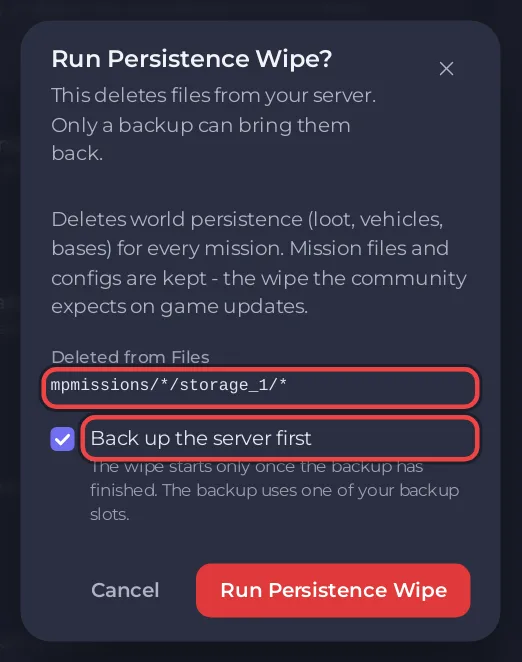
The whole run takes a few minutes: the panel waits 150 seconds after the stop before it deletes anything, because DayZ takes more than two minutes to shut down. Run works through the server's Persistence wipe schedule: if the server has none yet, it adds one, switched off, and the next Run reuses it.
What is deleted?
Everything in the storage_1 folder of every map. The panel describes it as the world persistence: loot, vehicles and bases. Bohemia's server configuration page calls these the server's persistence files and does not list them one by one, so do not count on anything in storage_1 surviving a wipe. Keep the backup.
What is kept
- Your mission files in
mpmissions, including the ones you edited. serverDZ.cfg, the settings in Game Settings, your mods and their keys.- Your backups.
Only the contents of each map's storage_1 folder are deleted.
Wipe only one map
Each map keeps its own world in its own storage_1 folder. To wipe only one:
- Click Stop and wait for Offline. DayZ can take more than two minutes to stop.
- Take a backup on Backups: How to back up and restore your DayZ world.
- In Files, open
mpmissions, then the map's folder, for exampledayzOffline.chernarusplusfor Chernarus, thenstorage_1. - Tick the box in the header to select everything in
storage_1, and click Delete. - Start the server.
Wipe every month
A ready-made Persistence wipe schedule waits under Ready-made for DayZ on Quick Tasks. Click Add: it becomes one of your Schedules, switched off. Switched on, it runs at 04:00 on the 1st of each month: stop, wipe at 150 seconds, start at 210 seconds. Switch it on only if your community wants a monthly wipe. Schedule times cannot be changed afterwards on Quick Tasks: How to schedule tasks and automatic backups.
The schedule has no backup step. The nightly Automatic backup still runs, and you can lock a backup to keep it.


