

To start a Day of Defeat: Source server on PlayNHost, open it in the panel and click Start. It is ready when the Console prints a line with gameserver Steam ID and the badge changes to Online. A new server starts on dod_anzio, with no Steam token and RCON switched off.
Start it
- Open your server in the panel. The badge next to the name says Offline.
- Click Start. The badge changes to Starting.
- Click the Console tab to watch the server load.
- Wait for the line with
gameserver Steam ID(without a Steam token it readsAssigned anonymous gameserver Steam ID). The panel switches the badge to Online when that line appears, and players can join.
The line after it is VAC secure mode is activated., which means Valve Anti-Cheat protects the server.
How long does the first start take?
The first time, the server is installed from Steam before it starts: about 4 to 5 minutes in our own test on 10 October 2026, install and first start together. Later starts skip the install and are quicker.
If the badge stays on Starting for more than 10 minutes, read the last Console lines and see Day of Defeat: Source server problems and fixes.
Are the token lines in the Console an error?
No. Without a Steam token the Console prints No account token specified; logging into anonymous game server account. and a line saying the server's ranking in the server browser is lower. The server still starts, is listed and accepts players. We measured those lines and the listing on Counter-Strike: Source and Team Fortress 2, which run the same Source engine, and the panel's own message for Day of Defeat: Source says the same. A free token only improves the ranking: How to add a Steam login token to your Day of Defeat: Source server.
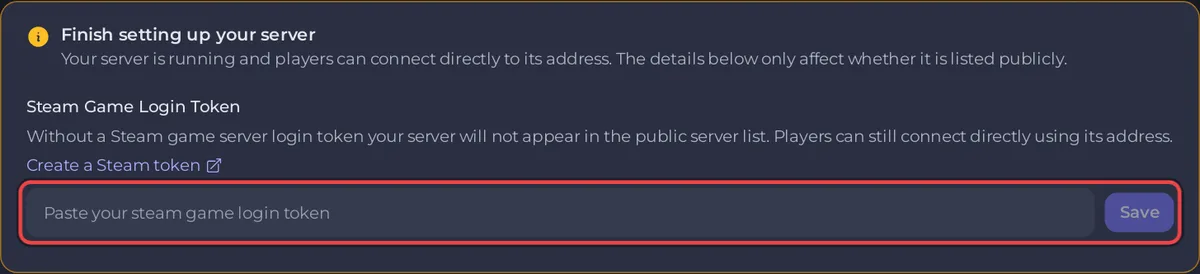
The Overview page shows the same choice as an amber card, Finish setting up your server. It is optional, and your server works without it.
What does a new Day of Defeat: Source server already have?
Everything is set on the Settings tab, under Game Settings:
| Setting | On a new server |
|---|---|
| Server name | PlayNHost-DODS-Server. Change it before you invite people: How to change your Day of Defeat: Source server name |
| Map | dod_anzio, loaded at every start |
| Max Players | the slot count the server runs with, up to your plan's 12, 24 or 32. If it is lower than your plan, raise it with the pencil next to Slots on Overview |
| RCON password | empty, so remote admin tools are off. The Console tab works without it |
| Steam Game Login Token | empty, so the server logs in to Steam anonymously |
| Install SourceMod | off, so there is no admin plugin yet |
There is no world to save. Day of Defeat: Source is match-based, so every map starts fresh. What you keep is your configuration, your maps and your plugins, all in the dod folder under Files.
A ready-made Automatic backup schedule also takes a full backup every night: How to back up and restore your Day of Defeat: Source server.
Next steps
If the server does not reach Online, see How to fix a server that will not start.


