

To invite friends to a Day of Defeat: Source server on PlayNHost, click Join on your server's Overview page to copy its address and send it to them, with the join password if you set one. Each friend types connect and that address in the game console. To let a friend help run the server, invite them under Team & Roles.
Send friends the address
- Open your server in the panel and check that the badge says Online.
- On the Overview page, click Join on the server card. The Server Address is copied, in the form
address:port. - Paste it into your message to your friends, for example on Discord.
- If the server has a join password, add it to the message.
- Tell them how to join: press
~in Day of Defeat: Source, typepasswordand the password if there is one, thenconnectand the address.
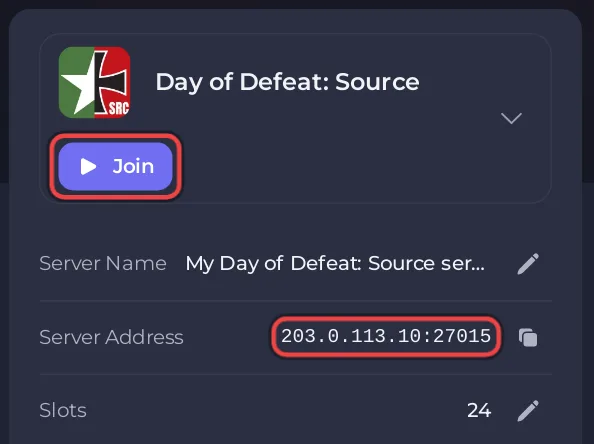
The full steps for players, including how to switch the game's developer console on, are in How to join your Day of Defeat: Source server.
Your friends can also find the server in the game's server browser under its Server name. Give it a name they will recognise first: How to change your Day of Defeat: Source server name.
What do my friends need?
- Their own copy of Day of Defeat: Source on Steam. It is a paid game, for Windows and Linux.
- Nothing else. They do not need a PlayNHost account to play.
How do I keep strangers out?
Set a join password. Only players who type it can join: How to set a join password on your Day of Defeat: Source server.
Give a friend access to the panel
A friend who should start the server, change maps or read the console needs their own access. They never need your password.
- Click Team & Roles in the left menu.
- Click Invite someone, which is there while nobody else is on the team. The Invite people window opens. On a wide screen, the Invite people button at the top of every server page opens the same window, also when you already have people on the team.
- Type their Email address.
- Pick a Role: Member, Moderator, or Co-owner for full access. The line under Role says what it allows.
- Click Send invitation. They get an email with a link to accept.
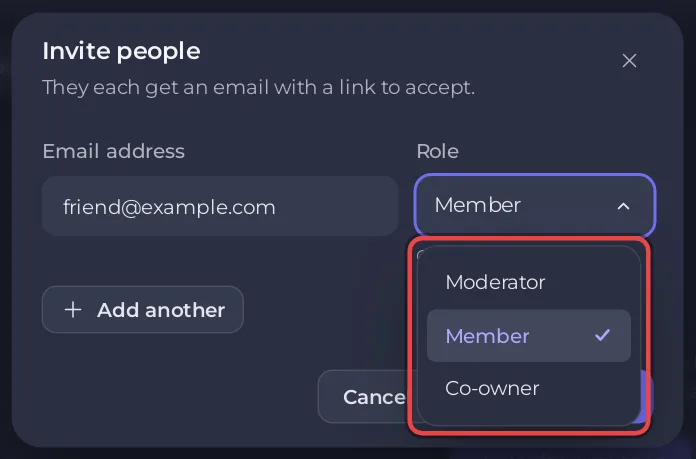
You can change what they can do later, or take the access away. Every option on the page: How to invite friends and give them access.
How do I make a friend an admin in the game?
Panel access does not make anyone an admin inside the game. For in-game admin commands, such as kick and ban from chat, add their SteamID to SourceMod: How to add admins and kick or ban players on your Day of Defeat: Source server.


