

To join a Day of Defeat: Source server on PlayNHost, click Join on your server's Overview page to copy its address, open the developer console in the game with the ~ key, and type connect followed by the address. The server must show Online in the panel.
Join from the game
- Open your server in the panel. The badge next to the name must say Online. If it says Offline, click Start and wait: see How to start your Day of Defeat: Source server for the first time.
- On the Overview page, click Join on the server card. It copies the Server Address, which looks like
address:port. The copy icon next to Server Address copies the same text. - Start Day of Defeat: Source on Steam and wait for the main menu.
- Press the
~key (the key above Tab) to open the developer console. - Type
connect, a space, then paste the address, and press Enter. For exampleconnect address:portwith your own address.
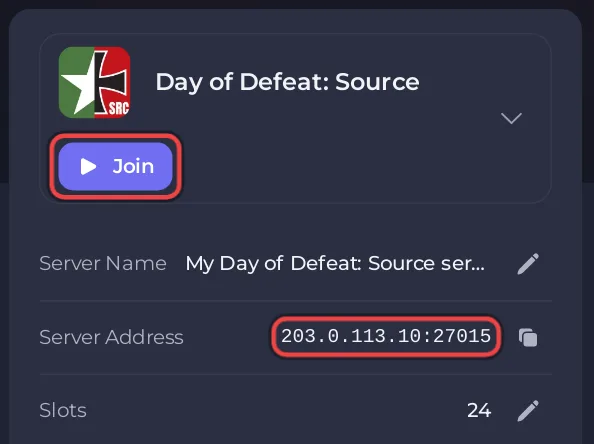
Type the address whole: it already holds the port, and the server listens only on that port. The same address is on the Ports & Network page in the left menu.
The ~ key does nothing
The developer console is off by default in Source games. The Valve Developer Community says how to switch it on: in the game, open Options, then Keyboard, click Advanced and tick Enable Developer Console in the window that opens. Then press ~ again.
Can I find my server in the server browser?
Yes. Your server is listed under its Server name, with or without a Steam token. Without a token it ranks lower in the list (the panel's own message for this game says so, and we measured it on Counter-Strike: Source and Team Fortress 2, which run the same engine), so searching by name or using connect is quicker. See How to add a Steam login token to your Day of Defeat: Source server.
How do I join a Day of Defeat: Source server that has a password?
A new server has no join password. If you set one with sv_password, players type it in the same console before they connect:
- Press the
~key. - Type
passwordand the join password, for examplepassword your-join-password, and press Enter. - Type
connectand the address, and press Enter.
See How to set a join password on your Day of Defeat: Source server.
Do my players need to own the game?
Yes. Day of Defeat: Source is a paid game on Steam, for Windows and Linux. Every player needs their own copy. Your server itself needs no Steam account.
If you cannot join
- The badge is not Online: the server is still starting or is stopped. Wait for Online or click Start.
- The server is full: every slot is taken. See How to change player slots on your Day of Defeat: Source server.
- The game asks for a password: the server has a join password. Ask the owner for it.
- You are kicked straight away: you may be banned. See How to add admins and kick or ban players on your Day of Defeat: Source server.
Every problem and its fix is in Day of Defeat: Source server problems and fixes. To bring friends along, see How to invite friends to your Day of Defeat: Source server.


