

To change the name of a Day of Defeat: Source server on PlayNHost, open the Settings tab, type the new name in Server name under Game Settings, press Enter and click Restart now. The name can be up to 64 characters long, without spaces: join words with - or _.
Change the name players see
- Open your server in the panel and click the Settings tab.
- Under Game Settings, click in the Server name field. A new server has
PlayNHost-DODS-Server. - Type the new name, for example
Normandy-Veterans-24-7, and press Enter. The panel saves it and showsSaved. The server must restart before these take effect. - Click Restart now. When the badge is back to Online, the new name is live.
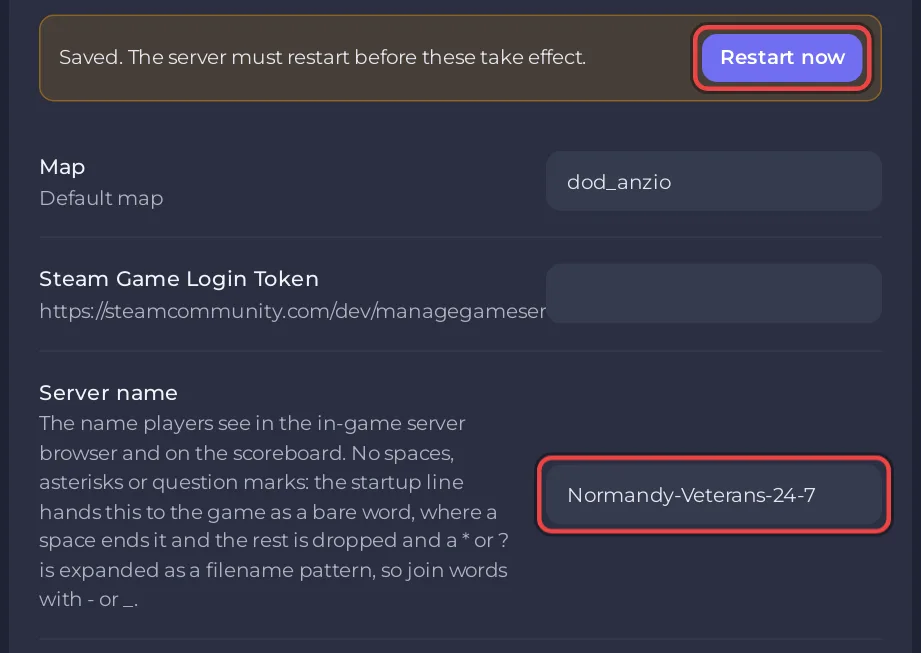
Players see the name in the game's server browser and on the scoreboard.
Why can't the name have spaces?
The panel hands the name to the game in the server's start line, where a space would cut the name short and * or ? would be read as a file pattern. So the field refuses spaces, quotes ", backslashes, * and ?. If you type one, the panel shows The value format is invalid. and keeps the old name.
Use - or _ between words instead: Normandy_Veterans or Normandy-Veterans.
Can I put the name in server.cfg instead?
Keep it in Settings. At every start the panel writes the Server name into its own file, dod/cfg/pnh_autoexec.cfg, as the hostname line, and runs that file. A second hostname line in dod/cfg/server.cfg competes with it, so delete it if you added one. Editing pnh_autoexec.cfg itself does not last: it is written again at every start.
How do I rename the server in the panel only?
The Server Name row on the Overview server card is the name you see in your panel and server list. It is separate from the in-game name and does not change what players see.
- On Overview, click the pencil next to Server Name (Rename this server).
- Type the new name and click Rename.
No restart is needed for this one. See How to rename your server and change player slots.
Related guides
- How to set a join password on your Day of Defeat: Source server
- How to add a Steam login token to your Day of Defeat: Source server, which helps the name rank higher in the server browser


