

A Steam Game Server Login Token is optional for a Day of Defeat: Source server on PlayNHost: without one the server is listed and accepts players, but ranks lower in the server browser. To add one, make a free token for App ID 300 on Steam's game server page, paste it into Steam Game Login Token and restart the server.
Make the token on Steam
- Go to Steam's game server account page and sign in.
- Enter
300as the App ID. That is the ID of Day of Defeat: Source itself, not the ID of its dedicated server (232290). - Create the token and copy it. The panel accepts it only as 32 letters and digits.
Steam's page lists its account requirements, among them: your Steam account must own the game you make a token for, must have a qualifying registered phone, and must not be limited or community banned. It also says a token that goes unused for a long period of time (the game server never logs in) expires.
Add the token to your server
- Open your server in the panel and click the Settings tab.
- Under Game Settings, paste the token into Steam Game Login Token and press Enter. The panel shows
Saved. The server must restart before these take effect. - Click Restart now.
- On the Console tab, wait for the line with
gameserver Steam ID. The badge changes to Online.
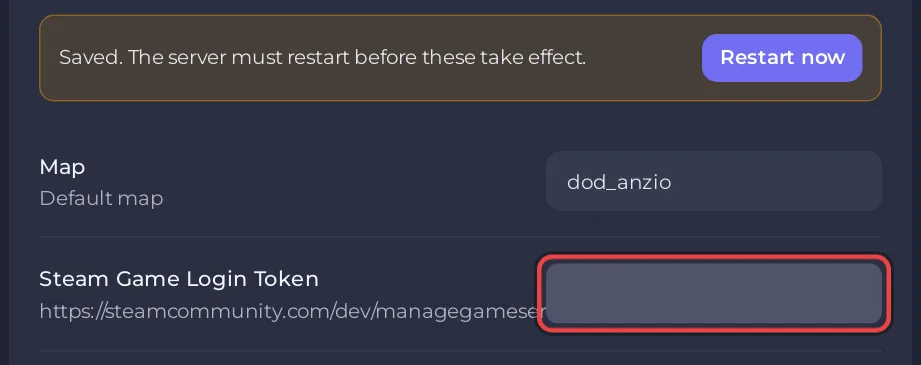
You can also paste it in the amber Finish setting up your server card on Overview and click Save. The card goes away once the token is saved. Restart the server afterwards: the token is used from the next start.
What does the token change?
The panel's own message for this game says it: the server is listed and accepts joins without a token, and a token "only improves your server-browser ranking and login stability". Without one, the Console prints at every start:
No account token specified; logging into anonymous game server account.and a line saying the server's ranking in the server browser is lower. We measured these lines on Counter-Strike: Source and Team Fortress 2, which run the same Source engine. Both are expected and not an error. Players can always join with connect and the address: How to join your Day of Defeat: Source server.
The card on Overview is written for every game that takes a Steam token, and says a server without one "will not appear in the public server list". For Day of Defeat: Source, the panel's ready email is the precise one: listed either way, ranked lower without a token.
The badge stays on Starting after I added the token
A wrong token is worse than none. The server cannot log in to Steam, and the badge stays on Starting because the line with gameserver Steam ID never comes. On Counter-Strike: Source, which runs the same engine, we measured the Console printing Could not establish connection to Steam servers. (Result = 18) in this case; we have not reproduced it on Day of Defeat: Source itself.
- On Settings, empty Steam Game Login Token, or paste a new token, and press Enter.
- Click Restart now.
Make a separate token for each server you run. The field refuses a value of the wrong length with The value must be 32 characters., which usually means a character was lost while copying.
Related guides
- How to change your Day of Defeat: Source server name, the name the server is listed under
- Day of Defeat: Source server problems and fixes


