

To make someone admin on a Day of Defeat: Source server on PlayNHost, install SourceMod, add their SteamID with the flags "99:z" to dod/addons/sourcemod/configs/admins_simple.ini, and type sm_reloadadmins in the Console. Admins then kick with sm_kick and ban with sm_ban, in game or from the panel's Console tab.
SourceMod is not on a new server. Install it first: How to install SourceMod on your Day of Defeat: Source server.
Make yourself admin
- Join your server in the game.
- In the panel, click the Console tab, type
statusin the Type a command box and press Enter. Find your name in the list and copy your SteamID from the same line, for exampleSTEAM_0:1:16or[U:1:33]. - Click the Files tab and open
dod/addons/sourcemod/configs/admins_simple.ini. - Add a new line with your SteamID and the flags, both in quotes:
"STEAM_0:1:16" "99:z". - Click Save content.
- On the Console tab, type
sm_reloadadminsand press Enter. - In the game, open the developer console with
~, typesm_adminand press Enter. Back in the game, the admin menu opens.
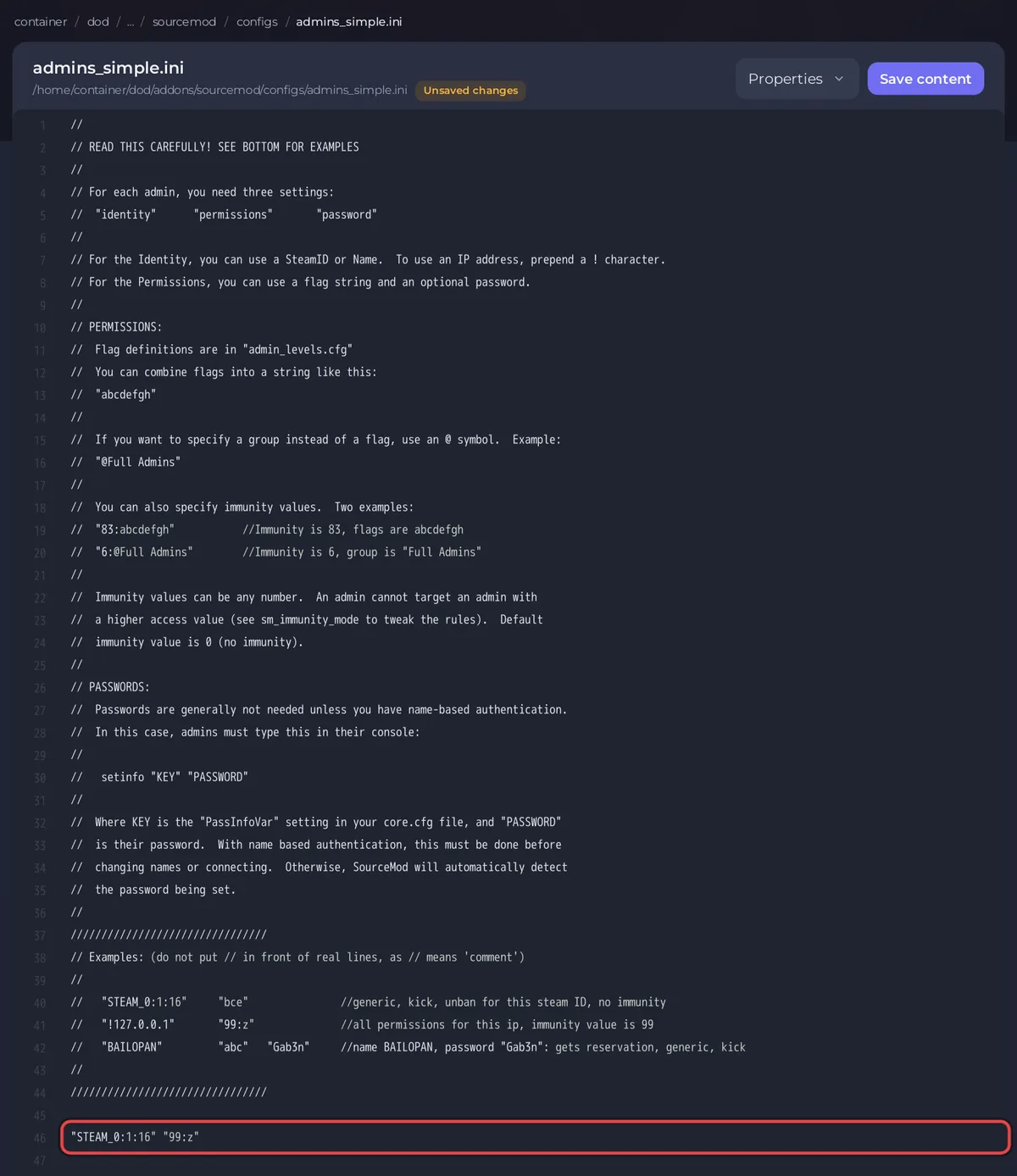
SourceMod reads the SteamID in any of its forms: STEAM_0:1:16, [U:1:33] or the 17-digit number from a Steam profile link (SourceMod's admin code turns each into the same ID).
What do the admin flags mean?
99:z gives root access: every flag, with immunity level 99, so admins with a lower level cannot kick or ban you. For a moderator, give fewer flags, for example "STEAM_0:1:16" "bcd". The main flags, from AlliedModders' admin guide:
| Flag | Allows |
|---|---|
a | a reserved slot |
b | generic admin, needed for every admin |
c | kick other players |
d | ban other players |
e | remove bans |
g | change the map |
z | everything, and ignores immunity |
Kick, ban and unban players
Type these in the game console as an admin, or in the Console tab of the panel, which needs no admin rights. In chat, an admin can type the same command with ! instead of sm_, for example !kick, or with / to hide it from other players.
| Command | What it does |
|---|---|
sm_kick <name or #userid> [reason] | kicks a player |
sm_ban <name or #userid> <minutes> [reason] | bans a player; 0 minutes is a permanent ban |
sm_unban <steamid or ip> | removes a ban |
sm_map <map> | changes the map |
sm_who | lists players and their admin rights |
The #userid is the player's userid number shown by status, for example sm_ban #5 0 cheating. The commands come from SourceMod's admin command list.
Can I kick players without SourceMod?
Yes, from the Console tab. Valve's console command list has the engine's own commands:
status: lists the players, with their userid and SteamID.kick: kicks a player by slot, userid or name, for examplekick PlayerName.banid,removeidandlistid: add a SteamID to the ban list, remove it, and list the bans.writeid: writes the list of permanent bans to the filebanned_user.cfg.
SourceMod's commands are easier for bans, because they take the player's name and the length in one line.
Is there a kick button in the panel?
No. The Active players card on Overview shows who is online and how long they have been connected, without kick or ban buttons for this game. Use the commands above.
Related: How to use the Console and RCON on your Day of Defeat: Source server and How to set a join password on your Day of Defeat: Source server.


