

To change the map on a Day of Defeat: Source server on PlayNHost right away, type changelevel and the map name in the Console tab, for example changelevel dod_flash. The new map loads without a restart. To choose the map the server starts on, set Map under Game Settings on the Settings tab.
Change the map now
- Open your server in the panel and click the Console tab. The badge must say Online.
- Type
changelevel dod_flashin the Type a command box, with the map you want, and press Enter. - The Console shows the new map loading. Players on the server load it too.
Use the map's file name without .bsp. The maps your server has are the .bsp files in dod/maps, on the Files tab.
Change the map with the Change Map task
The Change Map task on Quick Tasks sends the same changelevel command. It is handy to pin to Overview or to put on a schedule.
- Click Quick Tasks in the left menu.
- Under All tasks, open Default tasks and find Change Map. It says
Loads a different map right away, without restarting the server. There is no world to save on these match-based games. - Click Run. The Configure task window opens.
- Type the map in Map name, for example
dod_kalt, and click Save task. - Click Your tasks above the list and click Run next to your saved task.
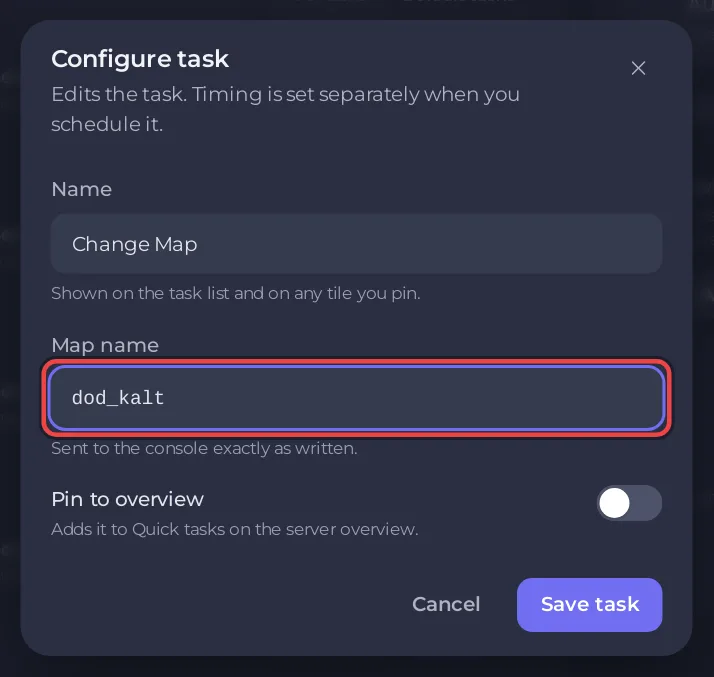
The task keeps only letters, digits and underscores in Map name, up to 32 characters. For a custom map with - or . in its name, use changelevel in the Console instead.
How do I choose the map the server starts on?
- Click the Settings tab.
- Under Game Settings, type the map in Map, for example
dod_avalanche. It isdod_anzioon a new server. - Press Enter, then click Restart now.
The server loads this map at every start and every restart, whatever map was played last. It accepts any map name without spaces, quotes, * or ?.
Which maps come with Day of Defeat: Source?
The Valve Developer Community lists 9 official maps:
| Map | Game mode |
|---|---|
dod_anzio | Area capture |
dod_argentan | Area capture |
dod_avalanche | Area capture |
dod_colmar | Detonation |
dod_donner | Area capture |
dod_flash | Area capture |
dod_jagd | Detonation |
dod_kalt | Area capture |
dod_palermo | Area capture |
To play a community map, upload it first: How to add custom maps to your Day of Defeat: Source server.
How do I set up a map rotation?
When a map ends, the server loads the next map in its map cycle file, mapcycle.txt by default (the mapcyclefile setting). Edit that file to choose the rotation:
- On the Files tab, look for
mapcycle.txtindod/cfg, and if it is not there, indod. - Write one map name per line, without
.bsp, in the order you want. - Click Save content, then restart the server so the new list is in use.
How long each map runs is mp_timelimit, in minutes ("Game time per map in minutes", in Valve's console command list). Add a line such as mp_timelimit 30 to dod/cfg/server.cfg to set it.
Can admins change the map in the game?
Yes, with SourceMod installed. An admin types sm_map dod_flash in the game console, or !map dod_flash in chat. See How to add admins and kick or ban players on your Day of Defeat: Source server.
To change maps on a timer, schedule the Change Map task: How to restart your Day of Defeat: Source server on a schedule shows how a schedule is built.


