

To set a join password on a Day of Defeat: Source server on PlayNHost, add the line sv_password "your-password" to dod/cfg/server.cfg on the Files tab and restart the server. Players then type password your-password in the game's developer console before they connect. There is no join password field in Settings for this game.
Set the password
- Open your server in the panel and click the Files tab.
- Open the
dodfolder, then thecfgfolder. - Click
server.cfgto open it in the editor. If there is noserver.cfg, click New file in this folder instead. - Add the line
sv_password "your-password"on a line of its own, with your own password between the quotes. - Click Save content. For a new file, click Create file and type
server.cfgas the File name. - Click Restart and wait for the badge to say Online.
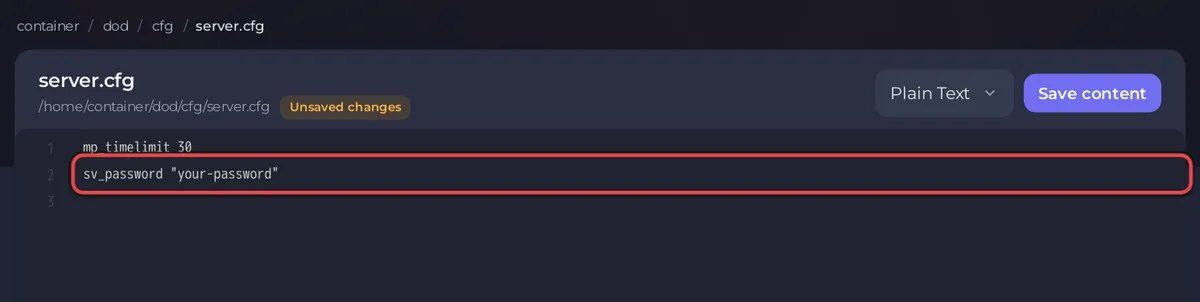
Valve's CFG page says server.cfg runs when a dedicated server starts and again every time the map changes. So the password also takes effect at the next map change, without a restart.
To switch it on at once, type sv_password "your-password" in the Type a command box on the Console tab and press Enter. The line in the file keeps it after the next restart.
How do players join with the password?
- Press the
~key in Day of Defeat: Source to open the developer console. - Type
password your-passwordand press Enter. - Type
connectand the server address, and press Enter.
The full join steps, and how to switch the developer console on, are in How to join your Day of Defeat: Source server.
How do I remove the password?
- On Files, open
dod/cfg/server.cfgand change the line tosv_password "". - Click Save content and restart the server.
Typing sv_password "" in the Console removes it at once.
Is the join password the same as the RCON password?
No. The RCON password in Settings lets an RCON tool run admin commands on the server. The join password only lets players in. Use two different passwords. See How to use the Console and RCON on your Day of Defeat: Source server.
Other ways to keep a server private
- Invite only the people you want and change the password when someone should no longer join: How to invite friends to your Day of Defeat: Source server.
- Remove someone who is already on: How to add admins and kick or ban players on your Day of Defeat: Source server.


