

To add a custom map to a Counter-Strike 1.6 server on PlayNHost, upload its .bsp file to the cstrike/maps folder on the Files tab, then type changelevel and the map name in the Console tab. No restart is needed. A map that comes as a .zip with several folders is unzipped inside cstrike.
Upload a single map
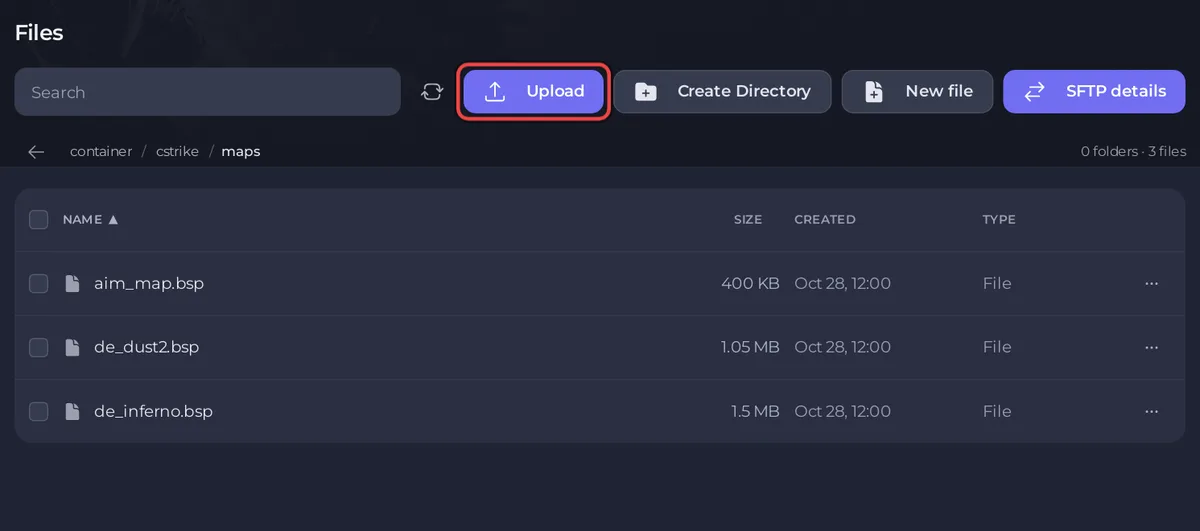
- Open your server in the panel and click the Files tab.
- Open the
cstrikefolder, then themapsfolder. - Click Upload and choose the
.bspfile, for exampleaim_map.bsp. You can also drag files onto the page. - Wait until the file shows in the list.
- Click the Console tab, type
changelevel aim_mapand press Enter. The server loads the new map.
Use the file name without .bsp. If the Console prints changelevel failed: 'aim_map' not found on server., check that the file is in cstrike/maps and that the name matches exactly.
How do I upload a map that comes as a zip?
Many maps come with extra files, such as textures (.wad), sounds or models, in folders like maps, sound or models.
- On the Files tab, open the
cstrikefolder. - Click Upload and choose the
.zipfile. - Tick the box next to the
.zipand click Unzip. The folders inside it are unpacked intocstrike, so each file lands where the game looks for it. - Open
cstrike/mapsand check that the.bspis there. If the zip had one more folder around everything, move the files up with Move. - Delete the
.zipwhen you are done.
Folder uploads are not supported in the browser: zip the folder first, or use SFTP for many files at once. See How to connect to your server files with SFTP.
Do players need to download the map?
Yes, every player needs the map's files to play it. Players who do not have them download them from your server when they join: the ReHLDS setting that allows this, sv_allowdownload, is 1 by default, and when cstrike/server.cfg has an sv_allowdownload line the panel sets it back to "1" at every start. Big maps with many extra files take longer for each new player.
How do I keep the map in the rotation?
- On the Files tab, open
cstrike/mapcycle.txt. - Add the map name, without
.bsp, on its own line. - Click Save content and restart the server, so the rotation is read again.
To start the server on the custom map, type its name in Map in Settings, Game Settings and restart. Map accepts letters, digits, - and _ only, so a map with a dot in its name can be played with changelevel but not set as the start map. The Change Map task on Quick Tasks keeps letters, digits and underscores only. More in How to change the map on your Counter-Strike 1.6 server.
How do I remove a map?
Open cstrike/maps, open the map's menu and choose Delete file. Take it out of cstrike/mapcycle.txt too. Do not delete the map the server is playing or the one set in Map.
Before large changes, take a backup: How to back up and restore your Counter-Strike 1.6 server. More on the file manager: How to upload, edit and manage your server files.


