

A Counter-Strike 1.6 server needs very little RAM. In PlayNHost's own test on 15 September 2026, a server with the full stack (ReHLDS, ReGameDLL, Metamod-r and AMX Mod X) used about 73 MiB of memory (about 76 MB) after 6 minutes running with no players. Every Counter-Strike 1.6 plan on PlayNHost holds 32 players, whatever its memory.
What uses memory on a Counter-Strike 1.6 server?
- The game server and its add-ons: about 76 MB in PlayNHost's test, with nobody on.
- What you add and who plays: AMX Mod X plugins, bots, custom maps and the players themselves were not part of that test.
That test was an empty server, so treat it as the floor, not what a full server with plugins uses. The way to know your own server's use is to watch it.
How do I see how much memory my server uses?
- Open your server in the panel and stay on Overview.
- Look at the RAM graph while people play, ideally at your busiest hour.
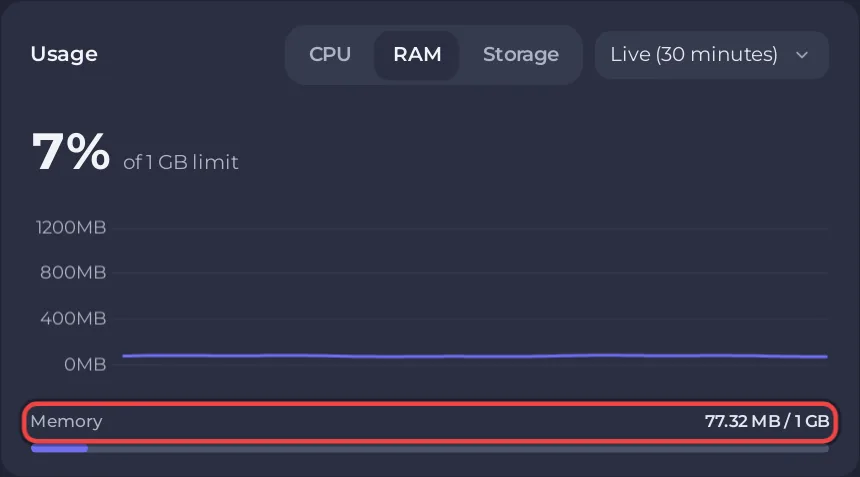
How to read the graphs: How to read your server's usage graphs.
What happens if the server runs out of memory?
The system stops it. For a week after that, Overview shows a card, This server ran out of memory, with the last time and how often it happened. The card appears only after such a stop, so a server that copes never shows it. If you see it, look first at what you added last: plugins and bots you do not need can go.
Does more RAM mean more players?
No. Every plan holds up to 32 players, because +maxplayers 32 is fixed in the server's start line. Memory does not change the number of slots. See How many players can a Counter-Strike 1.6 server have.
To restart the server at a quiet hour every day, see How to restart your Counter-Strike 1.6 server on a schedule.


