

To change the map on a Counter-Strike 1.6 server on PlayNHost right away, type changelevel and the map name in the Console tab, for example changelevel de_inferno. Players stay connected and the new map loads without a restart. To choose the map the server starts on, set Map in Settings, Game Settings.
Change the map now
- Open your server in the panel and click the Console tab. The badge must say Online.
- Type
changelevel de_infernoin the Type a command box, with the map you want, and press Enter. - The map loads. Players on the server move to it with you.
Use the map's file name without .bsp. The maps your server has are the .bsp files in cstrike/maps, on the Files tab. If the name is wrong, the Console prints changelevel failed: 'mapname' not found on server.
Change the map with a task on Quick Tasks
The Change Map task on Quick Tasks sends the same changelevel command. It is handy to pin to Overview or to put on a schedule.
- Click Quick Tasks in the left menu.
- Under All tasks, open Default tasks and find Change Map. It says
Loads a different map right away, without restarting the server. There is no world to save on these match-based games. - Click Run. The Configure task window opens.
- Type the map in Map name, for example
de_inferno, and click Save task. - Click Your tasks above the list and click Run next to your saved task.
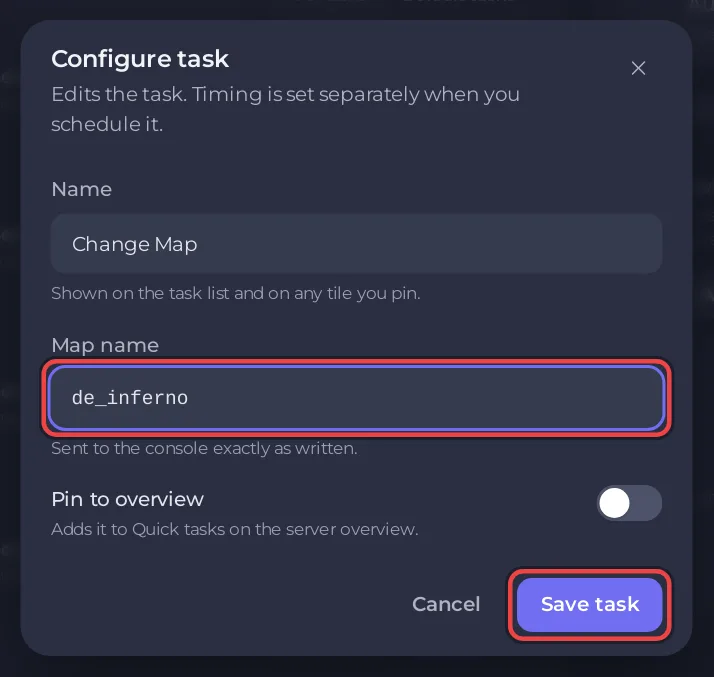
Only letters, digits and underscores are kept in Map name, up to 32 characters.
How do I choose the map the server starts on?
- Click the Settings tab, then Game Settings under Server Settings.
- Type the map in Map, for example
cs_assault. It isde_dust2on a new server. - Press Enter, then click Restart now.
The Map setting is loaded at every start and every restart, whatever map was played last. It accepts letters, digits, - and _ only.
How do I set up a map rotation?
When a map's time runs out, the server loads the next map listed in cstrike/mapcycle.txt. Edit that file to choose the rotation:
- On the Files tab, open
cstrike/mapcycle.txt. - Write one map name per line, without
.bsp, in the order you want. - Click Save content.
- Click Restart. The ReGameDLL game library reads
mapcycle.txtonce per server start, so a restart makes sure the new list is used.
Maps that are not on the server are skipped. Each map runs for mp_timelimit minutes, which is 20 in cstrike/game.cfg on a new server (ReGameDLL settings: 0 means no limit). To change it, see How to change the game rules on your Counter-Strike 1.6 server.
Two stock AMX Mod X plugins also run on a new server: mapchooser.amxx lets players vote for the next map, and nextmap.amxx shows which map is next in the rotation. A map won in a vote is played instead of the next one in the file.
Can admins change the map in the game?
Yes. An AMX Mod X admin with the access flag f types amx_map de_inferno in the game console, or uses the maps menu in amxmodmenu. See How to become admin on your Counter-Strike 1.6 server.
To play a map that is not on the server yet, upload it first: How to add custom maps to your Counter-Strike 1.6 server.


