

To invite friends to your ARK: Survival Ascended server, send them three things: the Server Name to search in the unofficial list, the Server Address from the Overview page for PC players, and the Server Password if you set one. Playing needs nothing more. Helping you run the server needs an invitation from Team & Roles.
Collect what to send
- Open your server in the panel.
- On Overview, click Join. It copies the Server Address to your clipboard, for example
203.0.113.10:7777with your own numbers.
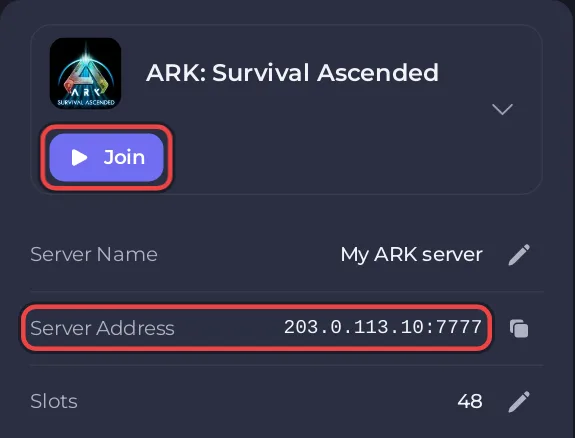
- Click the Settings tab. On Game Settings, copy the Server Name and, if you set one, the Server Password.
There is no ready-made invite card for ARK: Survival Ascended, so write the message yourself.
A message you can paste
Join my ARK: Survival Ascended server!
Search for: <Server Name> in the unofficial server list
PC players can also press ~ and type: open <Server Address>
Password: <Server Password>
Replace the parts in brackets with your own values. Leave out the password line on a public server.
Before your friends try
- The server must say Online, and it shows in the list once the Console has printed
is now advertising for join. - Everyone needs ARK: Survival Ascended, not Survival Evolved, updated to the newest version.
- Friends on Xbox or PlayStation need Crossplay on: Which platforms can join your ARK: Survival Ascended server.
- If you use mods, console friends can only load mods marked for every platform.
The steps for each friend: How to join your ARK: Survival Ascended server and How to join your ARK: Survival Ascended server from Xbox or PlayStation.
Let a friend help run the server
A friend who should restart the server, change settings or kick players needs their own panel access. Click Team & Roles in the left menu, then Invite someone, and pick a role. Never share your own panel password. Which permission each ARK task needs: How to let a friend help run your ARK: Survival Ascended server. The general steps: How to invite friends and give them access.
To make a friend an admin inside the game, give them the Admin Password, or add their ID to the admin list: How to become admin on your ARK: Survival Ascended server.


