%7B.s%7Banimation%3Ab%201.5s%20ease-out%20both%7D.d%7Banimation-delay%3A.16s%7D%7D%40keyframes%20b%7B0%25%7Bfill%3A%23F4F6FA%7D18%25%7Bfill%3A%23FFE08A%7D34%25%2C70%25%7Bfill%3A%23FF8A1F%7D80%25%7Bfill%3A%23FFE08A%7D100%25%7Bfill%3A%23FF8A1F%7D%7D%3C%2Fstyle%3E%3Cg%20transform%3D%22translate(143%20428.93)%20scale(3.885906)%22%3E%3Cg%20transform%3D%22translate(0%202)%22%20fill%3D%22%23706EF0%22%3E%3Cpath%20d%3D%22M0%200%20H48%20A40%2040%200%200%201%2048%2080%20V100%20H0%20Z%22%2F%3E%3Cpath%20transform%3D%22translate(91.75%200)%22%20d%3D%22M0%200%20L48%200%20L48%2050%20L76%2050%20L76%20100%20L0%20100%20Z%22%2F%3E%3Cpath%20transform%3D%22translate(173%200)%22%20d%3D%22M0%20100%20L58%20-4%20L116%20100%20Z%22%2F%3E%3Cpath%20transform%3D%22translate(264.25%200)%22%20d%3D%22M0%200%20L104%200%20L76%2050%20L76%20100%20L28%20100%20L28%2050%20Z%22%2F%3E%3Cg%20transform%3D%22translate(375%200)%22%3E%3Cpath%20d%3D%22M0%200%20L50%2038%20L50%200%20L100%200%20L100%20100%20L0%20100%20Z%22%20fill%3D%22%23F4F6FA%22%2F%3E%3Crect%20class%3D%22s%22%20x%3D%2247%22%20y%3D%2263%22%20width%3D%2219%22%20height%3D%2230%22%2F%3E%3Crect%20class%3D%22s%20d%22%20x%3D%2274%22%20y%3D%2263%22%20width%3D%2219%22%20height%3D%2230%22%2F%3E%3C%2Fg%3E%3Cpath%20transform%3D%22translate(484.75%200)%22%20d%3D%22M0%200%20L48%200%20L48%2037%20L52%2037%20L52%200%20L100%200%20L100%20100%20L52%20100%20L52%2063%20L48%2063%20L48%20100%20L0%20100%20Z%22%2F%3E%3Cpath%20transform%3D%22translate(588.5%200)%22%20d%3D%22M0%2050%20A53%2053%200%201%200%20106%2050%20A53%2053%200%201%200%200%2050%20Z%22%2F%3E%3Cpath%20transform%3D%22translate(698.25%200)%22%20d%3D%22M25%200%20H102%20V50%20H77%20A25%2025%200%200%201%2077%20100%20H0%20V50%20H25%20A25%2025%200%200%201%2025%200%20Z%22%2F%3E%3Cpath%20transform%3D%22translate(804%200)%22%20d%3D%22M0%200%20L90%200%20L90%2050%20L69%2050%20L69%20100%20L21%20100%20L21%2050%20L0%2050%20Z%22%2F%3E%3C%2Fg%3E%3C%2Fg%3E%3C%2Fsvg%3E)


World load failed mid-file. Exiting without save. Check backups! means part of the world is missing, usually one of its .chunk files. The game quits without saving over your world, so nothing more is lost. Rewind the world to a complete copy on the Worlds page, or upload the complete world again.
What you see
The Console shows lines like these, then the server goes Offline. The panel restarts it once and it stops again:
ZNet.LoadWorld: ... save number 8Exception while loading world ... FileNotFoundExceptionnaming a file such as00_00__0_8.chunkWorld load failed mid-file. Exiting without save. Check backups!World db couldn't load correctly, saving has been disabled to prevent .old file from being overwritten.Skipping world save
On the Worlds page, a world with part of its last save missing shows Incomplete, and the timeline says the game would replace it with a new world.
Fix it: rewind to a copy
- Open Worlds in the left menu and click the world.
- On the Rewind timeline, pick the newest Automatic copy or Server backups entry from before the problem, and click Rewind to this. A copy marked
incomplete, cannot be usedcannot be picked. - Confirm. The server starts again with the copy.
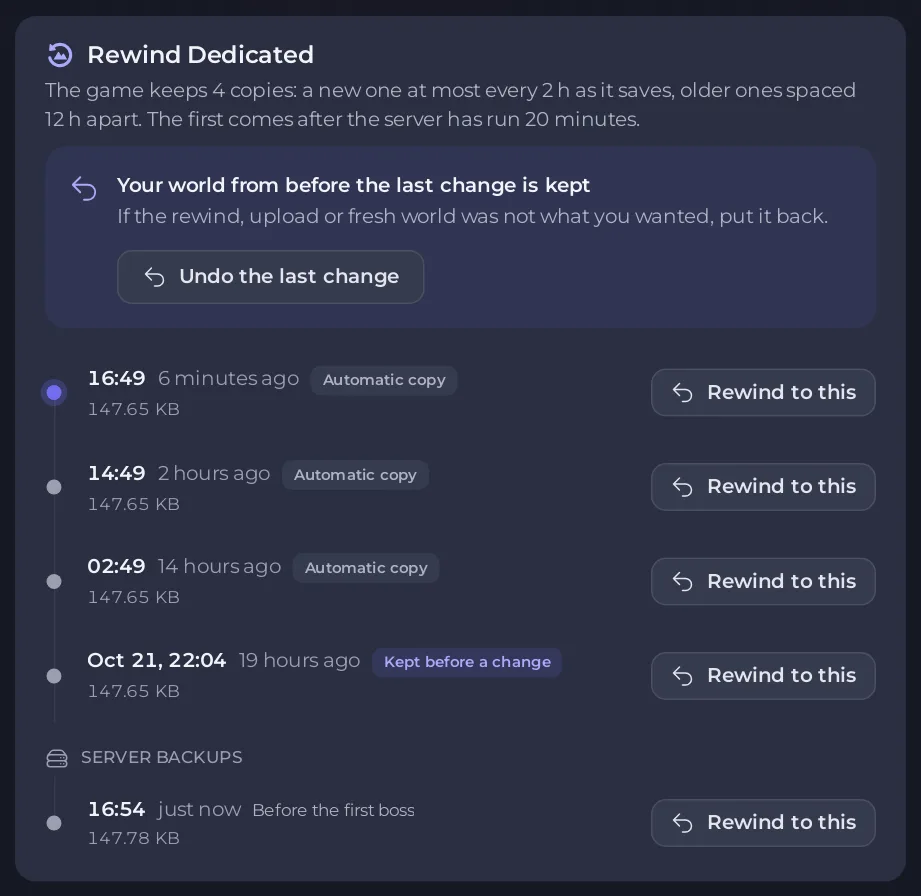
Full steps: How to rewind your Valheim world to an earlier copy.
Or upload the world again
If the world came from your PC, zip the whole world folder again, with every file in it, and upload it on the Worlds page with the same name. The panel checks the upload, refuses it with the reason if a file is still missing, and keeps the broken world as a copy. See How to upload your own Valheim world.
Check it loaded
Start the server and look for ZNet.LoadWorld: with no World load failed line after it: How to check which world your Valheim server loaded.
Still failing?
Open a ticket with the last 50 to 100 lines of the Console.





