%7B.s%7Banimation%3Ab%201.5s%20ease-out%20both%7D.d%7Banimation-delay%3A.16s%7D%7D%40keyframes%20b%7B0%25%7Bfill%3A%23F4F6FA%7D18%25%7Bfill%3A%23FFE08A%7D34%25%2C70%25%7Bfill%3A%23FF8A1F%7D80%25%7Bfill%3A%23FFE08A%7D100%25%7Bfill%3A%23FF8A1F%7D%7D%3C%2Fstyle%3E%3Cg%20transform%3D%22translate(143%20428.93)%20scale(3.885906)%22%3E%3Cg%20transform%3D%22translate(0%202)%22%20fill%3D%22%23706EF0%22%3E%3Cpath%20d%3D%22M0%200%20H48%20A40%2040%200%200%201%2048%2080%20V100%20H0%20Z%22%2F%3E%3Cpath%20transform%3D%22translate(91.75%200)%22%20d%3D%22M0%200%20L48%200%20L48%2050%20L76%2050%20L76%20100%20L0%20100%20Z%22%2F%3E%3Cpath%20transform%3D%22translate(173%200)%22%20d%3D%22M0%20100%20L58%20-4%20L116%20100%20Z%22%2F%3E%3Cpath%20transform%3D%22translate(264.25%200)%22%20d%3D%22M0%200%20L104%200%20L76%2050%20L76%20100%20L28%20100%20L28%2050%20Z%22%2F%3E%3Cg%20transform%3D%22translate(375%200)%22%3E%3Cpath%20d%3D%22M0%200%20L50%2038%20L50%200%20L100%200%20L100%20100%20L0%20100%20Z%22%20fill%3D%22%23F4F6FA%22%2F%3E%3Crect%20class%3D%22s%22%20x%3D%2247%22%20y%3D%2263%22%20width%3D%2219%22%20height%3D%2230%22%2F%3E%3Crect%20class%3D%22s%20d%22%20x%3D%2274%22%20y%3D%2263%22%20width%3D%2219%22%20height%3D%2230%22%2F%3E%3C%2Fg%3E%3Cpath%20transform%3D%22translate(484.75%200)%22%20d%3D%22M0%200%20L48%200%20L48%2037%20L52%2037%20L52%200%20L100%200%20L100%20100%20L52%20100%20L52%2063%20L48%2063%20L48%20100%20L0%20100%20Z%22%2F%3E%3Cpath%20transform%3D%22translate(588.5%200)%22%20d%3D%22M0%2050%20A53%2053%200%201%200%20106%2050%20A53%2053%200%201%200%200%2050%20Z%22%2F%3E%3Cpath%20transform%3D%22translate(698.25%200)%22%20d%3D%22M25%200%20H102%20V50%20H77%20A25%2025%200%200%201%2077%20100%20H0%20V50%20H25%20A25%2025%200%200%201%2025%200%20Z%22%2F%3E%3Cpath%20transform%3D%22translate(804%200)%22%20d%3D%22M0%200%20L90%200%20L90%2050%20L69%2050%20L69%20100%20L21%20100%20L21%2050%20L0%2050%20Z%22%2F%3E%3C%2Fg%3E%3C%2Fg%3E%3C%2Fsvg%3E)


The Worlds page marks the world the server runs as Active, and the badge at the top says Running with its name. To be sure the game loaded that world and did not make a new one, look for the line ZNet.LoadWorld: in the Console after a start.
On the Worlds page
- Open your server in the panel and click Worlds in the left menu.
- The first row of Your worlds is the active world, marked Active. Its row shows when it was last saved and the in-game day.
- While the server runs, the badge at the top right says Running and the world's name.
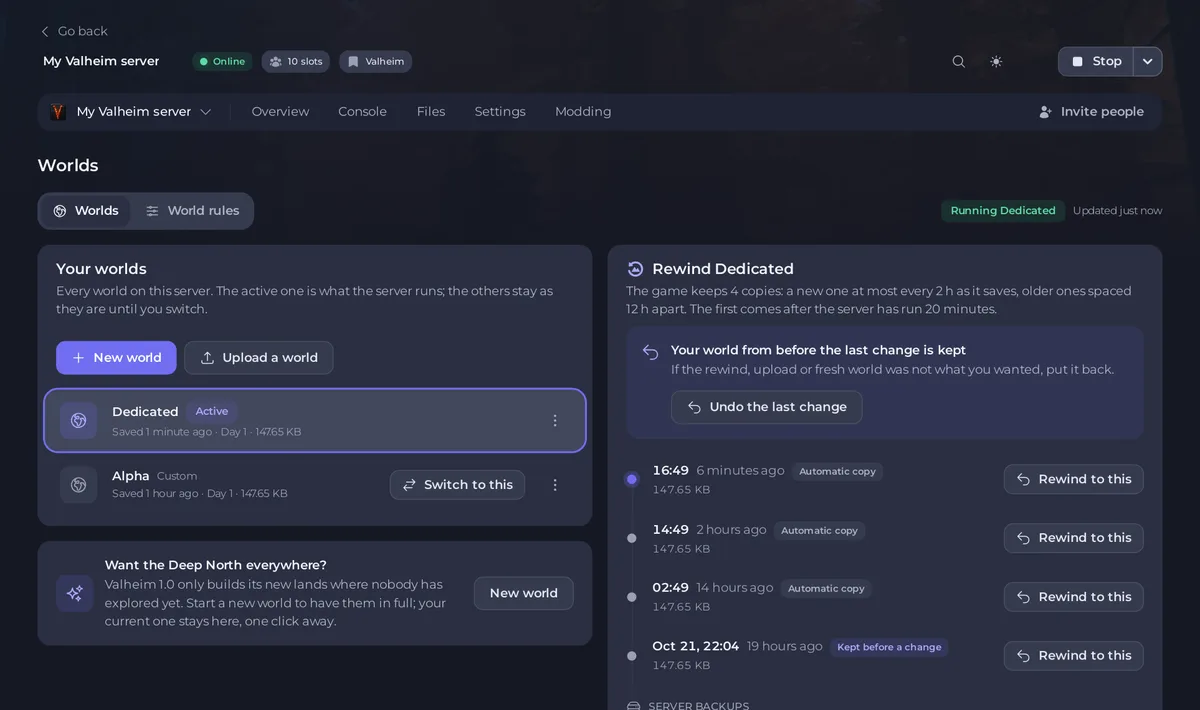
If the page says The world the server runs and a name does not exist yet: the game makes it at the next start., there is no world under that name, and the next start makes a new one.
In the Console
- Click Console.
- Start the server, or scroll to the last start. The filter Since last start shows only the lines of the current run.
- Use the magnifying glass (Search the console) and search for
LoadWorldorLoad world.

Your world loaded
You see a line like this, with no problem line after it:
ZNet.LoadWorld: MyWorld (MyWorld), save number 7
The name in brackets is the folder the server read. The save number goes up each time the server saves. The first name can differ from the folder name: a world uploaded under another name keeps the name stored inside it.
A new world was made
You see these lines instead:
Load world: MyWorld (MyWorld)missing .../worlds_local/MyWorld.dbLoading: Generating locations
That is right if you meant to start fresh. If you uploaded a world, see My uploaded Valheim world is gone and the server made a new one.
The world is broken or incomplete
World load failed mid-file. Exiting without save. Check backups! means part of the world is missing. The game stops without saving over it. See Valheim says World load failed and the server stops. On the Worlds page, such a world shows Incomplete.
Related
How to switch between Valheim worlds on your server and How to read your Valheim server console.





