%7B.s%7Banimation%3Ab%201.5s%20ease-out%20both%7D.d%7Banimation-delay%3A.16s%7D%7D%40keyframes%20b%7B0%25%7Bfill%3A%23F4F6FA%7D18%25%7Bfill%3A%23FFE08A%7D34%25%2C70%25%7Bfill%3A%23FF8A1F%7D80%25%7Bfill%3A%23FFE08A%7D100%25%7Bfill%3A%23FF8A1F%7D%7D%3C%2Fstyle%3E%3Cg%20transform%3D%22translate(143%20428.93)%20scale(3.885906)%22%3E%3Cg%20transform%3D%22translate(0%202)%22%20fill%3D%22%23706EF0%22%3E%3Cpath%20d%3D%22M0%200%20H48%20A40%2040%200%200%201%2048%2080%20V100%20H0%20Z%22%2F%3E%3Cpath%20transform%3D%22translate(91.75%200)%22%20d%3D%22M0%200%20L48%200%20L48%2050%20L76%2050%20L76%20100%20L0%20100%20Z%22%2F%3E%3Cpath%20transform%3D%22translate(173%200)%22%20d%3D%22M0%20100%20L58%20-4%20L116%20100%20Z%22%2F%3E%3Cpath%20transform%3D%22translate(264.25%200)%22%20d%3D%22M0%200%20L104%200%20L76%2050%20L76%20100%20L28%20100%20L28%2050%20Z%22%2F%3E%3Cg%20transform%3D%22translate(375%200)%22%3E%3Cpath%20d%3D%22M0%200%20L50%2038%20L50%200%20L100%200%20L100%20100%20L0%20100%20Z%22%20fill%3D%22%23F4F6FA%22%2F%3E%3Crect%20class%3D%22s%22%20x%3D%2247%22%20y%3D%2263%22%20width%3D%2219%22%20height%3D%2230%22%2F%3E%3Crect%20class%3D%22s%20d%22%20x%3D%2274%22%20y%3D%2263%22%20width%3D%2219%22%20height%3D%2230%22%2F%3E%3C%2Fg%3E%3Cpath%20transform%3D%22translate(484.75%200)%22%20d%3D%22M0%200%20L48%200%20L48%2037%20L52%2037%20L52%200%20L100%200%20L100%20100%20L52%20100%20L52%2063%20L48%2063%20L48%20100%20L0%20100%20Z%22%2F%3E%3Cpath%20transform%3D%22translate(588.5%200)%22%20d%3D%22M0%2050%20A53%2053%200%201%200%20106%2050%20A53%2053%200%201%200%200%2050%20Z%22%2F%3E%3Cpath%20transform%3D%22translate(698.25%200)%22%20d%3D%22M25%200%20H102%20V50%20H77%20A25%2025%200%200%201%2077%20100%20H0%20V50%20H25%20A25%2025%200%200%201%2025%200%20Z%22%2F%3E%3Cpath%20transform%3D%22translate(804%200)%22%20d%3D%22M0%200%20L90%200%20L90%2050%20L69%2050%20L69%20100%20L21%20100%20L21%2050%20L0%2050%20Z%22%2F%3E%3C%2Fg%3E%3C%2Fg%3E%3C%2Fsvg%3E)


Your Valheim join code is on the Play with friends card of the Overview page, under the third join step, while the server runs with crossplay on. It is six digits and it can change at every restart, so check the card after one. The same code is also printed in the Console.
Find the code on the Overview page
- Open your server in the panel and make sure the badge says Online.
- On the Play with friends card, look under How to join. Below the third step, Join code shows the six digits.
- Click the copy button beside the code, or use Copy invite message, which adds the code at the end of the message.

The note under the code says: New at every restart. Steam friends can keep using the address above.
What the card says when there is no code
| The card says | What it means | What to do |
|---|---|---|
The server is starting. The join code appears here a few seconds after it is open. | The game has not registered the server yet. | Wait for Online and a few seconds more. |
The server is stopped. Start it to get a join code: it is new at every start. | No code while the server is off. | Click Start. |
Crossplay is off, so only Steam players can join. | No code without crossplay. | Turn on Enable Crossplay in Settings, Game Settings, and restart. See How to turn crossplay on or off on your Valheim server. |
The panel cannot read the join code right now. | The panel could not read it this time. | Read it in the Console, as below. |
Find the code in the Console
- Click the Console tab.
- Click the magnifying glass above the console (Search the console) and type
join codein the Search output... box. - Look for a line like this:
Session "My Server" registered with join code 123456 - The six digits after
join codeare the code.
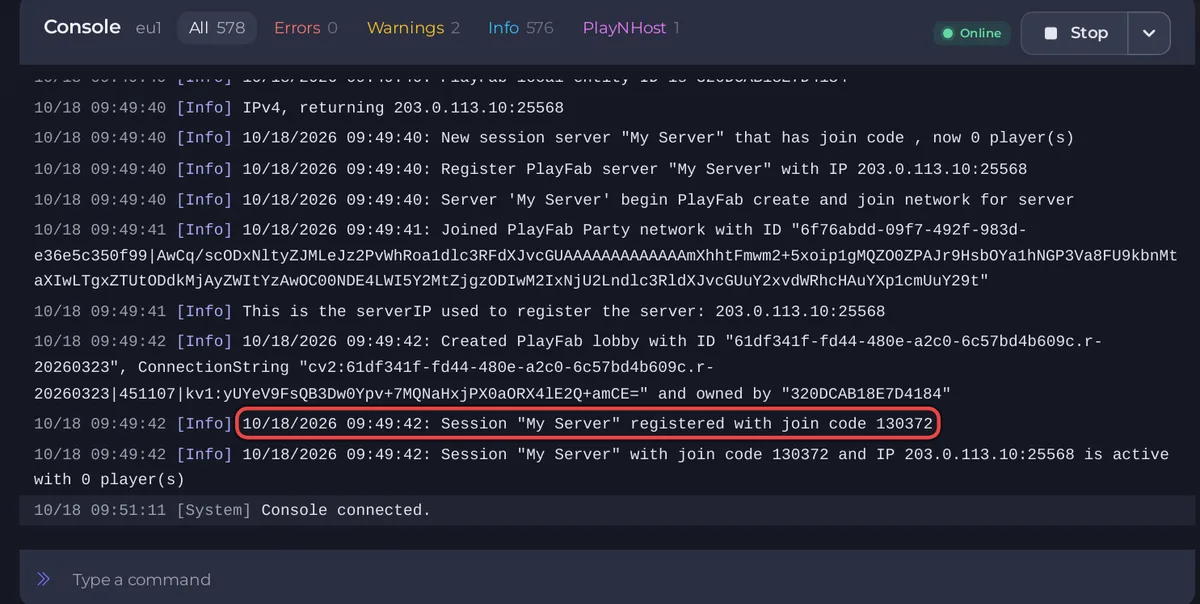
The game repeats the code in other lines, for example Session "My Server" with join code 123456 and IP ... is active with 0 player(s). A line that says has join code , now 0 player(s) has no digits yet: the code comes a few seconds later.
The Console keeps only recent lines. If the line has scrolled out, use the card instead.
Use the code
- Xbox, PlayStation and Game Pass: How to join your Valheim server from Xbox or Game Pass.
- PC players can use the code too, or the address: How to join your Valheim server from Steam.





