%7B.s%7Banimation%3Ab%201.5s%20ease-out%20both%7D.d%7Banimation-delay%3A.16s%7D%7D%40keyframes%20b%7B0%25%7Bfill%3A%23F4F6FA%7D18%25%7Bfill%3A%23FFE08A%7D34%25%2C70%25%7Bfill%3A%23FF8A1F%7D80%25%7Bfill%3A%23FFE08A%7D100%25%7Bfill%3A%23FF8A1F%7D%7D%3C%2Fstyle%3E%3Cg%20transform%3D%22translate(143%20428.93)%20scale(3.885906)%22%3E%3Cg%20transform%3D%22translate(0%202)%22%20fill%3D%22%23706EF0%22%3E%3Cpath%20d%3D%22M0%200%20H48%20A40%2040%200%200%201%2048%2080%20V100%20H0%20Z%22%2F%3E%3Cpath%20transform%3D%22translate(91.75%200)%22%20d%3D%22M0%200%20L48%200%20L48%2050%20L76%2050%20L76%20100%20L0%20100%20Z%22%2F%3E%3Cpath%20transform%3D%22translate(173%200)%22%20d%3D%22M0%20100%20L58%20-4%20L116%20100%20Z%22%2F%3E%3Cpath%20transform%3D%22translate(264.25%200)%22%20d%3D%22M0%200%20L104%200%20L76%2050%20L76%20100%20L28%20100%20L28%2050%20Z%22%2F%3E%3Cg%20transform%3D%22translate(375%200)%22%3E%3Cpath%20d%3D%22M0%200%20L50%2038%20L50%200%20L100%200%20L100%20100%20L0%20100%20Z%22%20fill%3D%22%23F4F6FA%22%2F%3E%3Crect%20class%3D%22s%22%20x%3D%2247%22%20y%3D%2263%22%20width%3D%2219%22%20height%3D%2230%22%2F%3E%3Crect%20class%3D%22s%20d%22%20x%3D%2274%22%20y%3D%2263%22%20width%3D%2219%22%20height%3D%2230%22%2F%3E%3C%2Fg%3E%3Cpath%20transform%3D%22translate(484.75%200)%22%20d%3D%22M0%200%20L48%200%20L48%2037%20L52%2037%20L52%200%20L100%200%20L100%20100%20L52%20100%20L52%2063%20L48%2063%20L48%20100%20L0%20100%20Z%22%2F%3E%3Cpath%20transform%3D%22translate(588.5%200)%22%20d%3D%22M0%2050%20A53%2053%200%201%200%20106%2050%20A53%2053%200%201%200%200%2050%20Z%22%2F%3E%3Cpath%20transform%3D%22translate(698.25%200)%22%20d%3D%22M25%200%20H102%20V50%20H77%20A25%2025%200%200%201%2077%20100%20H0%20V50%20H25%20A25%2025%200%200%201%2025%200%20Z%22%2F%3E%3Cpath%20transform%3D%22translate(804%200)%22%20d%3D%22M0%200%20L90%200%20L90%2050%20L69%2050%20L69%20100%20L21%20100%20L21%2050%20L0%2050%20Z%22%2F%3E%3C%2Fg%3E%3C%2Fg%3E%3C%2Fsvg%3E)


Open the Console tab and type a command without a /. On Terraria Vanilla and tModLoader, type help to list the commands the server knows. The most used are save, say, playing, kick and exit. On TShock, the Console runs TShock's own commands.
Terraria Vanilla and tModLoader
The server's own help lists these:
| Command | What it does |
|---|---|
help | Displays a list of commands. |
playing | Shows the list of players. |
clear | Clear the console window. |
exit | Shutdown the server and save. |
exit-nosave | Shutdown the server without saving. |
save | Save the game world. |
kick <player> | Kicks a player from the server. |
ban <player> | Bans a player from the server. |
password | Show password. |
password <pass> | Change password, until the next restart. |
version | Print version number. |
time | Display game time. |
port | Print the listening port. |
maxplayers | Print the max number of players. |
say <words> | Send a message to everyone. |
motd | Print MOTD. |
motd <words> | Change MOTD, until the next restart. |
dawn, noon, dusk, midnight | Change the time of day. |
settle | Settle all water. |
seed | Displays the world seed. |
A command the server does not know answers Invalid command.
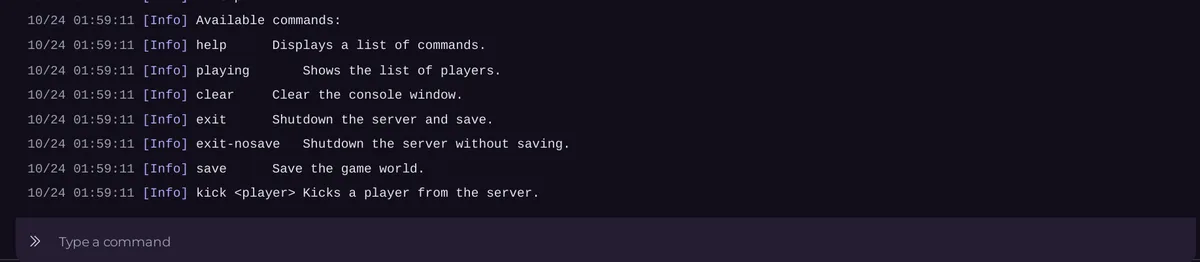
On tModLoader, modlist shows which mods loaded.
TShock
TShock's Console runs TShock commands, typed without /. Some useful ones:
help: lists the commands.playingorwho: who is on.say: a message to everyone.save: saves the world.kickand a name,ban addand a name,ban list,ban deland a number.userandgroup: accounts and permissions: How to manage TShock groups and permissions.whitelistand an address: How to use a whitelist on your TShock server.timeandday,night,noon,midnightor a time such as04:30.off: shuts down the server while saving.
Good to know
- Stop in the panel sends
exitfor you, which saves the world and shuts the server down, on all three types. passwordandmotdchanges last until the next restart. Set them in Game Settings to keep them.- Typing in the Console needs the Use the console permission.
- Lines starting with
[pnh-update]and[pnh-mods]come from the panel's start tools: How to update your Terraria server and hold a version. - Commands you run often can be pinned on Quick Tasks: How to schedule backups and restarts for your Terraria server.
- More on the Console: How to use the console and run commands.





