%7B.s%7Banimation%3Ab%201.5s%20ease-out%20both%7D.d%7Banimation-delay%3A.16s%7D%7D%40keyframes%20b%7B0%25%7Bfill%3A%23F4F6FA%7D18%25%7Bfill%3A%23FFE08A%7D34%25%2C70%25%7Bfill%3A%23FF8A1F%7D80%25%7Bfill%3A%23FFE08A%7D100%25%7Bfill%3A%23FF8A1F%7D%7D%3C%2Fstyle%3E%3Cg%20transform%3D%22translate(143%20428.93)%20scale(3.885906)%22%3E%3Cg%20transform%3D%22translate(0%202)%22%20fill%3D%22%23706EF0%22%3E%3Cpath%20d%3D%22M0%200%20H48%20A40%2040%200%200%201%2048%2080%20V100%20H0%20Z%22%2F%3E%3Cpath%20transform%3D%22translate(91.75%200)%22%20d%3D%22M0%200%20L48%200%20L48%2050%20L76%2050%20L76%20100%20L0%20100%20Z%22%2F%3E%3Cpath%20transform%3D%22translate(173%200)%22%20d%3D%22M0%20100%20L58%20-4%20L116%20100%20Z%22%2F%3E%3Cpath%20transform%3D%22translate(264.25%200)%22%20d%3D%22M0%200%20L104%200%20L76%2050%20L76%20100%20L28%20100%20L28%2050%20Z%22%2F%3E%3Cg%20transform%3D%22translate(375%200)%22%3E%3Cpath%20d%3D%22M0%200%20L50%2038%20L50%200%20L100%200%20L100%20100%20L0%20100%20Z%22%20fill%3D%22%23F4F6FA%22%2F%3E%3Crect%20class%3D%22s%22%20x%3D%2247%22%20y%3D%2263%22%20width%3D%2219%22%20height%3D%2230%22%2F%3E%3Crect%20class%3D%22s%20d%22%20x%3D%2274%22%20y%3D%2263%22%20width%3D%2219%22%20height%3D%2230%22%2F%3E%3C%2Fg%3E%3Cpath%20transform%3D%22translate(484.75%200)%22%20d%3D%22M0%200%20L48%200%20L48%2037%20L52%2037%20L52%200%20L100%200%20L100%20100%20L52%20100%20L52%2063%20L48%2063%20L48%20100%20L0%20100%20Z%22%2F%3E%3Cpath%20transform%3D%22translate(588.5%200)%22%20d%3D%22M0%2050%20A53%2053%200%201%200%20106%2050%20A53%2053%200%201%200%200%2050%20Z%22%2F%3E%3Cpath%20transform%3D%22translate(698.25%200)%22%20d%3D%22M25%200%20H102%20V50%20H77%20A25%2025%200%200%201%2077%20100%20H0%20V50%20H25%20A25%2025%200%200%201%2025%200%20Z%22%2F%3E%3Cpath%20transform%3D%22translate(804%200)%22%20d%3D%22M0%200%20L90%200%20L90%2050%20L69%2050%20L69%20100%20L21%20100%20L21%2050%20L0%2050%20Z%22%2F%3E%3C%2Fg%3E%3C%2Fg%3E%3C%2Fsvg%3E)


A new Terraria server has one schedule: the nightly Automatic backup, if your plan has backup slots. It saves the world, then backs up the server. There is no daily restart. Build one on Quick Tasks from Send Restart, and switch on Skip while players are online if it should wait for an empty server. A restart is what installs Terraria, TShock or tModLoader updates and Workshop mod updates.
See your schedules
- Open your server in the panel and click Quick Tasks in the left menu.
- Scroll to Schedules. The Automatic backup card types
save, then takes a backup 30 seconds later.
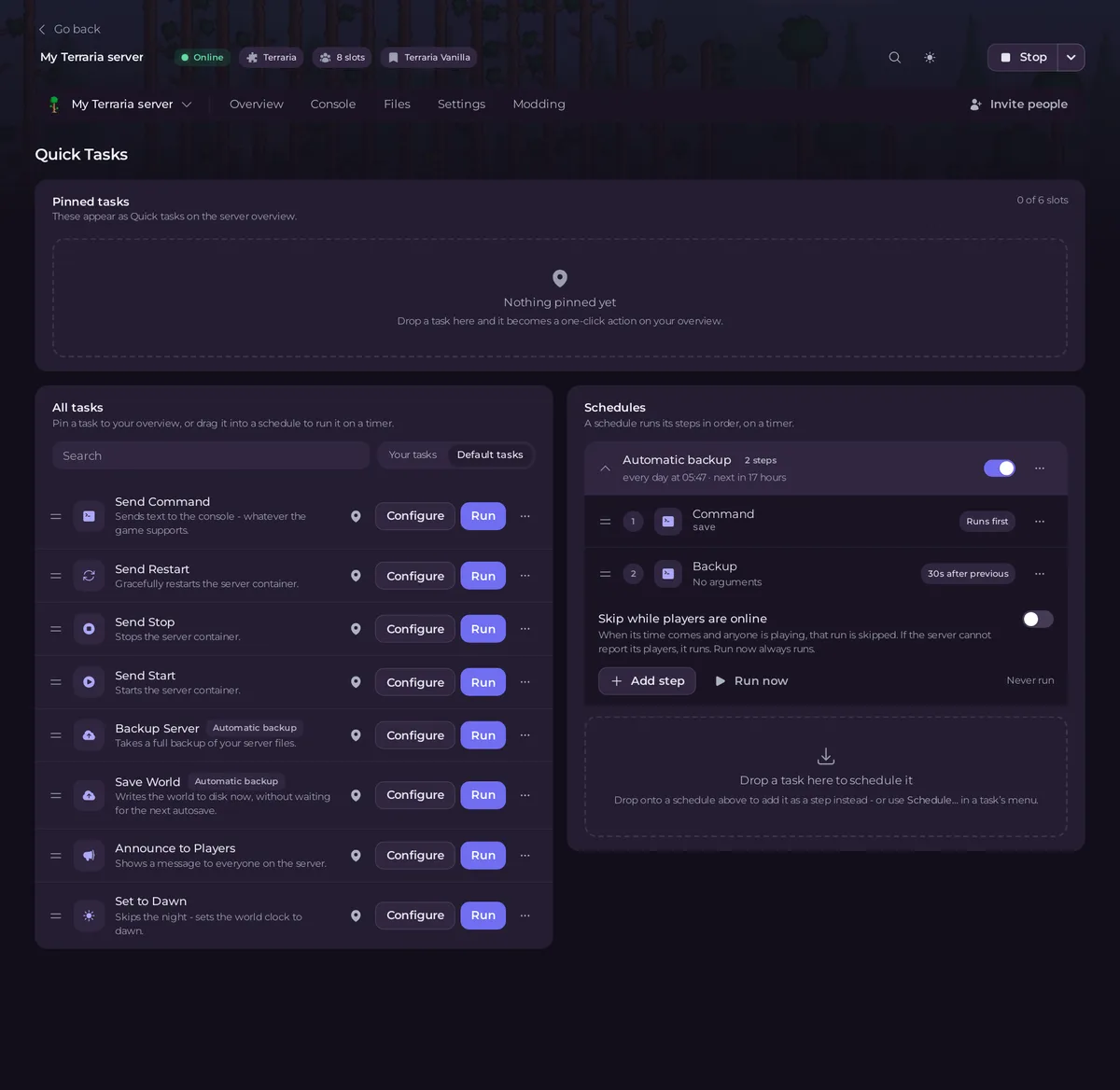
To change the backup's time, open Backups, Scheduled backups, and choose Edit in its menu. If it is missing, find it under Ready-made for Terraria and click Add.
Build a daily restart
- On Quick Tasks, under All tasks, open Default tasks and find Send Restart.
- Open its menu and choose Schedule….
- Give the schedule a Name, for example
Daily restart, then click Next step. - Choose Repeats, set How often to Every day, and set the time under At. The window shows the time where you are.
- Keep Enabled on and click Schedule.
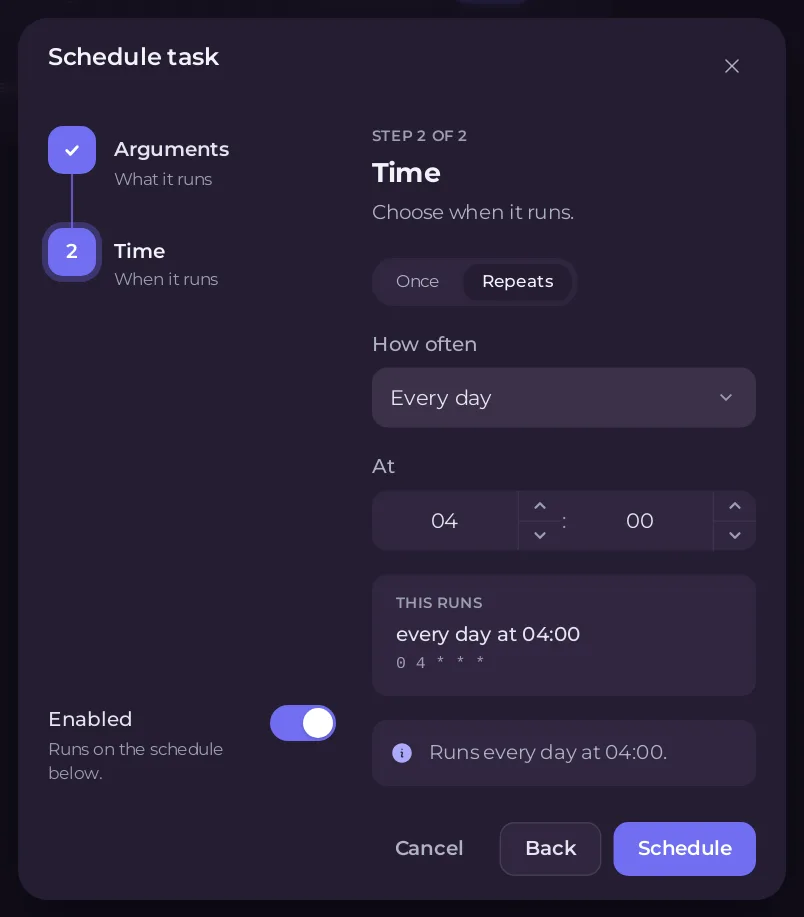
Send Restart stops the server cleanly, which saves the world, and starts it again. Players are disconnected for a short while.
Warn players first
Make a second schedule a few minutes earlier with Announce to Players and a message such as The server restarts in 5 minutes. Because the task needs a message, Run and Schedule… first let you set it. See How to send a message to every player on your Terraria server.
Wait until nobody is online
- Under Schedules, click your restart schedule to open it.
- Switch on Skip while players are online.
Under When players are online, choose:
- Skip that run: a run that comes while anyone is playing is skipped, and the next one comes at its usual time.
- Wait up to a time for the server to empty, from 15 minutes to 12 hours:
It looks again every 5 minutes, runs as soon as the game reports nobody on, and runs anyway when the wait is over.
The panel knows who is on from the server console, as on the Active players card. If it cannot tell, the run goes ahead. Run now always runs.
Switch off, test or delete
- Use the switch on a schedule's card to turn it off or on.
- Its ... menu has Run now, to test it, and Delete schedule.
- The time of an existing schedule cannot be changed on Quick Tasks. For another time, build a new schedule and switch the old one off.
Other ready tasks for Terraria
Save World (save), Announce to Players (say) and Set to Dawn are in Default tasks too. Pin one to Overview by dragging it to Pinned tasks.
More on the page: How to schedule tasks and automatic backups.





