%7B.s%7Banimation%3Ab%201.5s%20ease-out%20both%7D.d%7Banimation-delay%3A.16s%7D%7D%40keyframes%20b%7B0%25%7Bfill%3A%23F4F6FA%7D18%25%7Bfill%3A%23FFE08A%7D34%25%2C70%25%7Bfill%3A%23FF8A1F%7D80%25%7Bfill%3A%23FFE08A%7D100%25%7Bfill%3A%23FF8A1F%7D%7D%3C%2Fstyle%3E%3Cg%20transform%3D%22translate(143%20428.93)%20scale(3.885906)%22%3E%3Cg%20transform%3D%22translate(0%202)%22%20fill%3D%22%23706EF0%22%3E%3Cpath%20d%3D%22M0%200%20H48%20A40%2040%200%200%201%2048%2080%20V100%20H0%20Z%22%2F%3E%3Cpath%20transform%3D%22translate(91.75%200)%22%20d%3D%22M0%200%20L48%200%20L48%2050%20L76%2050%20L76%20100%20L0%20100%20Z%22%2F%3E%3Cpath%20transform%3D%22translate(173%200)%22%20d%3D%22M0%20100%20L58%20-4%20L116%20100%20Z%22%2F%3E%3Cpath%20transform%3D%22translate(264.25%200)%22%20d%3D%22M0%200%20L104%200%20L76%2050%20L76%20100%20L28%20100%20L28%2050%20Z%22%2F%3E%3Cg%20transform%3D%22translate(375%200)%22%3E%3Cpath%20d%3D%22M0%200%20L50%2038%20L50%200%20L100%200%20L100%20100%20L0%20100%20Z%22%20fill%3D%22%23F4F6FA%22%2F%3E%3Crect%20class%3D%22s%22%20x%3D%2247%22%20y%3D%2263%22%20width%3D%2219%22%20height%3D%2230%22%2F%3E%3Crect%20class%3D%22s%20d%22%20x%3D%2274%22%20y%3D%2263%22%20width%3D%2219%22%20height%3D%2230%22%2F%3E%3C%2Fg%3E%3Cpath%20transform%3D%22translate(484.75%200)%22%20d%3D%22M0%200%20L48%200%20L48%2037%20L52%2037%20L52%200%20L100%200%20L100%20100%20L52%20100%20L52%2063%20L48%2063%20L48%20100%20L0%20100%20Z%22%2F%3E%3Cpath%20transform%3D%22translate(588.5%200)%22%20d%3D%22M0%2050%20A53%2053%200%201%200%20106%2050%20A53%2053%200%201%200%200%2050%20Z%22%2F%3E%3Cpath%20transform%3D%22translate(698.25%200)%22%20d%3D%22M25%200%20H102%20V50%20H77%20A25%2025%200%200%201%2077%20100%20H0%20V50%20H25%20A25%2025%200%200%201%2025%200%20Z%22%2F%3E%3Cpath%20transform%3D%22translate(804%200)%22%20d%3D%22M0%200%20L90%200%20L90%2050%20L69%2050%20L69%20100%20L21%20100%20L21%2050%20L0%2050%20Z%22%2F%3E%3C%2Fg%3E%3C%2Fg%3E%3C%2Fsvg%3E)


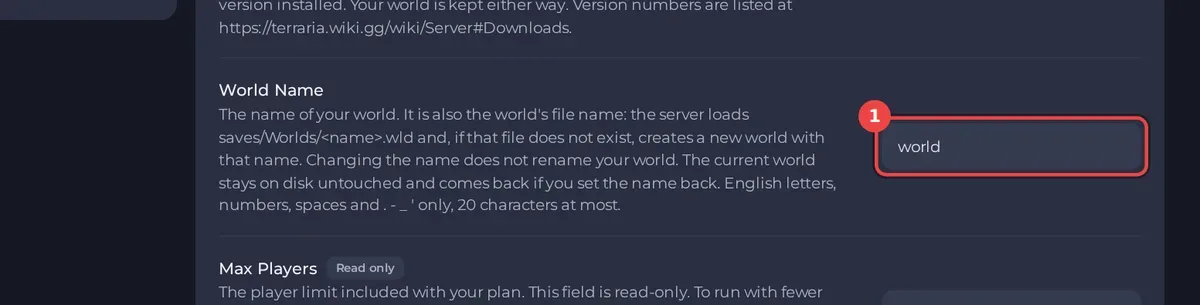
The safest way to start fresh is a new World Name. Open Settings, Game Settings, set the size, difficulty and seed you want, type a name that has no world yet in World Name, and restart. The server generates a new world, and your old one stays on disk, ready to come back.
Keep the old world (recommended)
- Open your server in the panel, click the Settings tab, then Game Settings.
- Set World Size, Difficulty, World Seed (Terraria Vanilla) or World Evil (TShock) for the new world.
- Change World Name to a new name, for example
world2.
- Restart the server. The Console shows the new world being generated, then the ready line.
To go back to the old world, set World Name back to its old name and restart: How to switch between worlds on your Terraria server.
Delete the old world for good
Deleting a world removes it and everything built in it. Take a backup first: How to back up and restore your Terraria world.
- Stop the server.
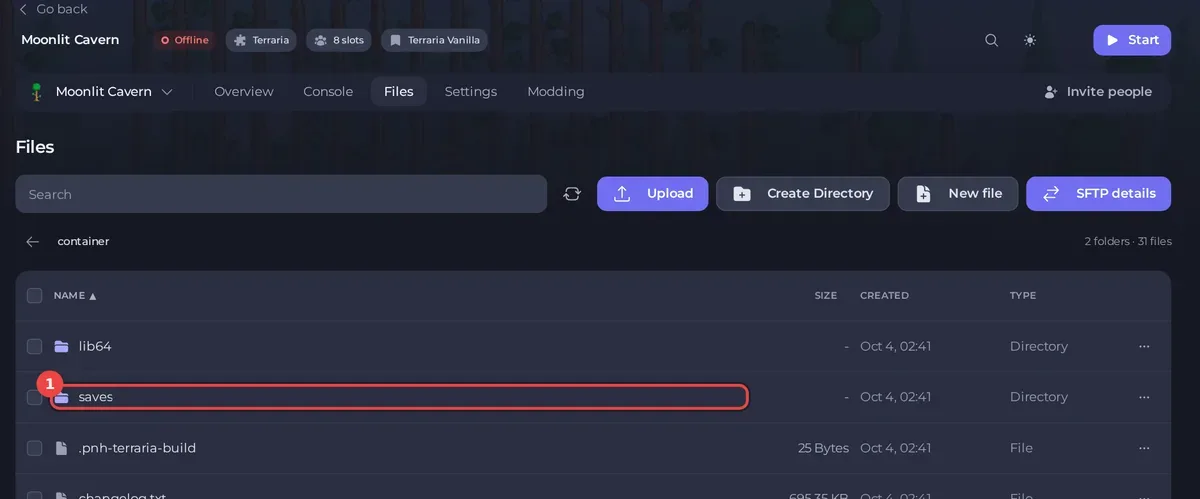
- Open the Files tab and go to
saves, thenWorlds. - Delete the
.wldfile named after your World Name, for exampleworld.wld. Also delete the.wld.bakcopies beside it, and on tModLoader the.twldfile of the same name. - Set the options for the new world in Game Settings, keeping the same World Name.
- Start the server. With no file for that name, it generates a new world.
Good to know
- Changing World Size, Difficulty or World Seed alone does nothing to a world that exists. The server needs a world name with no file.
- On Terraria Vanilla, the Special seed switches make special worlds such as Skyblock: How to make a Skyblock or special seed world on your Terraria server.
- On TShock, its own world copies in
tshock/backupsare not deleted with the world. Delete them in Files if you no longer need them. - To keep two whole setups, for example a vanilla world and a modded one, see How to use instances to switch between worlds.





