

Encryption token missing is the network error Satisfactory shows when a player tries to reach a dedicated server through Join Game on the main menu. The fix is to join through Server Manager instead: add the server there with its IP and port, then join from the Server Manager. The official wiki gives the same answer: "They should not use the 'Join Game' option."
Fix it
- In the panel, open your server's Overview page and copy the IP and the Port from the Play with friends card.
- In Satisfactory, go back to the main menu and open Server Manager.
- Choose Add Server. Put the IP in the top field and the port in the field below.
- Confirm. The server appears in the Server Manager list.
- Select it and click Join Game inside the Server Manager.
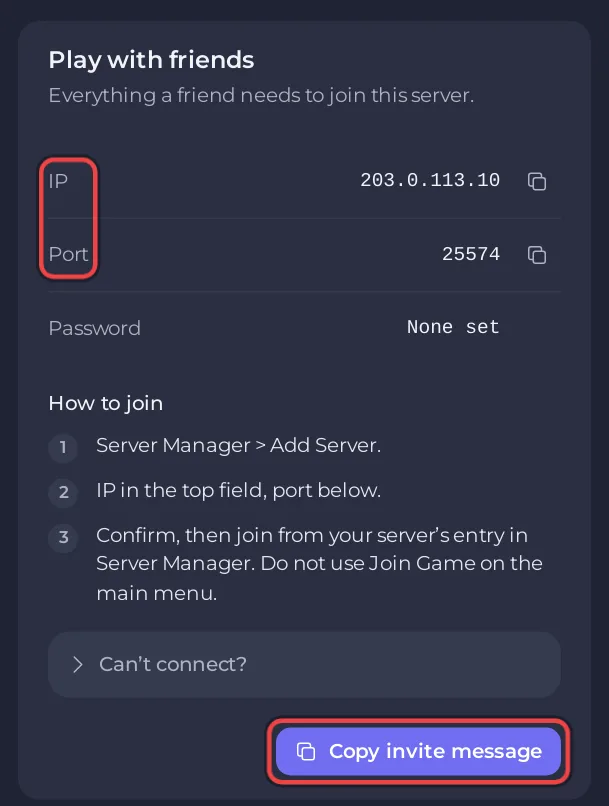
A player only has to add the server once. Next time it is already in their Server Manager list.
Make sure every friend uses the right route
A dedicated server is reached through the Server Manager, and the game then finds the server's second port by itself. The Play with friends card's steps and Copy invite message already point players there, so send the invite message rather than only the address: How to invite friends to your Satisfactory server.
Still cannot join?
- Wait for
[PlayNHost] Ready.in the Console after a start. - Check the game version and mods: Players cannot join your modded Satisfactory server.
- More causes: Satisfactory server problems and fixes.


