

The Console tab of a PlayNHost Satisfactory server shows the game's log and the panel's own lines, and a line you type there is sent to the game as a server console command, with the game's answer printed below. It is the same console as the console tab of the game's Server Manager.
Send a command
- Open your server in the panel and click the Console tab. The server must be running and show
[PlayNHost] Ready. - Type a command in the box at the bottom and press Enter.
- Read the answer under your line. If the game prints nothing, you see
[PlayNHost] No answer to "<your command>".
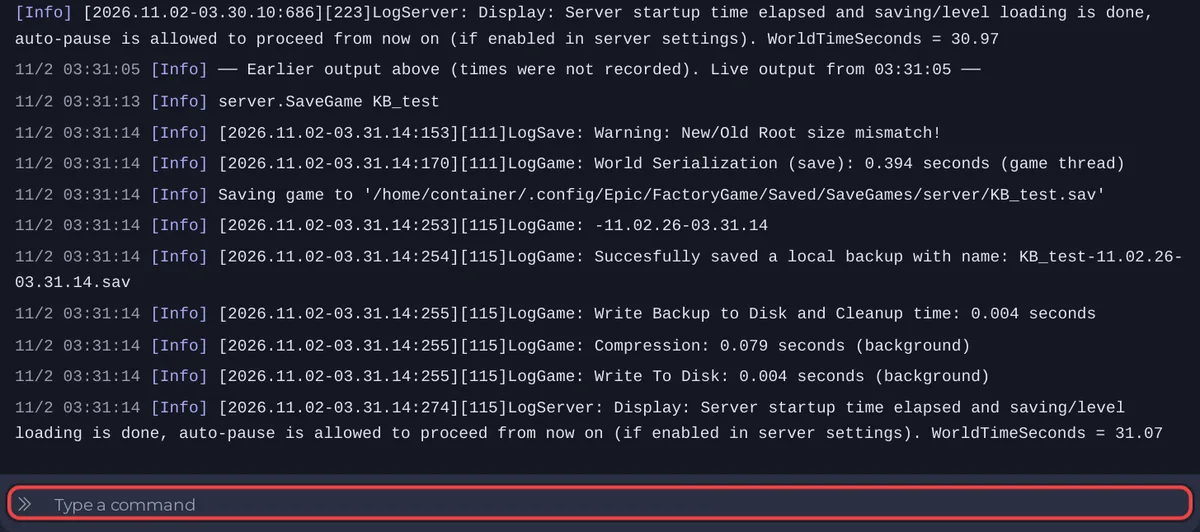
Commands go to the game through its own server API, signed in by the panel. If the panel could not sign in at the start, typed lines are refused with Console commands need the panel to be signed in to the server (see the messages above). See How to become admin on your Satisfactory server.
Commands that work
The official wiki lists these server console commands, and says the list is incomplete:
| Command | What it does |
|---|---|
server.SaveGame MyFactory_backup | Saves the current session under the name you give |
quit, stop or exit | Shuts down the game server |
Use the panel's Stop button instead of quit, stop or exit: Stop saves the game first and the panel knows the server stopped on purpose. For saving, Save now on the Worlds page does the same as server.SaveGame with a name made for you.
Lines to look for
| Line starts with | Comes from | Examples |
|---|---|---|
[PlayNHost] | The panel's launcher | Server claimed for you as ..., No world yet: starting a new game ..., Ready. The panel will save the game before every stop and restart., Saving "..." before stopping... |
[pnh-ficsit] | The mod installer, before the game starts | Resolving mods: ..., The Mods folder now holds: ..., WARNING ficsit.app has no mod called: ... |
[playnhost] | The settings writer | setting(s) from the panel written to the game's config files |
Everything else is Satisfactory's own log. The game also writes its log files to FactoryGame/Saved/Logs in Files.


