

A PlayNHost Satisfactory server autosaves every 5 minutes, keeps the 3 newest autosaves, saves when a player leaves, and saves before every Stop and Restart from the panel. Change the first three in Settings, Game Settings, then restart.
Change the autosave settings
- Open your server in the panel and click the Settings tab.
- Open Game Settings.
- Set the values below. Click outside a field to save it.
- Restart the server.
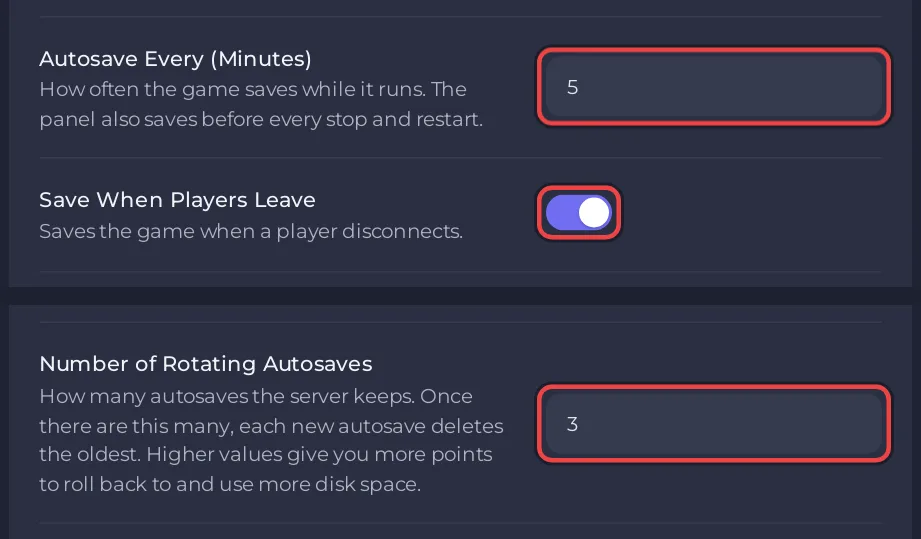
| Setting | What it does | Allowed | Default |
|---|---|---|---|
| Autosave Every (Minutes) | How often the game saves while it runs | 1 to 60 | 5 |
| Number of Rotating Autosaves | How many autosaves are kept. Each new one replaces the oldest once there are this many | 1 to 50 | 3 |
| Save When Players Leave | Saves the game when a player disconnects | on or off | on |
The Console confirms the first and third at the next start: [PlayNHost] Auto-pause, autosave and save-on-leave applied. Number of Rotating Autosaves is written into the game's config file at every start.
The save before every stop
When you click Stop or Restart, or a schedule restarts the server, the panel first asks the game to save the running session, then stops it. The Console shows:
[PlayNHost] Saving "<your session>" before stopping...
followed by [PlayNHost] Saved. The save is named after the session with _stop at the end, and it is listed on the Worlds page like any other save. So you do not lose the minutes since the last autosave when you stop the server from the panel.
Use Kill only when Stop does not work: it ends the game at once, without that save.
Save right now
On the Worlds page, click Save now on the Running now card. The save is named after the session and the time, for example MyFactory_2026-11-01_18-30 (UTC). See How to use the Worlds page of your Satisfactory server.
Which values to pick
- A shorter interval loses less progress after a crash. A longer one writes the world less often.
- If players notice a short freeze that comes back on the same rhythm as the autosave interval, try a longer interval, for example 10 minutes. See Why is my Satisfactory server lagging?
- More rotating autosaves give you more points to go back to, and take more space on the server and in your backups.
Changed it in the game?
The game's Server Manager also has the autosave interval and saving when a player leaves. The panel only sends them again when you change one of them, or Pause When Empty, in the panel, so the newest change wins. Number of Rotating Autosaves is not in the Server Manager: the panel writes it at every start.
To go back to an older autosave, load it on the Worlds page. To keep copies off the server, use How to back up and restore your Satisfactory world.


