%7B.s%7Banimation%3Ab%201.5s%20ease-out%20both%7D.d%7Banimation-delay%3A.16s%7D%7D%40keyframes%20b%7B0%25%7Bfill%3A%23F4F6FA%7D18%25%7Bfill%3A%23FFE08A%7D34%25%2C70%25%7Bfill%3A%23FF8A1F%7D80%25%7Bfill%3A%23FFE08A%7D100%25%7Bfill%3A%23FF8A1F%7D%7D%3C%2Fstyle%3E%3Cg%20transform%3D%22translate(143%20428.93)%20scale(3.885906)%22%3E%3Cg%20transform%3D%22translate(0%202)%22%20fill%3D%22%23706EF0%22%3E%3Cpath%20d%3D%22M0%200%20H48%20A40%2040%200%200%201%2048%2080%20V100%20H0%20Z%22%2F%3E%3Cpath%20transform%3D%22translate(91.75%200)%22%20d%3D%22M0%200%20L48%200%20L48%2050%20L76%2050%20L76%20100%20L0%20100%20Z%22%2F%3E%3Cpath%20transform%3D%22translate(173%200)%22%20d%3D%22M0%20100%20L58%20-4%20L116%20100%20Z%22%2F%3E%3Cpath%20transform%3D%22translate(264.25%200)%22%20d%3D%22M0%200%20L104%200%20L76%2050%20L76%20100%20L28%20100%20L28%2050%20Z%22%2F%3E%3Cg%20transform%3D%22translate(375%200)%22%3E%3Cpath%20d%3D%22M0%200%20L50%2038%20L50%200%20L100%200%20L100%20100%20L0%20100%20Z%22%20fill%3D%22%23F4F6FA%22%2F%3E%3Crect%20class%3D%22s%22%20x%3D%2247%22%20y%3D%2263%22%20width%3D%2219%22%20height%3D%2230%22%2F%3E%3Crect%20class%3D%22s%20d%22%20x%3D%2274%22%20y%3D%2263%22%20width%3D%2219%22%20height%3D%2230%22%2F%3E%3C%2Fg%3E%3Cpath%20transform%3D%22translate(484.75%200)%22%20d%3D%22M0%200%20L48%200%20L48%2037%20L52%2037%20L52%200%20L100%200%20L100%20100%20L52%20100%20L52%2063%20L48%2063%20L48%20100%20L0%20100%20Z%22%2F%3E%3Cpath%20transform%3D%22translate(588.5%200)%22%20d%3D%22M0%2050%20A53%2053%200%201%200%20106%2050%20A53%2053%200%201%200%200%2050%20Z%22%2F%3E%3Cpath%20transform%3D%22translate(698.25%200)%22%20d%3D%22M25%200%20H102%20V50%20H77%20A25%2025%200%200%201%2077%20100%20H0%20V50%20H25%20A25%2025%200%200%201%2025%200%20Z%22%2F%3E%3Cpath%20transform%3D%22translate(804%200)%22%20d%3D%22M0%200%20L90%200%20L90%2050%20L69%2050%20L69%20100%20L21%20100%20L21%2050%20L0%2050%20Z%22%2F%3E%3C%2Fg%3E%3C%2Fg%3E%3C%2Fsvg%3E)


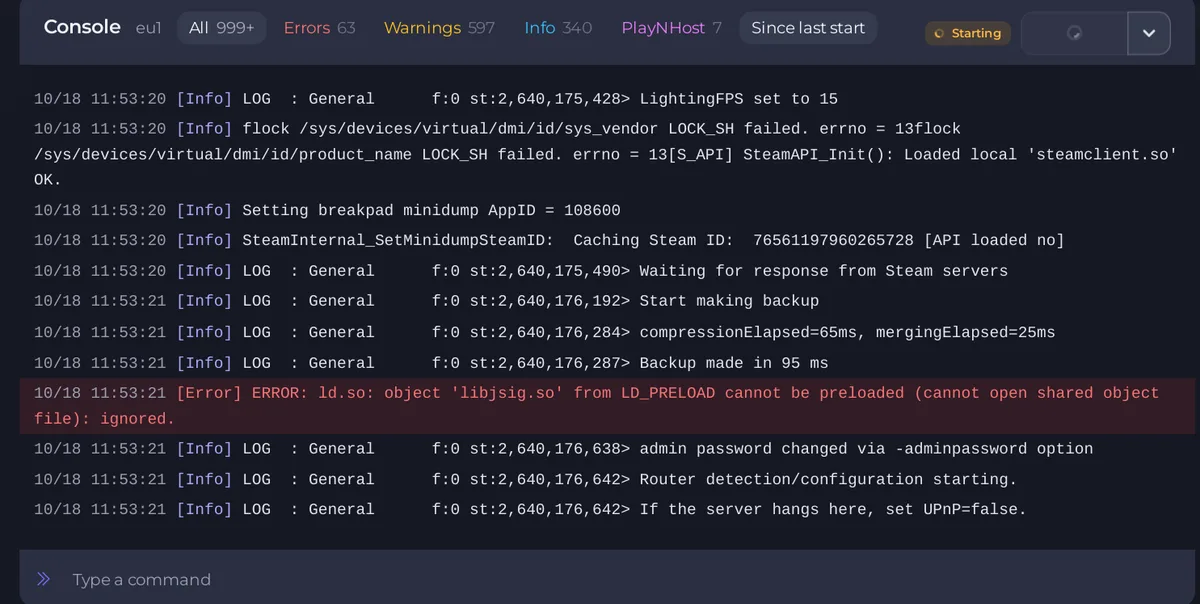
A Project Zomboid server can take a few minutes to start, and longer when it downloads mods or installs a game update. It is ready when the Console prints *** SERVER STARTED ****. If the badge still says Starting after that long, read the last line of the Console to see what it is doing.
What the last line tells you
| Last line | What it means | What to do |
|---|---|---|
Checking for game server updates..., then Steam lines | It is installing a new build | Wait. A start after an update takes a few minutes longer |
pnh-workshop-check: verifying item <number>... | It is downloading a mod | Wait. A big list takes longer. The server downloads mods at every start |
Loading ... or Initialising Server Systems... with other lines after it | The game is loading its data | Wait. It is normal for about a minute or more |
Waiting for response from Steam servers | The game is contacting Steam | Wait a minute, then see below |
If the server hangs here, set UPnP=false. | The game is looking for a router | It gives up after a few seconds. See below if it does not |
First start
The first start of a new server or a new Server Name builds a world and takes longer: What happens the first time you start your Project Zomboid server.
If it does not move for several minutes
- Do not press Kill yet. Wait at least five minutes on a modded server.
- Click Stop and wait for Offline. Then Start again.
- If it hangs again at the line
If the server hangs here, set UPnP=false., the game itself suggests the fix. Stop the server, open.cache/Server/<Server Name>.iniunder Files, find the line that starts withUPnP=, change its value tofalse, click Save content and start again. We have not needed this on PlayNHost, so use it only if the server really stops at that line. - If a mod was added last, remove it: How to remove a mod from your Project Zomboid server.
Get help
Open a ticket with the last 100 lines of the Console. Use Share log: How to use the Console on your Project Zomboid server. Other causes: Your Project Zomboid server will not start.





