%7B.s%7Banimation%3Ab%201.5s%20ease-out%20both%7D.d%7Banimation-delay%3A.16s%7D%7D%40keyframes%20b%7B0%25%7Bfill%3A%23F4F6FA%7D18%25%7Bfill%3A%23FFE08A%7D34%25%2C70%25%7Bfill%3A%23FF8A1F%7D80%25%7Bfill%3A%23FFE08A%7D100%25%7Bfill%3A%23FF8A1F%7D%7D%3C%2Fstyle%3E%3Cg%20transform%3D%22translate(143%20428.93)%20scale(3.885906)%22%3E%3Cg%20transform%3D%22translate(0%202)%22%20fill%3D%22%23706EF0%22%3E%3Cpath%20d%3D%22M0%200%20H48%20A40%2040%200%200%201%2048%2080%20V100%20H0%20Z%22%2F%3E%3Cpath%20transform%3D%22translate(91.75%200)%22%20d%3D%22M0%200%20L48%200%20L48%2050%20L76%2050%20L76%20100%20L0%20100%20Z%22%2F%3E%3Cpath%20transform%3D%22translate(173%200)%22%20d%3D%22M0%20100%20L58%20-4%20L116%20100%20Z%22%2F%3E%3Cpath%20transform%3D%22translate(264.25%200)%22%20d%3D%22M0%200%20L104%200%20L76%2050%20L76%20100%20L28%20100%20L28%2050%20Z%22%2F%3E%3Cg%20transform%3D%22translate(375%200)%22%3E%3Cpath%20d%3D%22M0%200%20L50%2038%20L50%200%20L100%200%20L100%20100%20L0%20100%20Z%22%20fill%3D%22%23F4F6FA%22%2F%3E%3Crect%20class%3D%22s%22%20x%3D%2247%22%20y%3D%2263%22%20width%3D%2219%22%20height%3D%2230%22%2F%3E%3Crect%20class%3D%22s%20d%22%20x%3D%2274%22%20y%3D%2263%22%20width%3D%2219%22%20height%3D%2230%22%2F%3E%3C%2Fg%3E%3Cpath%20transform%3D%22translate(484.75%200)%22%20d%3D%22M0%200%20L48%200%20L48%2037%20L52%2037%20L52%200%20L100%200%20L100%20100%20L52%20100%20L52%2063%20L48%2063%20L48%20100%20L0%20100%20Z%22%2F%3E%3Cpath%20transform%3D%22translate(588.5%200)%22%20d%3D%22M0%2050%20A53%2053%200%201%200%20106%2050%20A53%2053%200%201%200%200%2050%20Z%22%2F%3E%3Cpath%20transform%3D%22translate(698.25%200)%22%20d%3D%22M25%200%20H102%20V50%20H77%20A25%2025%200%200%201%2077%20100%20H0%20V50%20H25%20A25%2025%200%200%201%2025%200%20Z%22%2F%3E%3Cpath%20transform%3D%22translate(804%200)%22%20d%3D%22M0%200%20L90%200%20L90%2050%20L69%2050%20L69%20100%20L21%20100%20L21%2050%20L0%2050%20Z%22%2F%3E%3C%2Fg%3E%3C%2Fg%3E%3C%2Fsvg%3E)


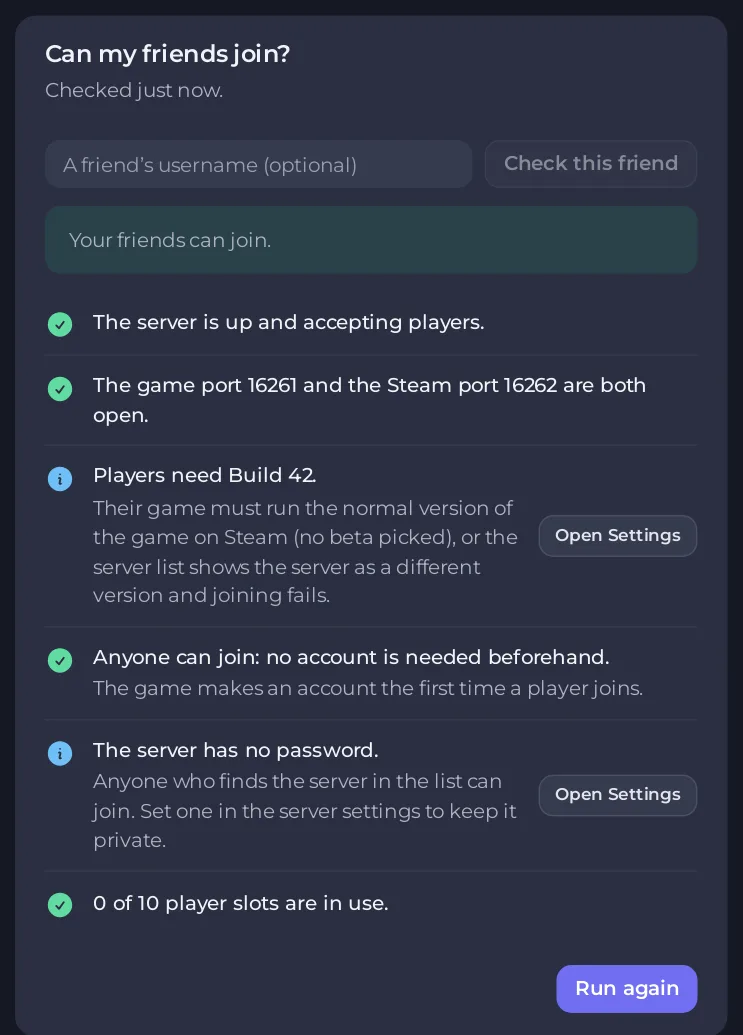
The card Can my friends join? on the Overview page checks your Project Zomboid server the way a friend's game would see it: is it running, are the ports right, which build players need, are the mods downloaded, is there a free slot. Type a friend's username to check their account and bans too. Each problem has a button to the page that fixes it.
Run the check
- Open your server in the panel and stay on Overview.
- Find the card Can my friends join?. It runs once when you open the page and shows a verdict: "Your friends can join.", "Your friends can probably join. Read the notes below." or "Your friends cannot join yet."
- To check one friend, type their name in A friend's username (optional) and click Check this friend. The card says "Checked for" and the name.
- Click Run again after you fixed something.
What each row means
| Row | What to do |
|---|---|
| "The server is not running." | Click Start server. |
| "The server is still starting." | Wait for SERVER STARTED in the Console. Project Zomboid takes a few minutes to load its world. |
| "The server cannot finish starting." | The reason follows. See How to find out why your Project Zomboid server stopped. |
| The game port and the Steam port | Both must be ports of your server and different. Open Network fixes a clash: Project Zomboid server ports and address explained. |
| "Players need Build 42." | Tells you which build and Steam branch friends must run. For Build 41 it names the "legacy41" beta: in Steam, Project Zomboid, Properties, Betas. |
| Workshop items | All downloaded, or how many are not on the server yet. A restart downloads them. |
| "Steam has newer versions of some mods." | Restart the server so players and server match: Players get "Workshop item version is different than the server". |
| "Only players with an account can join." | The server is closed to new accounts. Add friends on the Players page: How to run a whitelist-only Project Zomboid server. |
| "The server has a password." | Tell friends the password. The check never shows it. |
| "The server is full" | Nobody else can join until someone leaves: How to change player slots. |
The friend rows
- "<name> has an account on this server." If they typed it differently, the card says how it is spelled: "they must type it exactly like that."
- "<name> is banned on this server." Lift it on the Players page, Bans tab: How to unban a player on your Project Zomboid server.
- "<name> has no account, and only players with one can join." Add them on the Players page.
- "<name> has not joined yet; they can." The game makes their account the first time they join.
Good to know
- The check reads your server's files, so it needs the permission to read file contents. It is hidden while the setup wizard is open.
- It cannot see your friend's own computer. If every row passes and they still cannot join, go through Players cannot join your Project Zomboid server.
- The card's fix buttons are Start server, Open Players, Open console, Open Network, Open Settings and Open Workshop.





