

 MINECRAFT HOSTING
 GAME SERVERS
 Game Panel
Most of what you want to change on a Palworld server is on one page of the panel.
Open Game Settings
- Open your server in the panel and click the Settings tab.
- Click Game Settings.
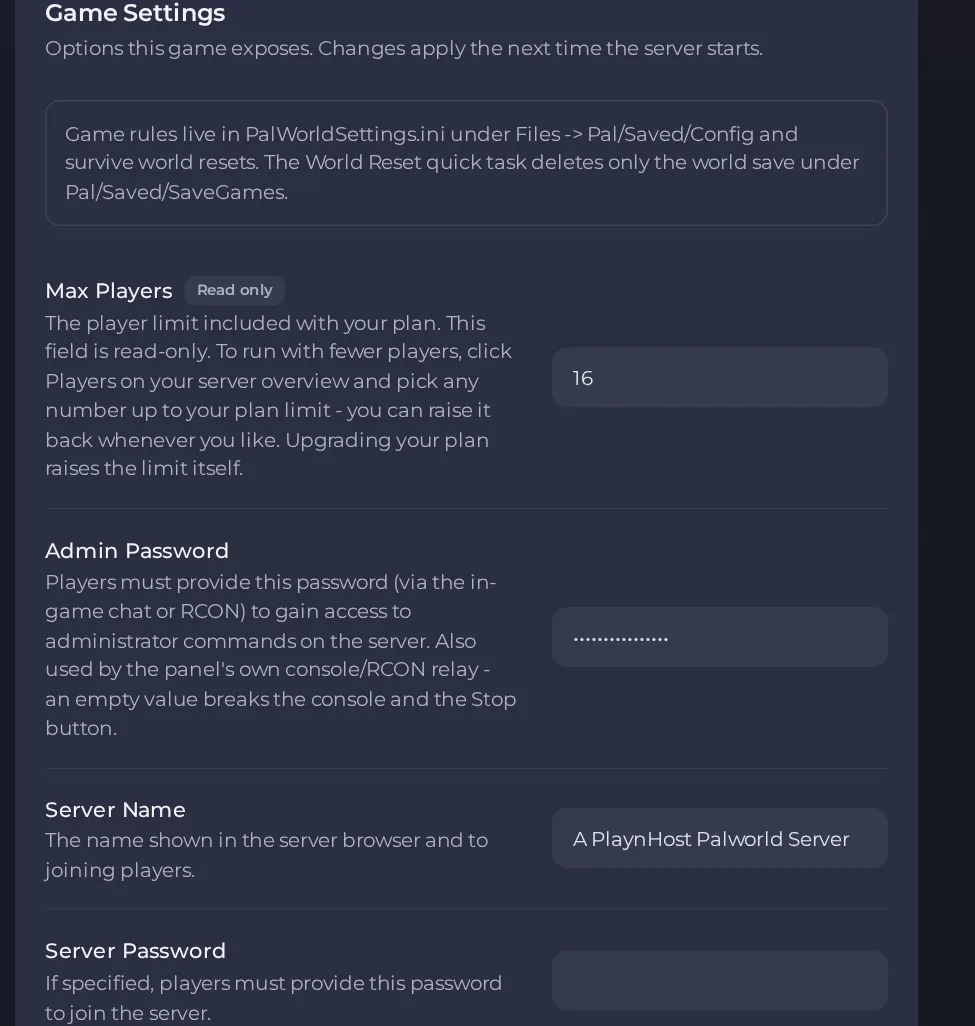
- Change a value and click outside the field, or press Enter. The panel saves it. Switches save as soon as you flip them.
- Restart the server so the change takes effect. See How to start, stop, restart and force-stop your server.
Options most owners change first
- Server Name. The name shown in the server browser, up to 64 characters; double quotes, backslashes and control characters are not allowed.
- Server Description. Free text shown with the server, up to 128 characters.
- Server Password. Optional. If set, players must enter it to join; letters, numbers, dash and underscore only, 1 to 30 characters. Leave empty for an open server.
- Admin Password. Unlocks administrator commands in game chat and is also used by the panel Console and Stop button, so it must never be empty. 1 to 30 characters, letters, numbers, dash and underscore only. The server starts with a placeholder password that is publicly known, so change it.
- Max Players. Read-only and set by your plan. To run with fewer players use Players on the server Overview page; upgrading the plan raises the ceiling.
- Crossplay Platforms. Comma-separated list from Steam, Xbox, PS5, Mac; the default is all four (Steam,Xbox,PS5,Mac).
- Auto Update. On by default; the game files are updated from Steam each time the server starts.
- Rates, death penalty and every other option. These have no field in the panel. Stop the server, open Pal/Saved/Config/LinuxServer/PalWorldSettings.ini in Files, change the values and start the server again. Build the file with the free Palworld settings generator.
The fields in Settings, then Game Settings take effect on the next start or restart. All other Palworld options, such as rates and the death penalty, live in Pal/Saved/Config/LinuxServer/PalWorldSettings.ini in Files. Stop the server, edit that file, and start it again. The panel sets the name, passwords, player limit, crossplay and remote console itself at every start, so change those in Game Settings, not in the file. The free Palworld settings generator writes the whole file for you.
Every option is listed in Palworld server settings: every option explained.





