

To roll a Palworld world back to an earlier moment, stop the server, open Worlds, pick a time in the Snapshot list beside the world and click Restore. Palworld takes these snapshots by itself while it runs. Before the restore, the panel packs the current world into a file, so a rollback can be undone.
Restore a snapshot
- Open your server in the panel and click Stop. Wait until the badge says Offline.
- Click Worlds in the left menu.
- Beside the world, open the Snapshot list. Snapshots are named by the date and time they were taken, newest first.
- Pick the one you want and click Restore.
- The window Restore this snapshot? says: "The world goes back to snapshot ... Everything since then is replaced, but the current world is packed into a file first, so this can be undone." Click Restore.
- The page says
Restored. The world as it was before is kept in .pnh/palworld/and the file nameunder Files. - Start the server.
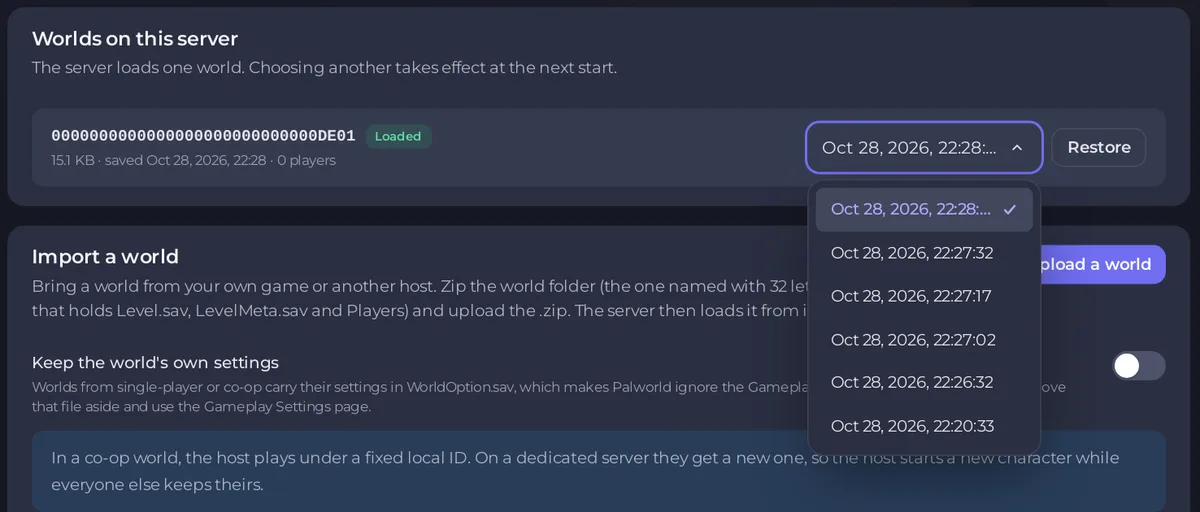
Where the snapshots come from
Palworld copies the world into a backup/world folder inside the world's folder as it runs, while World backups is on under Gameplay Settings, Server behaviour. It is on by default. Palworld's description: "Enable world backups. Enabling this increases disk load." If you switch it off, the Snapshot list stops getting new entries.
Pocketpair's settings page gives the backup interval as "5 save data per 30 sec", "6 save data per 10 min", "12 save data per 1 hour" and "7 save data per 1 day". The game keeps and replaces them itself; the list shows the ones on the server now. Every snapshot can be seen on the Worlds page.
Undo a rollback
The world from before the rollback is in Files, in the .pnh/palworld folder, as before-restore- followed by the time and .tar.gz. To go back to it, stop the server, unpack it in Files over the world's folder in Pal/Saved/SaveGames/0/, or ask support to help: How to upload, edit and manage your server files.
Snapshot or backup?
| Snapshot | Backup | |
|---|---|---|
| Made by | Palworld, while running | The panel: the nightly Automatic backup if your plan has backups, or when you start one |
| Stored | On the server's own disk, beside the world | In backup storage, outside the server |
| Covers | One world | The whole server: every world, settings, ban list |
| Restored on | Worlds | Backups |
Snapshots are quick for "go back an hour". For anything you cannot lose, keep backups: How to back up and restore your Palworld world.


