

To restart a Necesse server on a schedule on PlayNHost, open Quick Tasks, choose Schedule… in the menu of Send Restart, and set it to repeat every day at the time you want. A second schedule with Announce to Players, five minutes earlier, warns players in chat.
Schedule the restart
- Open your server in the panel and click Quick Tasks in the left menu.
- Under All tasks, open the menu of Send Restart ("Gracefully restarts the server container.") and choose Schedule….
- The Schedule task window opens on Arguments. Send Restart needs nothing filled in. Give the schedule a name, for example
Daily restart, and click Next step. - On Time, choose Repeats, then Every day, and pick the time under At, for example 06:00. The window shows when that is where you are.
- Leave Enabled on and click Schedule. The new schedule appears under Schedules.
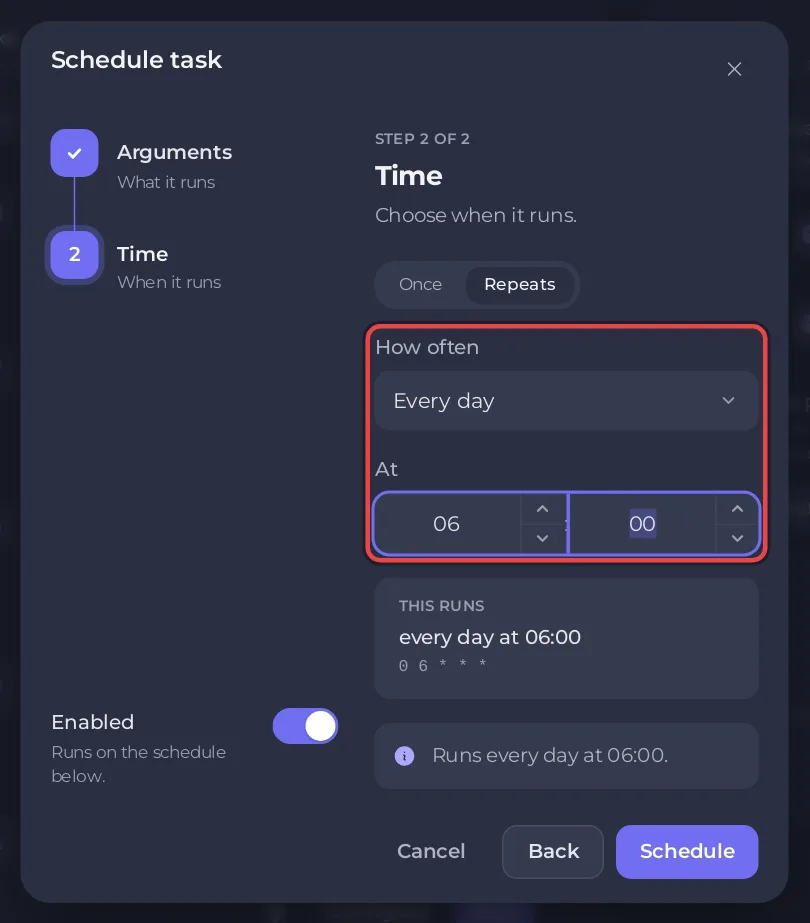
A restart saves the world first, because the panel stops Necesse with its stop command. If Steam Auto Update is on, each restart also installs a waiting Necesse update: How to update your Necesse server.
Warn players before the restart
- Under All tasks, open the menu of Announce to Players and choose Schedule….
- Type the Message, for example
Restarting in 5 minutes, and a name such asRestart warning. Click Next step. - Choose Repeats, Every day, and a time five minutes before the restart, for example 05:55.
- Click Schedule.
At 05:55 Necesse posts the message in chat with say, and at 06:00 the server restarts.
What can I change later?
Each schedule card has a switch to turn it off, and a menu with Edit schedule…, Run now and Delete schedule. The time of an existing schedule cannot be changed: for another time, make a new schedule and delete or switch off the old one, for both the restart and its warning.
Skip while players are online skips a run when someone is playing, but only if the server reports its players; when it cannot, the panel says the run goes ahead. With it on, When players are online lets you choose Skip that run or Wait up to a set time for the server to empty, so the restart still happens once the last player leaves.
The whole page: How to use Quick Tasks on your Necesse server. The general guide: How to schedule tasks and automatic backups.


