

To list a PlayNHost Factorio server in Factorio's Browse public games, add your factorio.com account name as Server Username and your factorio.com token as Server Token, keep Public on under Where the server is listed, and restart. Without them the server still runs and players join by address.
List the server
- Sign in at factorio.com/profile and copy your username and the token shown there. The token is not your password.
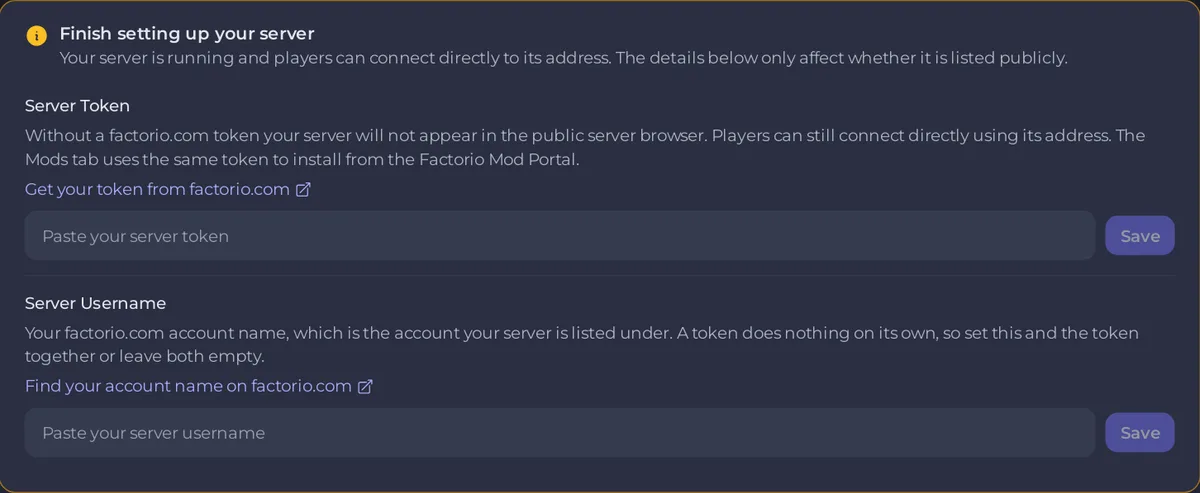
- Open your server in the panel. On Overview, the card Finish setting up your server has a row for each. Paste each value into its row and click Save.
- Or enter them in Settings, Game Settings, in Server Username and Server Token.
- On the Settings page, click server-settings.json under Config files and check that Public is on under Where the server is listed. It is on by default.
- Restart the server.
- Open the Console. The line
Matching server connection failedwithMissing tokenno longer appears afterHosting game at.
Players find the server in Factorio under Multiplayer, Browse public games, by its Server Name. They must be signed in to factorio.com to browse the list (Factorio wiki, Multiplayer).
What do the username and token also do?
The same pair lets the Modding tab download mods from the Factorio Mod Portal, which only allows downloads from a signed-in account. See How to add mods to your Factorio server. Set both together: a token without a username does nothing.
Treat the token as a secret: Factorio's wiki calls it sensitive information that you should keep to yourself.
How do I keep the server out of the list?
On Settings, server-settings.json, switch Public off under Where the server is listed and click Save & restart. Players then join only with Connect to address. A Server password keeps strangers out either way: How to change the server name and password of your Factorio server.
What shows in the list?
The Server Name, the Server Description and the Server tags from the server-settings.json card.
If the listing still fails, see Your Factorio server shows Matching server connection failed: Missing token.


