

To change the name or join password of a Factorio server on PlayNHost, open Settings, Game Settings, edit Server Name, Server Description or Server password, and restart the server. Leave Server password empty for an open server that anyone with the address can join.
Change them
- Open your server in the panel and click the Settings tab.
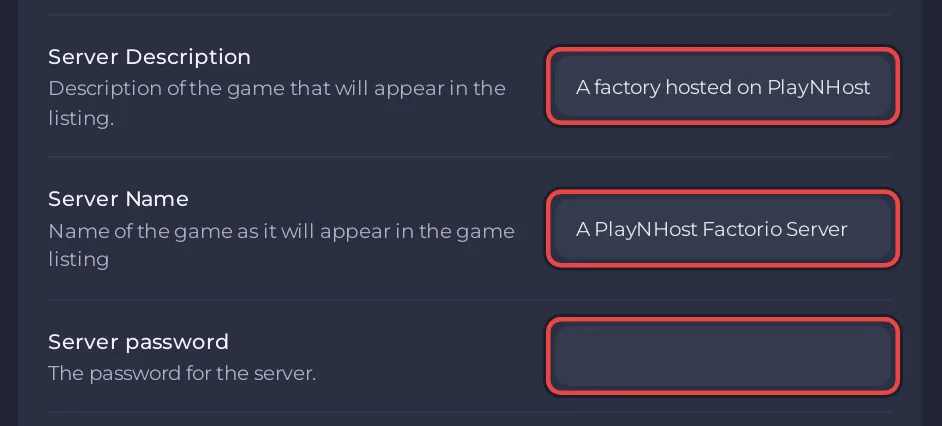
In Game Settings, edit the field you want and click outside it:
- Server Name: up to 100 characters. The default is
A PlayNHost Factorio Server. - Server Description: up to 200 characters. The default is
A factory hosted on PlayNHost. - Server password: up to 40 characters. Empty by default.
- Server Name: up to 100 characters. The default is
- Click Restart now on the
Saved. The server must restart before these take effect.notice.
Players who are on when you restart are disconnected and join again with the new password.
Where do players see the name?
In the public list under Browse public games, once the server is listed: How to list your Factorio server in the public server browser. Players who join with Connect to address never need the name.
Why set them in the panel and not in the game?
The panel writes the name, description and password from Game Settings into Factorio's data/server-settings.json every time the server starts, and the server reads that file as it starts. Factorio's in-game /config set command (an admin command on the Factorio wiki) changes the running game, while the panel writes the Game Settings values into the file again at every start. Set them in the panel so they last.
Should I set a password?
Yes, unless you want strangers to join. A new server has none, so anyone who has or guesses the address can join. With a password set, only people you give it to get in. To control exactly who joins, also see How to kick, ban and whitelist players on your Factorio server.


