%7B.s%7Banimation%3Ab%201.5s%20ease-out%20both%7D.d%7Banimation-delay%3A.16s%7D%7D%40keyframes%20b%7B0%25%7Bfill%3A%23F4F6FA%7D18%25%7Bfill%3A%23FFE08A%7D34%25%2C70%25%7Bfill%3A%23FF8A1F%7D80%25%7Bfill%3A%23FFE08A%7D100%25%7Bfill%3A%23FF8A1F%7D%7D%3C%2Fstyle%3E%3Cg%20transform%3D%22translate(143%20428.93)%20scale(3.885906)%22%3E%3Cg%20transform%3D%22translate(0%202)%22%20fill%3D%22%23706EF0%22%3E%3Cpath%20d%3D%22M0%200%20H48%20A40%2040%200%200%201%2048%2080%20V100%20H0%20Z%22%2F%3E%3Cpath%20transform%3D%22translate(91.75%200)%22%20d%3D%22M0%200%20L48%200%20L48%2050%20L76%2050%20L76%20100%20L0%20100%20Z%22%2F%3E%3Cpath%20transform%3D%22translate(173%200)%22%20d%3D%22M0%20100%20L58%20-4%20L116%20100%20Z%22%2F%3E%3Cpath%20transform%3D%22translate(264.25%200)%22%20d%3D%22M0%200%20L104%200%20L76%2050%20L76%20100%20L28%20100%20L28%2050%20Z%22%2F%3E%3Cg%20transform%3D%22translate(375%200)%22%3E%3Cpath%20d%3D%22M0%200%20L50%2038%20L50%200%20L100%200%20L100%20100%20L0%20100%20Z%22%20fill%3D%22%23F4F6FA%22%2F%3E%3Crect%20class%3D%22s%22%20x%3D%2247%22%20y%3D%2263%22%20width%3D%2219%22%20height%3D%2230%22%2F%3E%3Crect%20class%3D%22s%20d%22%20x%3D%2274%22%20y%3D%2263%22%20width%3D%2219%22%20height%3D%2230%22%2F%3E%3C%2Fg%3E%3Cpath%20transform%3D%22translate(484.75%200)%22%20d%3D%22M0%200%20L48%200%20L48%2037%20L52%2037%20L52%200%20L100%200%20L100%20100%20L52%20100%20L52%2063%20L48%2063%20L48%20100%20L0%20100%20Z%22%2F%3E%3Cpath%20transform%3D%22translate(588.5%200)%22%20d%3D%22M0%2050%20A53%2053%200%201%200%20106%2050%20A53%2053%200%201%200%200%2050%20Z%22%2F%3E%3Cpath%20transform%3D%22translate(698.25%200)%22%20d%3D%22M25%200%20H102%20V50%20H77%20A25%2025%200%200%201%2077%20100%20H0%20V50%20H25%20A25%2025%200%200%201%2025%200%20Z%22%2F%3E%3Cpath%20transform%3D%22translate(804%200)%22%20d%3D%22M0%200%20L90%200%20L90%2050%20L69%2050%20L69%20100%20L21%20100%20L21%2050%20L0%2050%20Z%22%2F%3E%3C%2Fg%3E%3C%2Fg%3E%3C%2Fsvg%3E)


To silence one player now, type status in the Console, then muteid with their id and the seconds, for example muteid 3 600. For spam bots, switch on Block chat and votes from known proxy addresses on the Maps page. DDNet's own spam protection is on already.
Mute one player
- Open your server in the panel and click the Console tab.
- Type
statusand note the player's id, a number such as3. - Type
muteid 3 600to mute player 3 in chat for 600 seconds (10 minutes). You can add a reason at the end.
To see the mutes, type mutes. To lift one early, type unmuteid 3.
Admins can do the same in the game after logging in with F2. Moderators cannot mute on a new server: DDNet gives them kick and ban commands, not mute. To let them mute too, add these lines to myServerconfig.cfg and restart:
access_level muteid moderator
access_level unmuteid moderator
access_level mutes moderator
See How to add moderators and helpers to your DDNet server.
Block spam bots
Most spam comes from bots on proxy addresses. The Make it a public server card on the Maps page has the option Block chat and votes from known proxy addresses. Each joining player's address is checked against the DroneBL list. Listed players can still play but cannot chat or vote.
- Click Maps in the left menu and find the Make it a public server card.
- Tick Block chat and votes from known proxy addresses.
- Click Make it a public server (or Update if the preset is on already), then restart the server.
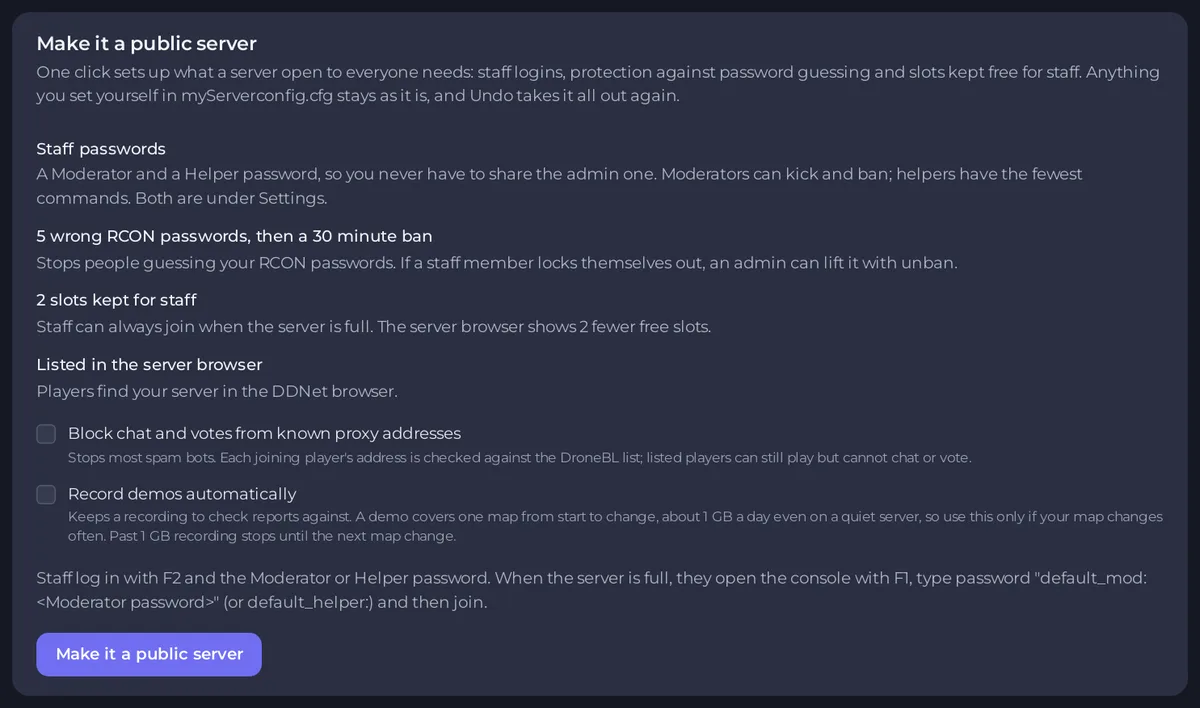
See How to make your DDNet server public and add moderators.
Tune DDNet's spam protection
DDNet mutes a player who writes too fast, by itself. You can change how strict it is with lines in myServerconfig.cfg under Files, then a restart:
| Line | What it does | DDNet's default |
|---|---|---|
sv_chat_delay 1 | Seconds a player must wait between two chat messages. | 1 |
sv_spam_mute_duration 60 | Seconds a spammer is muted for. 0 turns the automatic mute off. | 60 |
sv_chat_initial_delay 0 | Seconds a new player must wait before their first message. Helps against join-and-spam bots. | 0 |
sv_spamprotection 1 | Spam protection for chat, team changes, skins, emotes and votes. Keep it at 1. | 1 |
How to edit the file: How to add your own settings to your DDNet server.
Good to know
- If a muted player keeps causing trouble, kick or ban them: How to kick or ban a player on your DDNet server.
- To stop a player calling votes, type
vote_muteidwith their id and the seconds.





