

To run a command on a Day of Defeat: Source server on PlayNHost, click the Console tab, type it in the Type a command box and press Enter. The panel's Console needs no RCON password. RCON is only for your own tools: set an RCON password under Game Settings, restart, and connect the tool to your Server Address.
Run a command in the Console
- Open your server in the panel and click the Console tab. The badge must say Online.
- Click in the Type a command box at the bottom.
- Type a command, for example
status, and press Enter. - The answer appears in the Console output.
The Console types straight into the server, with full rights. Anyone on your team with Console access can use it: How to invite friends to your Day of Defeat: Source server.
Which commands are useful?
These come from Valve's console command list and the commands the panel itself sends:
| Command | What it does |
|---|---|
status | shows the map and the connected players, with their userid and SteamID |
say Hello everyone | sends a chat message to all players |
changelevel dod_flash | changes the map at once |
kick PlayerName | kicks a player by slot, userid or name |
sv_password "your-password" | sets a join password until the next restart |
mp_timelimit 30 | sets the time per map, in minutes |
exec server.cfg | runs dod/cfg/server.cfg again, after you edited it |
quit | stops the server, which is what Stop sends |
With SourceMod installed, the sm_ commands work here too, such as sm_ban and sm_reloadadmins: How to add admins and kick or ban players on your Day of Defeat: Source server.
A value typed in the Console lasts until the next restart. To keep it, put the same line in dod/cfg/server.cfg. Valve's CFG page says that file runs at every start and every map change.
Switch on RCON for your own tool
RCON lets a remote admin tool, or the game's own console, run commands on the server. It is off on a new server, which is the safer setting.
- Click the Settings tab.
- Under Game Settings, type a password in RCON password and press Enter. Use 1 to 30 letters, digits,
-or_, and not the join password. - Click Restart now.
- In your RCON tool, enter the Server Address from Overview (address and port) and the password.
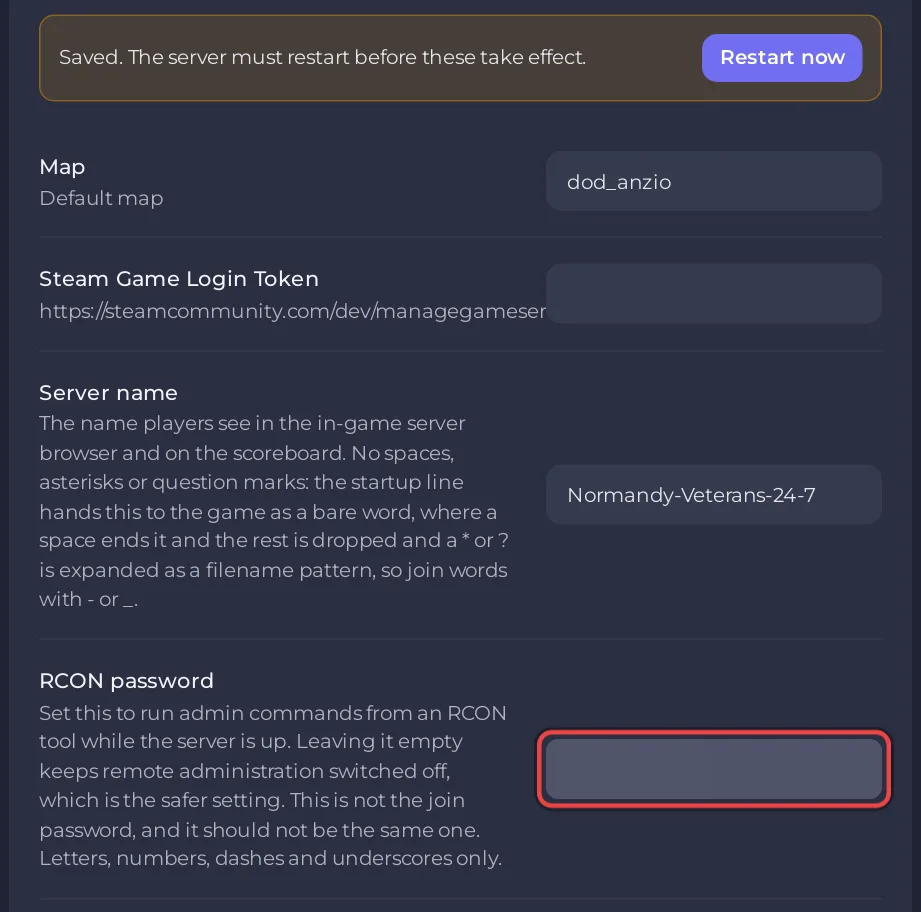
RCON uses the same port as the game, over TCP. Valve's Source Dedicated Server page lists port 27015 "TCP/UDP (game transmission, pings and RCON)". Your server starts on its own port instead of 27015: the port in its Server Address.
Use RCON from the game
While you play on your server, you can send commands from the game's developer console:
- Press
~to open the console. - Type
rcon_password your-rcon-passwordand press Enter. - Type
rconfollowed by a command, for examplercon status, and press Enter.
What happens after wrong RCON passwords?
The game bans an address after too many failed RCON logins: sv_rcon_maxfailures is 10 by default, "Max number of times a user can fail rcon authentication before being banned" in Valve's Team Fortress 2 list, the engine branch Day of Defeat: Source runs on. Check the password in Settings before you try again.
To switch RCON off, empty the RCON password field, press Enter and click Restart now. The panel's Console keeps working.
More about the Console page: How to use the console and run commands.


