

To add a custom map to a Day of Defeat: Source server on PlayNHost, upload its .bsp file into the dod/maps folder on the Files tab, then type changelevel and the map name in the Console. Players who do not have the map download it from your server when they join, if the file is 16 MB or smaller.
Upload the map
- Download the map you want. It is a
.bspfile, often packed in a.ziparchive. - Open your server in the panel and click the Files tab.
- Open the
dodfolder, then themapsfolder. You see the official maps, such asdod_anzio.bsp. - Click Upload and choose the
.bspfile, or drag it onto the page. - Wait until the file is listed in
dod/maps.
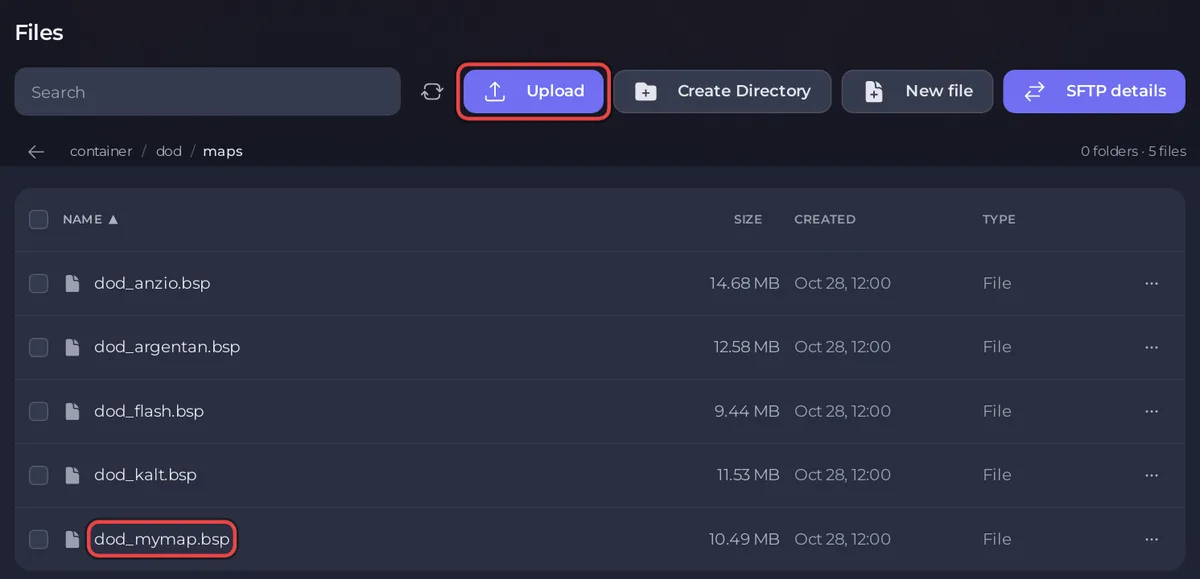
If you uploaded an archive instead, tick the box next to it and click Unzip, then delete the archive. For large files or many maps at once, an SFTP program is quicker: How to connect to your server files with SFTP.
Some maps come with extra folders next to maps, such as materials, models or sound. Those belong in dod too: upload the archive into dod and Unzip it there, so each folder lands in the right place.
Play the map
- Click the Console tab.
- Type
changeleveland the file name without.bsp, for examplechangelevel dod_mymap, and press Enter.
To start on it at every start, set it as Map under Game Settings. To add it to the rotation, add its name to mapcycle.txt. Both are in How to change the map on your Day of Defeat: Source server.
The Change Map task keeps only letters, digits and _ in the name, so a map called dod_my-map or dod_mymap_v1.2 must be loaded with changelevel in the Console.
How do players get the map?
A player who does not have the map downloads it from your server when they join. Valve's console command list gives the settings that control this:
sv_allowdownloadis1by default: clients may download files from the server.net_maxfilesizeis16by default: the largest file, in MB, the server sends. Valve's Team Fortress 2 list, the engine branch Day of Defeat: Source has run on since February 2025, gives64as the most it accepts.sv_downloadurlis a web address players download missing files from instead of from the server. It needs your own web hosting.
For a map over 16 MB, add net_maxfilesize 64 to dod/cfg/server.cfg and restart. A map over 64 MB needs sv_downloadurl, or players install it by hand into their own game's dod/maps folder.
Good to know
- Valve's Day of Defeat: Source update of 24 August 2026 fixed "a bug where certain custom maps would not load assets correctly on Linux" (Steam news). Your server runs on Linux, so this fix matters for it: How to update your Day of Defeat: Source server.
- Take a backup before you upload many maps: How to back up and restore your Day of Defeat: Source server.
- A map that does not load: Day of Defeat: Source server problems and fixes.


