

A new Counter-Strike 1.6 server on PlayNHost has no daily restart. To add one, open Quick Tasks, take Send Restart from Default tasks, choose Schedule…, and set Every day at a quiet hour. A restart reloads cstrike/server.cfg, the Settings values and the start map; there is no world to save on Counter-Strike 1.6.
Build a daily restart
- Open your server in the panel and click Quick Tasks in the left menu.
- Under All tasks, open Default tasks and find Send Restart.
- Open its menu and choose Schedule…. The Schedule task window opens.
- Give the schedule a Name, for example
Daily restart, and click Next step. - Choose Repeats, set How often to Every day, and set the time under At. The window says what time that is where you are.
- Keep Enabled on and click Schedule.
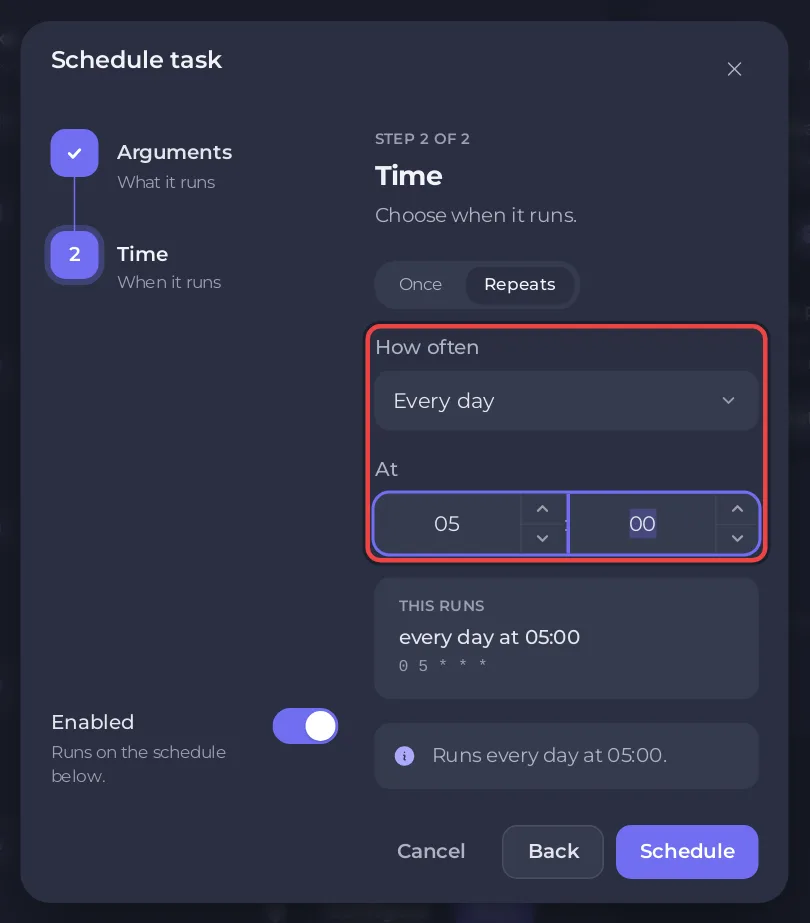
The new schedule appears under Schedules. Send Restart stops the server with quit and starts it again. Players are disconnected until the badge is back to Online, and they reconnect with the same address.
Why restart a Counter-Strike 1.6 server?
- The server reads
cstrike/server.cfgandcstrike/game_init.cfgonly when it starts, so changes to those files need a restart. - The Map in Settings is loaded at every start, so a restart also puts the server back on your start map.
- Timed bans and settings typed in the Console end at a restart.
How do I avoid restarting while people play?
- On Quick Tasks, click your schedule under Schedules.
- Switch on Skip while players are online. A list appears under it, When players are online.
- Choose Skip that run, or a wait such as
Wait up to 2 hours for the server to empty.
With a wait, the panel looks again every 5 minutes, restarts as soon as the game reports nobody on, and restarts anyway when the wait is over. If the server cannot report its players, the schedule runs. Run now always runs.
How do I warn players first?
The restart does not warn players in the game. Make a second schedule 5 minutes earlier with Send Command: in Default tasks, open the menu of Send Command, choose Schedule…, type say Server restart in 5 minutes in Command, and pick the same days at a time 5 minutes before the restart. The message shows in chat with your server name in front.
Switch it off, test it or delete it
- On Quick Tasks, find your schedule under Schedules.
- Use its switch to turn it off or on.
- Open the schedule's options menu and choose Run now to test it. This restarts the server at once. Choose Delete schedule to remove it.
The Quick Tasks page cannot change the time of a schedule that exists. For another time, build a new schedule and switch the old one off. The nightly Automatic backup is a separate ready-made schedule, and its time can be changed on Backups: How to back up and restore your Counter-Strike 1.6 server.
A map change on a timer is possible too: schedule the Change Map task in the same way. See How to change the map on your Counter-Strike 1.6 server. Every part of the page: How to schedule tasks and automatic backups.


