

To invite friends to a Counter-Strike 1.6 server on PlayNHost, click Join on your server's Overview page to copy its address and send it to them with the word connect in front. They paste that line into the game console, opened with the ~ key. To let a friend help run the server, invite them on Team & Roles.
Send your friends the address
- Open your server in the panel and stay on Overview.
- Click Join on the server card. The Server Address is copied, in the form
address:port. - Paste it into your message after the word
connect, as in the example below. - If you set a join password, add the line
password "the-join-password"above theconnectline. Players type it first.
A message your friends can follow, with your own address in it:
Join my Counter-Strike 1.6 server: open the console with ~ and type
connect address:port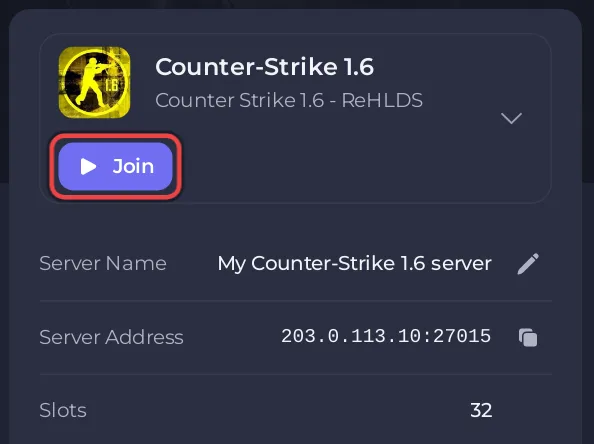
Your friends need Counter-Strike on Steam. The server must show Online in the panel when they connect. Counter-Strike 1.6 has no Play with friends card in the panel: the Join button and the Server Address row are where the address lives. Step by step for your friends: How to join your Counter-Strike 1.6 server.
How many friends can play?
Up to 32 players at once, on every plan. When many people from one home or LAN connect at the same moment, some can be refused with Too many connect packets from your ip address (the ReHLDS limit is 5 connecting at once from one address by default). They get in by connecting again a few seconds later. See How many players can a Counter-Strike 1.6 server have.
How do I let a friend help run the server?
Invite them to the panel. They sign in with their own account and see only this server.
- Click Team & Roles in the left menu.
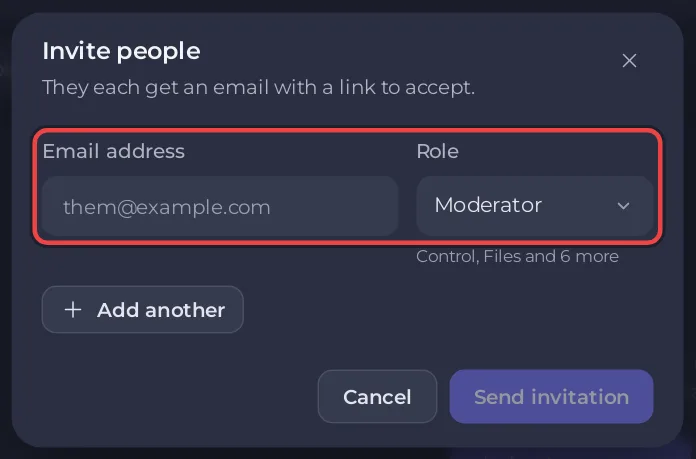
- Click Invite someone, shown while nobody else has access, or Invite people at the end of the tab row on a wide screen. Both open the same window.
- Type their Email address.
- Choose a Role: Moderator, Member, or a role you created on the Roles tab.
- Click Send invitation. They get an email with a link to accept.
Both built-in roles, Moderator and Member, include Use the console (Read output and send any command the server accepts.). On Counter-Strike 1.6 the Console can make anyone an admin in the game with amx_addadmin, or stop the server with quit. Give panel access only to people you trust. For someone who should only watch, click Create role on the Roles tab and start from Viewer (Watch the console, change nothing.): a role from that starting point can read the Console but cannot send commands. A Viewer-based role you saved earlier may still include Use the console: open it with Edit permissions and untick it.
Panel access is not the same as admin rights in the game. To give a friend kick, ban and map commands while they play, add them as an AMX Mod X admin: How to become admin on your Counter-Strike 1.6 server.
More on roles and permissions: How to invite friends and give them access.


