

To become admin on a Counter-Strike 1.6 server on PlayNHost, join the server, then type amx_addadmin "YourName" "abcdefghijklmnopqrstuv" in the Console tab of the panel. AMX Mod X, which is already installed, saves your SteamID as an admin with every access flag, and your rights work at once.
Make yourself admin
- Join your server from Counter-Strike: How to join your Counter-Strike 1.6 server.
- In the panel, open your server and click the Console tab.
- Type
statusin the Type a command box and press Enter. Find your name in the player list. Theuniqueidcolumn shows your SteamID, which starts withSTEAM_. - Type
amx_addadmin "YourName" "abcdefghijklmnopqrstuv"with your in-game name between the first quotes, and press Enter. - The Console prints
Adding:and the line it wrote tocstrike/addons/amxmodx/configs/users.ini. You are admin now, without reconnecting. - In the game, press the
~key and typeamxmodmenuto open the admin menu.
amx_addadmin looks you up by name among the players who are online and saves your SteamID, not your name, so the rights stay when you change your name. The panel's Console tab has every right, so the command works there with no password.
How do I add an admin who is not online?
Write their SteamID into the admin file:
- Ask them for their SteamID, or read it with
statusin the Console tab the next time they play. - Click the Files tab and open
cstrike/addons/amxmodx/configs/users.ini. - Add a line at the end in this form, with their SteamID:
"STEAM_0:0:123456" "" "abcdefghijklmnopqrstuv" "ce" - Click Save content.
- Type
amx_reloadadminsin the Console tab and press Enter. The admin list is read again and the new admin has the rights at once, or from their next join if they are offline.
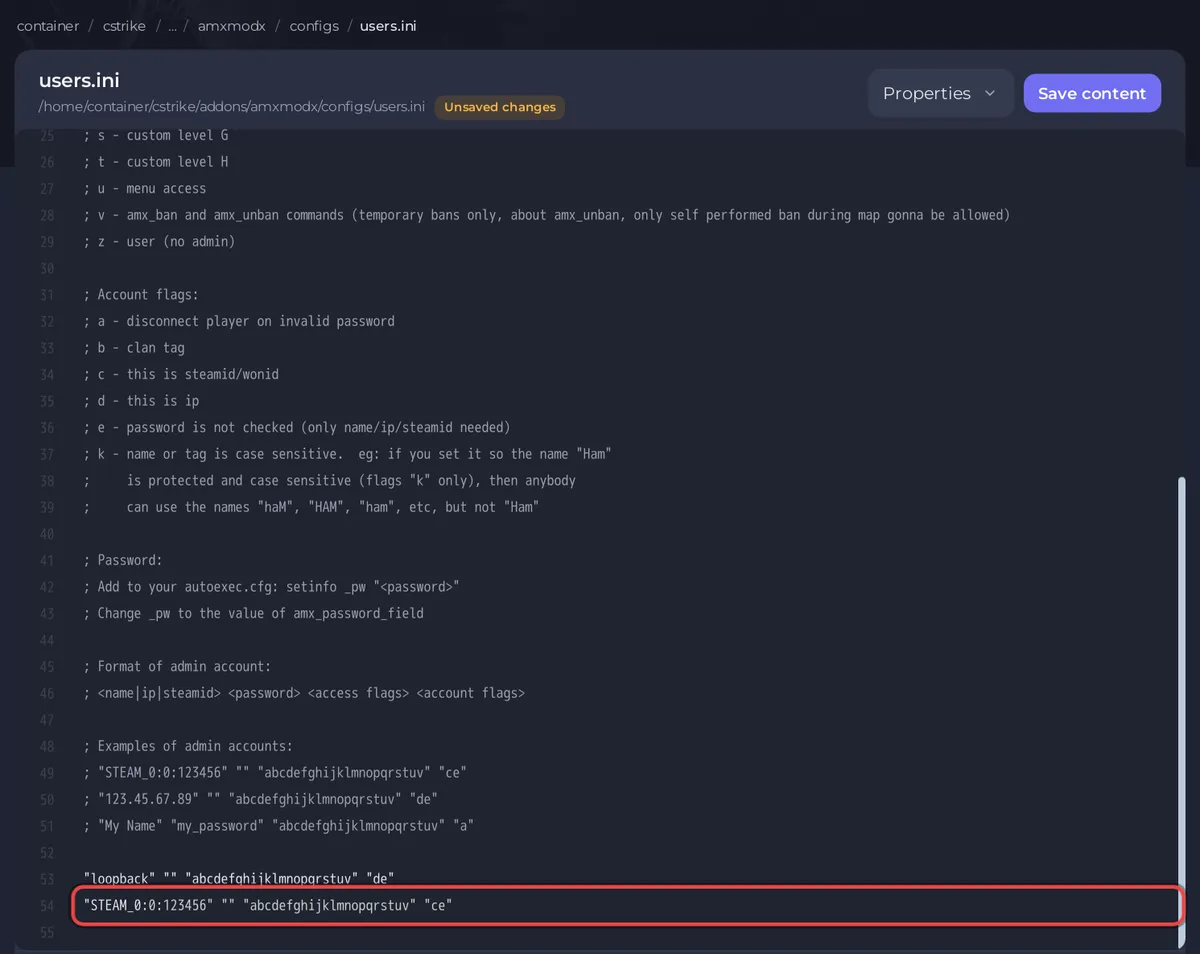
The last part, "ce", means "this is a SteamID" (c) and "no password is checked" (e). Leave the stock line "loopback" "" "abcdefghijklmnopqrstuv" "de" as it is.
Which access flags should a moderator get?
Each letter in the third part gives one right. These come from the AMX Mod X admin file:
| Flag | Right |
|---|---|
a | Immunity: cannot be kicked, banned, slain or slapped |
b | Can join on reserved slots |
c | amx_kick |
d | amx_ban and amx_unban, permanent and temporary bans |
e | amx_slay and amx_slap |
f | amx_map |
g | amx_cvar (not every cvar) |
h | amx_cfg |
i | amx_chat and other chat commands |
j | amx_vote and other vote commands |
k | Change the join password sv_password with amx_cvar |
l | amx_rcon and rcon_password |
m to t | Custom levels for extra plugins |
u | The admin menus |
v | Temporary bans only |
A moderator who may kick, ban for a while, change maps and use the menu gets, for example, "cfjuv". Give a, l and d only to people you trust.
How do I remove an admin?
- In Files, open
cstrike/addons/amxmodx/configs/users.iniand delete their line. - Click Save content.
- Type
amx_reloadadminsin the Console tab.
Good to know
- These are admins in the game. To let someone manage the server in the panel, invite them on Team & Roles: How to invite friends to your Counter-Strike 1.6 server.
- Update and reinstall keeps your
users.ini, so your admins stay, and it takes a backup first. For a copy of your own, see How to back up and restore your Counter-Strike 1.6 server. - What admins can do once they have the rights: How to kick, ban and unban players on your Counter-Strike 1.6 server.


