

To join a Counter-Strike 1.6 server on PlayNHost, click Join on your server's Overview page to copy its address, open the console in Counter-Strike with the ~ key, and type connect followed by the address. The server must show Online in the panel.
Join from the game
- Open your server in the panel. The badge next to the name must say Online. If it says Offline, click Start and wait for Online: see How to start your Counter-Strike 1.6 server for the first time.
- On the Overview page, click Join on the server card. It copies the Server Address, which looks like
address:port. The copy icon next to Server Address copies the same text. - Start Counter-Strike on Steam and wait for the main menu.
- Press the
~key to open the console. - Type
connect, a space, then paste the address, and press Enter. For exampleconnect address:portwith your own address.
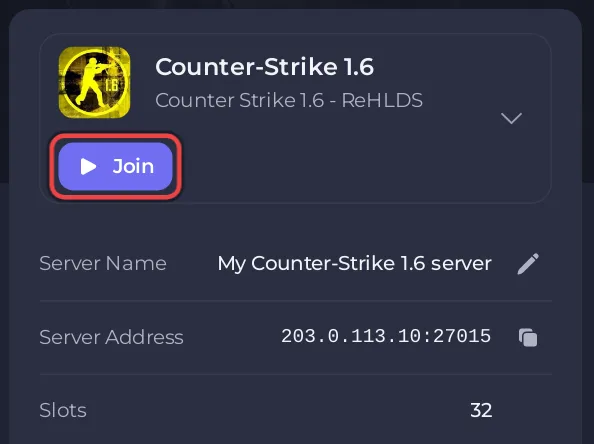
Type the address whole: it already holds the port, and the server listens only on that port. The same address is on the Ports & Network page in the left menu.
Does a Counter-Strike 1.6 server need a Steam token to be joined?
No. The panel's own server-ready email says it: Counter-Strike 1.6 predates Steam game server tokens, so your server lists and accepts joins with nothing to set up.
How do I join a Counter-Strike 1.6 server that has a password?
A new server has no join password. If you set one in cstrike/server.cfg, players type it in the same console before they connect:
- Press the
~key. - Type
passwordand the join password in quotes, for examplepassword "your-join-password", and press Enter. - Type
connectand the address, and press Enter.
A player who connects without a password is refused with No password set. Clean your userinfo., the message the ReHLDS engine sends. See How to set a password on your Counter-Strike 1.6 server.
How many players can join at once?
Up to 32 players. The cap is fixed in the server's own start line, on every plan. See How many players can a Counter-Strike 1.6 server have.
If you cannot join
- The badge is not Online: the server is still starting or is stopped. Wait for Online or click Start.
Server is full.: all 32 slots are taken.Too many connect packets from your ip address: too many players from one home or LAN were connecting at the same moment (the ReHLDS limit is 5 by default). Join one after another.You have been banned from this server: an admin banned you. See How to kick, ban and unban players on your Counter-Strike 1.6 server.
Every message and its fix is in Counter-Strike 1.6 server problems and fixes. To bring friends along, see How to invite friends to your Counter-Strike 1.6 server.


