

To install an AMX Mod X plugin on a Counter-Strike 1.6 server on PlayNHost, upload its .amxx file to cstrike/addons/amxmodx/plugins, add the file name on its own line in cstrike/addons/amxmodx/configs/plugins.ini, then change the map or restart. AMX Mod X, Metamod-r and ReAPI are already installed on every new server.
Install a plugin
- Open your server in the panel and click the Files tab.
- Open
cstrike, thenaddons,amxmodxandplugins. - Click Upload and choose the plugin's
.amxxfile, for examplemyplugin.amxx. - Go back to
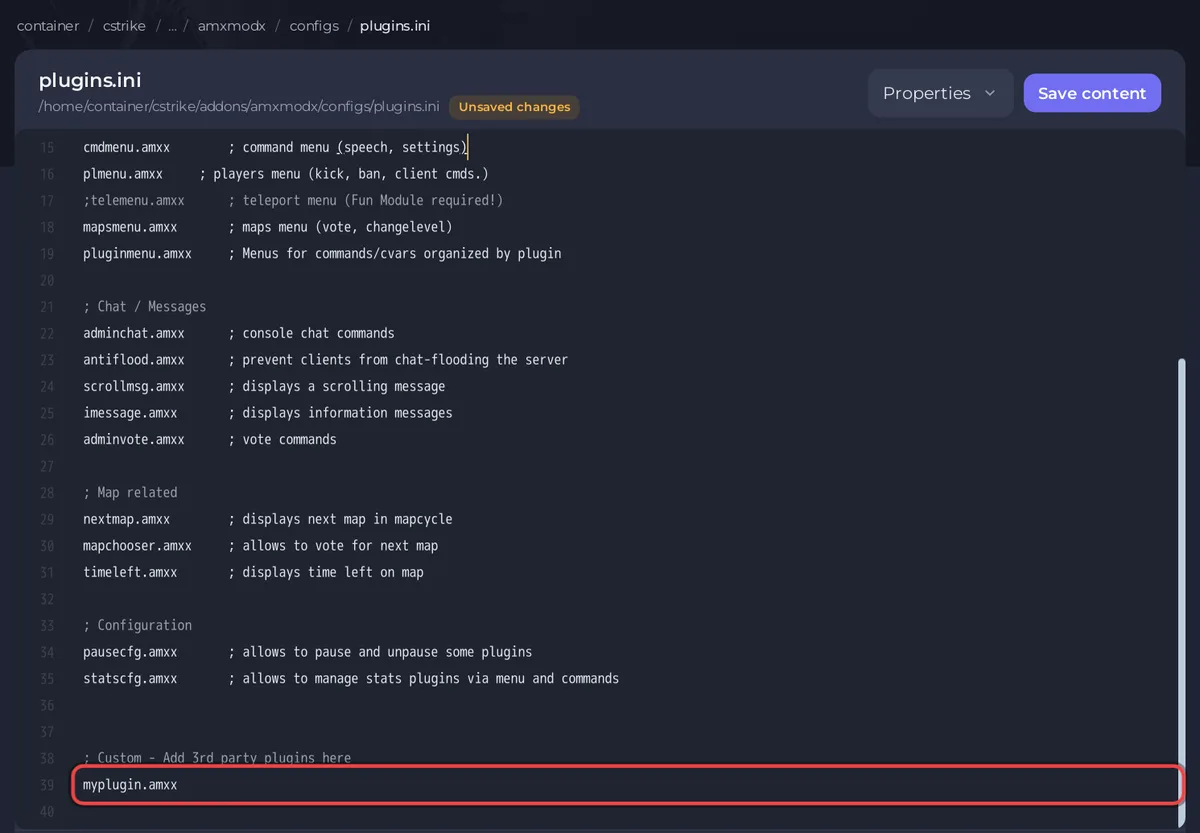
amxmodx, openconfigs, and clickplugins.ini. - Add the file name
myplugin.amxxon a new line at the end, under; Custom - Add 3rd party plugins here. - Click Save content.
- Click the Console tab and type
changelevel de_dust2, or click Restart. Plugins are loaded when a map starts. - Type
amxx pluginsand press Enter. Your plugin is in the list, and the last line counts the plugins and how many are running.
If the plugin also came with config files, language files or sounds, upload them to the folders its instructions name, usually under cstrike/addons/amxmodx (configs, data/lang) or cstrike/sound.
Why is my plugin not running?
Type amxx plugins in the Console tab. Under the table, a plugin that failed is listed with Load fails: and the reason. The usual causes:
- The file is a
.sma: that is source code. Get the compiled.amxxfrom the plugin's page, or compile it with the AMX Mod X compiler first. - The name in
plugins.inidoes not match the file name, including upper and lower case. - It needs a newer AMX Mod X: your server installs AMX Mod X 1.10.0, the latest release of the build it uses, unless the version was changed. See How to update your Counter-Strike 1.6 server and its mods.
- It needs the
cstrikeorcsxmodule: the reason readsModule/Library "cstrike" required for plugin. Check modules.ini.(orcsx). The AMX Mod X 1.10.0 build your server installs is the base package, and itsmodulesfolder has nocstrikeorcsxmodule, so plugins written for them do not load. Look for a version of the plugin made for ReAPI, which is installed. - It needs another module or plugin: its page lists what it needs. Many CS 1.6 plugins need ReAPI, which is already installed.
How do I switch a plugin off?
- Open
cstrike/addons/amxmodx/configs/plugins.inion the Files tab. - Put a
;at the start of the plugin's line, for example;myplugin.amxx. A line that starts with;is ignored. - Click Save content and change the map or restart.
The stock plugins work the same way. admin.amxx must stay on: AMX Mod X needs it for every admin feature.
Which plugins run on a new server?
The stock AMX Mod X set: admin commands (admincmd.amxx), the admin menus (menufront.amxx, plmenu.amxx, mapsmenu.amxx), slot reservation (adminslots.amxx), chat and vote commands, anti-flood, and the map plugins nextmap.amxx, mapchooser.amxx and timeleft.amxx. The full list, with a comment on each line, is in plugins.ini. The Counter-Strike stats plugins, such as statsx.amxx, are not in this build, because they need the csx module.
What about Metamod plugins?
Some add-ons are Metamod plugins (.so files for Linux), not AMX Mod X plugins. Metamod-r loads them from the list in cstrike/addons/metamod/plugins.ini, which already has AMX Mod X, Reunion and ReVoice. Add a line in the same form as those, restart the server, and type meta list in the Console tab to check its status is RUN.
Take a backup before you add several plugins, so you can go back: How to back up and restore your Counter-Strike 1.6 server. For admin rights in plugins, see How to become admin on your Counter-Strike 1.6 server.


