

To change the game rules on a Counter-Strike 1.6 server on PlayNHost, edit the rule lines in cstrike/game.cfg on the Files tab, for example mp_roundtime "3", and change the map. The server runs game.cfg at every map load, so your rules stay after map changes and restarts. To try a rule first, type it in the Console tab.
Change a rule for good
- Open your server in the panel and click the Files tab.
- Open the
cstrikefolder and clickgame.cfg. - Find the rule's line and change its value, for example
mp_buytime "0.25"tomp_buytime "1". If the rule is not in the file, add it at the end on its own line, for examplemp_roundtime "3". - Click Save content.
- Click the Console tab and type
changelevel de_dust2, or click Restart. The Console printsExecuting ReGameDLL Configuration Filewhen the file is read.
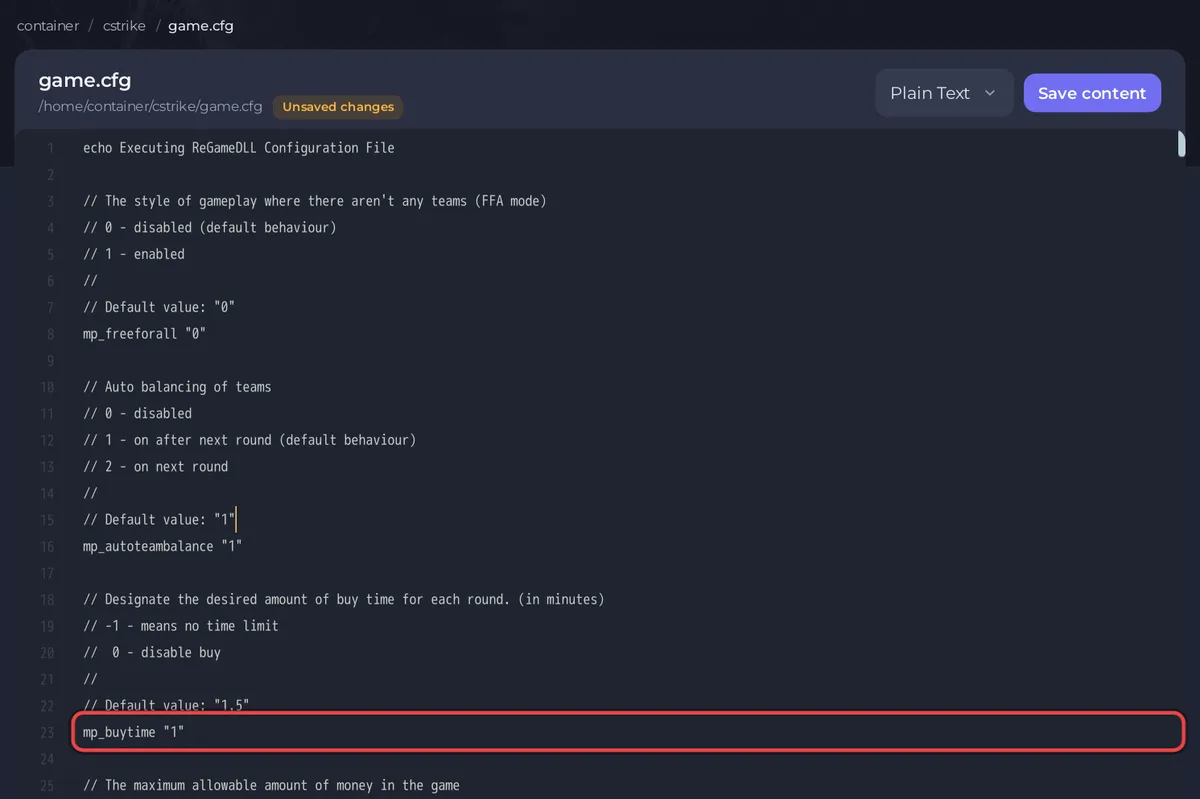
game.cfg comes from ReGameDLL, the rebuilt Counter-Strike game library your server runs. Each setting in it has a comment above it that says what it does and its normal value.
Which rules do people change most?
Values from the ReGameDLL settings list and its game library:
| Rule | What it sets | Game default | On a new server |
|---|---|---|---|
mp_roundtime | Round length, in minutes | 5 | not in game.cfg |
mp_freezetime | Freeze time at round start, in seconds | 6 | not in game.cfg |
mp_buytime | Buy time, in minutes. -1 no limit, 0 no buying | 1.5 | 0.25 |
mp_startmoney | Money at the start | 800 | not in game.cfg |
mp_maxmoney | Most money a player can hold, up to 999999 | 16000 | 16000 |
mp_c4timer | Seconds until the bomb explodes | 45 | not in game.cfg |
mp_friendlyfire | Team damage, 0 off, 1 on | 0 | not in game.cfg |
mp_timelimit | Minutes per map. 0 no limit | 0 | 20 |
mp_maxrounds | Rounds per map. 0 no limit | 0 | not in game.cfg |
mp_winlimit | Round wins that end the map. 0 no limit | 0 | not in game.cfg |
mp_limitteams | Most players one team may have over the other, 0 no limit | 2 | not in game.cfg |
mp_autoteambalance | Team balancing. 0 off, 1 after next round, 2 next round | 1 | 1 |
mp_freeforall | Every player for themselves, 0 off, 1 on | 0 | 0 |
sv_alltalk | Who hears whom on voice. 0 dead do not hear the living, 1 everyone | 0 | 0 |
"On a new server" is the value in the game.cfg that the install writes (ReGameDLL 5.30.0.814). Rules that are not in the file use the game default unless cstrike/server.cfg sets them.
How do I try a rule without editing a file?
Type it in the Console tab, for example mp_roundtime 3, and press Enter. Round time, freeze time, bomb timer and mp_limitteams are read again at the start of each round, so they apply from the next round. Type sv_restart 1 to restart the match in 1 second, so everyone starts over with the new rules. A rule typed in the Console lasts until the next restart. If game.cfg has a line for that rule, the next map change sets the file's value again.
Should I use game.cfg or server.cfg?
Use game.cfg for game rules. The server runs server.cfg once, when it starts, and game.cfg at every map. A rule set in both files is set again from game.cfg at every map change, so keep each rule in one place. Use server.cfg for server settings such as the join password: How to set a password on your Counter-Strike 1.6 server.
Good to know
- Update and reinstall keeps
game.cfgandgame_init.cfg, and takes a backup first. For a copy of your own, see How to back up and restore your Counter-Strike 1.6 server. - AMX Mod X admins with the access flag
gcan change many rules in the game withamx_cvar mp_roundtime 3. - Bots are set in the same files: How to add bots to your Counter-Strike 1.6 server.
- Map rotation: How to change the map on your Counter-Strike 1.6 server.


