

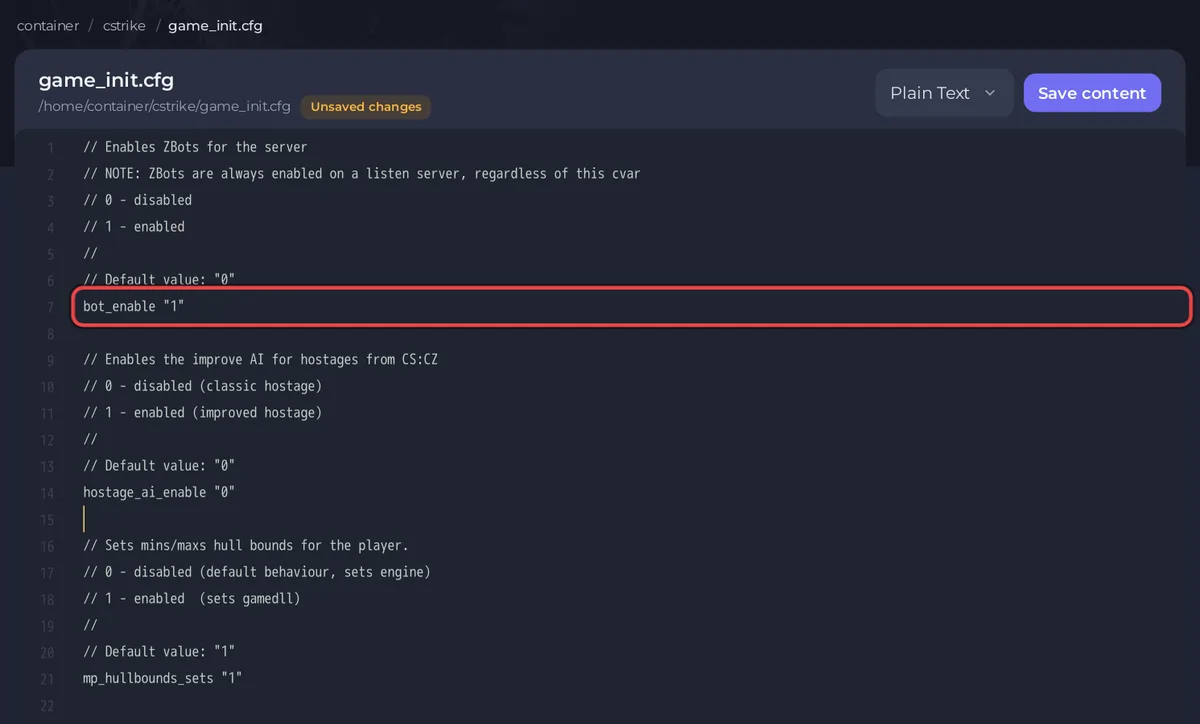
To add bots to a Counter-Strike 1.6 server on PlayNHost, upload ReGameDLL's bot_profiles.zip, unzip it, set bot_enable "1" in cstrike/game_init.cfg, and restart. Then type bot_add in the Console tab for each bot. The bots are zBot, which the ReGameDLL game library on your server can run. They are off on a new server.
Turn bots on
- Download
bot_profiles.zipfrom the ReGameDLL project to your computer. It is about 7 MB. - Open your server in the panel and click the Files tab. Stay in the top folder, where you see
cstrike. - Click Upload and choose
bot_profiles.zip. - Tick the box next to
bot_profiles.zipand click Unzip. Itscstrikefolder addsBotProfile.db,BotChatter.dband the bot radio sounds to yourcstrikefolder. - Open
cstrike/game_init.cfgand change the linebot_enable "0"tobot_enable "1". - Click Save content.
- Click Restart.
game_init.cfgis read only when the server starts, so a restart is needed.
Add and remove bots
Type these in the Console tab once bots are on:
| Command | What it does |
|---|---|
bot_add | Adds one bot |
bot_add_t | Adds one bot to the Terrorists |
bot_add_ct | Adds one bot to the Counter-Terrorists |
bot_kick | Removes all bots and sets bot_quota to 0. bot_kick with a bot's name removes that one |
bot_quota 10 | Keeps 10 bots on the server |
bot_difficulty 1 | Skill for new bots: 0 easy, 1 normal, 2 hard, 3 expert |
To keep the same bots after every restart, add lines such as bot_quota "10" and bot_difficulty "1" at the end of cstrike/game.cfg. That file is read at every map. Bots count toward the 32 player slots.
Why do the bots not join?
- No human is on a team yet.
bot_join_after_playeris1incstrike/game.cfgon a new server, so bots wait for the first human to join the Terrorists or Counter-Terrorists. Set it to0for bots on an empty server. - The map has no navigation file. Bots need a
.navfile for each map. When it is missing, the Console printsERROR: Failed to load 'maps/de_dust2.nav' file navigation map!(with the map's name), and the first bot to spawn builds one. Other bots wait until the Console printsNavigation fileandsaved., then the round restarts after 3 seconds. The file is kept incstrike/maps, so this happens once per map. - Bots are still off. Check that
cstrike/game_init.cfgsaysbot_enable "1"and that the server was restarted.
How do I choose how bots fill the server?
bot_quota_mode in cstrike/game.cfg decides what bot_quota means, as the ReGameDLL file explains:
normal:bot_quotabots, on top of the humans.fill: bots fill up tobot_quotaplayers in all, and leave as humans join.match:bot_quotabots for every human, a 1 to N ratio.
Changes to game rules for matches with bots are in How to change the game rules on your Counter-Strike 1.6 server. For the commands in the Console, see How to use the Console and RCON on your Counter-Strike 1.6 server.


