

Owning a Core Keeper server in the PlayNHost panel does not make you admin in the game. Admin rights come from the game's own admin list, which the server keeps in Admins.json. Ask an admin to promote you from the pause menu, or open a support ticket if nobody can.
How do I get admin?
- Ask a player who is already admin on the server to join while you are online.
- Have them open the pause menu, choose you and make you a server admin.
- If nobody on the server is admin, open a support ticket with the name of your server and the Steam account you play on. Our team helps you get admin.
Pugstorm added promoting from the pause menu in patch 0.3.12 (May 2022): "Other players can be made server admins from the pause menu."
Why am I not admin?
- A panel role is not admin. Team & Roles gives access to the panel, not admin in the game: How to let a friend help run your Core Keeper server.
- The panel's Console cannot make you admin. It has no command box for Core Keeper, because the server reads no console input, so a command cannot make you admin: How to use the Console on your Core Keeper server.
- The admin list was changed or replaced. A restored backup or an edited
Admins.jsonbrings back the admin list of that moment.
Where is the admin list?
In Files, at .config/unity3d/Pugstorm/Core Keeper/DedicatedServer/Admins.json, next to the ban list PlayerBans.json. It is outside the worlds folder, so new worlds and World Reset keep it.
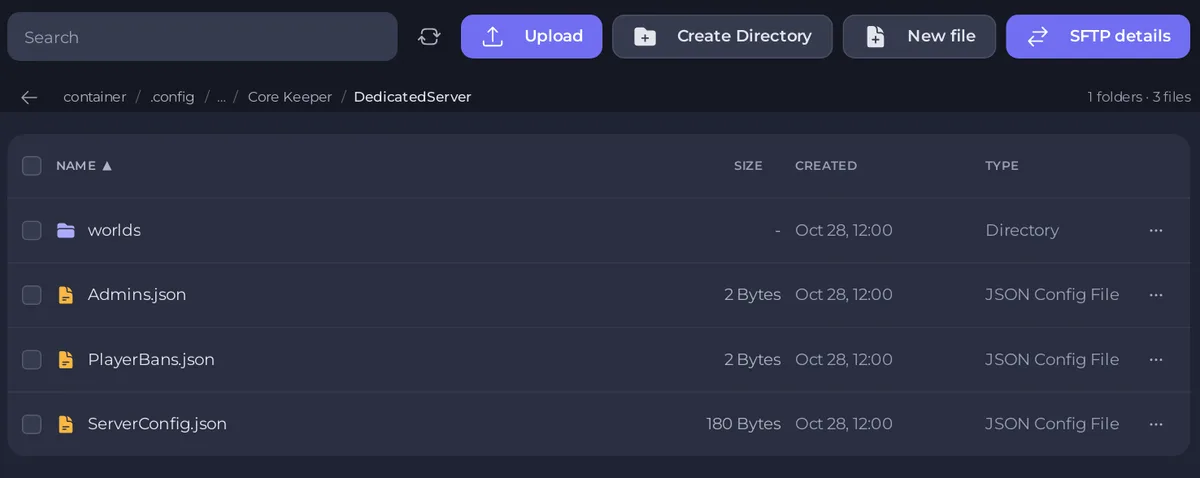
If someone edited the file and broke it, restore only Admins.json from a backup: How to restore only some files or one area of your map from a backup.
Full guide: How to become admin on your Core Keeper server.


