

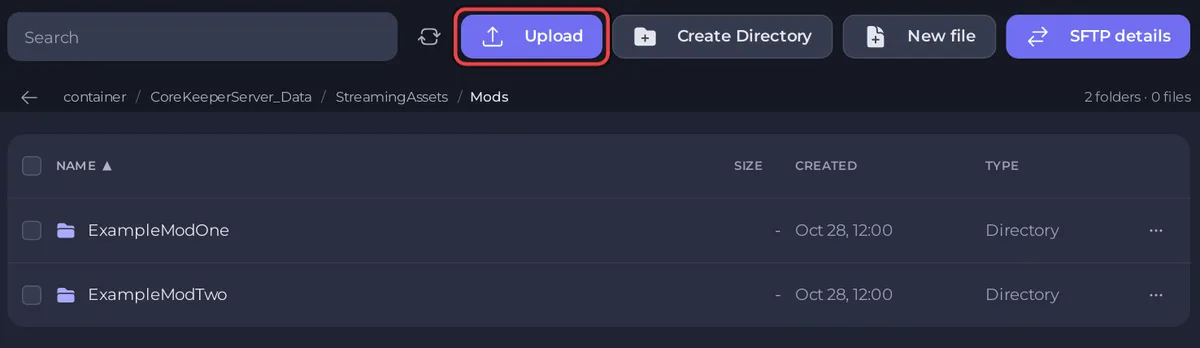
Each mod on a PlayNHost Core Keeper server is one folder in CoreKeeperServer_Data/StreamingAssets/Mods. To update a mod, replace that folder's files with the new version. To remove it, delete the folder. Restart the server after either, and take a backup first.
How do I update a mod?
- Download the new version from the mod's page on mod.io, or zip its updated Steam Workshop folder from your PC.
- Open your server in the panel and stop it.
- In Files, open
CoreKeeperServer_Data/StreamingAssets/Modsand then the mod's folder. - Select everything in it and delete it.
- Upload the new
.zip, tick it, click Unzip and delete the.zip. - Start the server and wait for
Started sessionin the Console.
Tell your players to update the mod in their own game too. Everyone needs the same version.
Do server mods update by themselves?
No. Pugstorm's modding documentation says "mods installed manually will need to be updated manually", and every mod on a server is installed by hand. Your players' mods from mod.io or Steam Workshop update in their own game while it is closed, so check the server's copy after a mod update.
How do I remove a mod?
- Take a backup: How to back up and restore your Core Keeper world.
- Stop the server.
- In Files, open
CoreKeeperServer_Data/StreamingAssets/Mods. - Open the menu of the mod's folder and choose Delete folder.
- Start the server.
The Modding tab puts it the same way: "Delete the mod folder and restart. Nothing else has to be undone." It also warns that removing a mod that added items can leave those items behind as nothing in your world.
Remove one mod at a time and check your world after each, so you know which one caused a change.
What happens to mods after a Core Keeper update?
A Core Keeper update can break a mod until its author updates it. If the server stops starting after an update, remove the mods one at a time until it starts, and add them back when they are updated. See How to update your Core Keeper server.
Where can I read more about mods?
- Adding mods: How to add mods to your Core Keeper server.
- The server will not start: Your Core Keeper server stops after you add a mod.


