

The safest way to start a new world on a PlayNHost Core Keeper server is an unused World Index slot: the server builds a fresh world and keeps the old one. To really delete worlds, delete one world file in Files, or run World Reset on Quick Tasks, which deletes every world on the server.
How do I start a new world and keep the old one?
- Open your server in the panel, click the Settings tab, then Game Settings.
- Set a new World Seed or switch Hard mode if you want.
- Set World Index to a number you have not used, for example
1. - Click Restart now. The server builds a new world in that slot in 3 to 5 minutes.
Switch back any time by setting the old number. See How to run several worlds on your Core Keeper server.
Deleting a world, with either method below, cannot be undone except from a backup. Take one first: How to back up and restore your Core Keeper world.
How do I delete one world?
- Stop the server.
- In Files, open
.config/unity3d/Pugstorm/Core Keeper/DedicatedServer/worlds. - Open the menu of the world file of that slot, for example
0.world.gzipfor slot0, and choose Delete file. - Start the server. If World Index points at that slot, it builds a new world there.
Leave the rest of the DedicatedServer folder alone, so your admin list and ban list stay.
How do I wipe every world with World Reset?
World Reset on Quick Tasks deletes every world on the server, every World Index slot, not only the one in use. The admin list, the ban list and your settings are kept.
- Click Quick Tasks in the left menu.
- Under All tasks, with Default tasks selected, find World Reset and click Run.
- Read the Run World Reset? window: it lists what is Deleted from Files. Keep Back up the server first ticked if your plan has backups.
- Click Run World Reset.
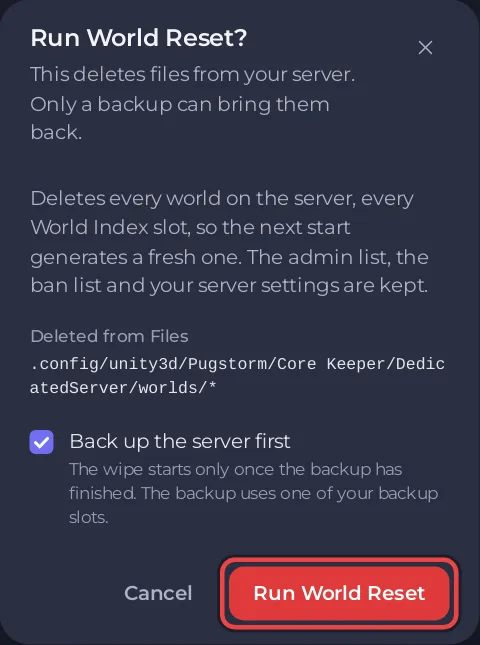
The panel says Started. It runs as the schedule “World reset”, and the console shows each step. It waits for the backup and stops the server. The worlds are deleted only once the server says Offline, and not before 90 seconds after the start of the run: from then on the panel looks every 15 seconds. The server starts again 60 seconds after the delete, and the new world then takes 3 to 5 minutes to build. If the server is still not Offline 10 minutes later, nothing is deleted, the wipe step fails and the panel sends you a notification, "World reset" did not run on <server>.
The first Run also adds a World reset schedule under Schedules, switched off. It is the record of the reset, and it only runs on a timer if you switch it on.
Can the worlds reset every month by themselves?
Yes, if you want that. On Quick Tasks, under Ready-made for Core Keeper, there is a World reset schedule. Click Add: it arrives switched off, and its row shows when it runs. It deletes every world on the server, every World Index slot, so turn it on only if you want that on a timer. For your own day and hour, open the menu of World Reset under All tasks, choose Schedule…, type a Name, click Next step, choose Once or Repeats and the time, and click Schedule: the panel adds the same ready-made reset (stop, wipe, start) with the name, time and switch you chose. Both stop the server first and delete only once it is Offline. See How to use Quick Tasks on your Core Keeper server.
What stays the same after a new world?
- The Game ID stays the same, so friends join as before.
- The admin list and the ban list stay.
- To try a new world without touching this server, copy it first: How to make a copy of your server and try a change on it first.


