

Before an ARK: Survival Ascended server can start for the first time, PlayNHost installs the game server from Steam, about 11 GiB on disk, so a new server takes longer to be ready. The badge turns Online when the Console shows Waiting commands for 127.0.0.1:. Players can join once the game also prints is now advertising for join.
Start it and watch the Console
- Open your server in the panel. The badge near the name says Offline.
- Click Start. The badge changes to Starting.
- Click the Console tab to follow what the server is doing.
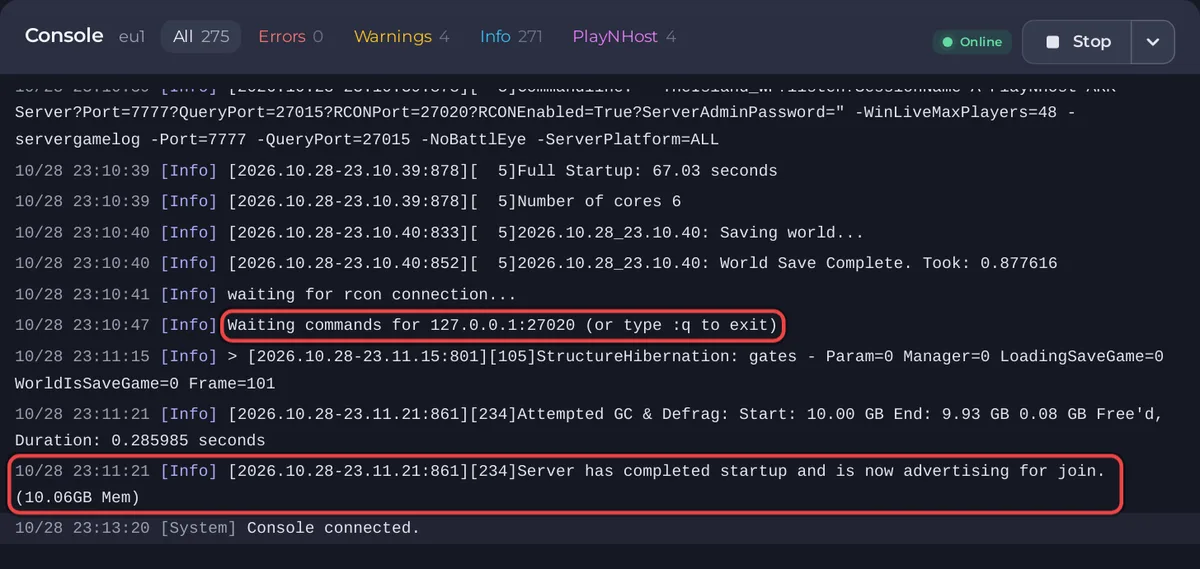
What the Console shows, in order
- The update check. The server asks Steam for the newest build:
Checking for game server updates...and, when nothing is new,Success! App '2430930' already up to date.The game itself was downloaded when the server was installed, so on a new server this check is short unless ARK has released a patch since the install. - The game loading, with lines such as
ARK Version:and the version number, andUShooterEngine::LoadGameMods with 0 mods(the number is how many mods you listed). waiting for rcon connection...every few seconds, sometimes withconnection refusedori/o timeout. This is the panel's console waiting for the game to open its admin port. It is normal while the game loads.- The game is up:
Server: "A PlayNHost ARK Server" has successfully started!with your own server name, thenFull Startup:and a number of seconds. - The panel's console connects:
Waiting commands for 127.0.0.1:27020 (or type :q to exit). The badge changes to Online. The Console box now sends commands to the game. - Ready for players:
Server has completed startup and is now advertising for join.From here the server shows in the in-game list.
Many lines look like errors but are part of a healthy start: ARK: Survival Ascended console lines that look like errors but are normal.
How long it takes
- The install, before the first start: the panel downloads the game server from Steam, which the ARK wiki puts at around 11 GiB on disk. The badge says Installing until it is done. Give it extra minutes and do not reinstall while it downloads.
- The first start: the game builds a new world for your map, then loads it as on any later start.
- Later starts: on a PlayNHost server that was already installed, running The Island with nobody on, the game reported
Full Startup: 67.03 seconds, the badge turned Online about 1.5 minutes after the start, andadvertising for joincame about 2 minutes after the start. - After a game update or a new mod: longer, because the update or the mod downloads first.
What a new server already has
- Server Name
A PlayNHost ARK Serverand Server MapTheIsland_WP. Change the name before you invite people: How to change your ARK: Survival Ascended server name and password. - No Server Password, so anyone who finds it can join.
- Its own random Admin Password in Game Settings, which you can change: How to become admin on your ARK: Survival Ascended server.
- Crossplay on, PvE Mode off, BattlEye Anti-Cheat off, Auto Update on, no mods.
- Player slots: the number your plan includes.
- On Quick Tasks: a Daily restart every morning and, if your plan has backup space, an Automatic backup every night. See How to use Quick Tasks on your ARK: Survival Ascended server.
- After this first start, Game User Settings appears under Config files on the Settings tab.
If it does not reach Online
See Your ARK: Survival Ascended server is stuck on starting and How to fix a server that will not start. When it is online, join it: How to join your ARK: Survival Ascended server.


