

Quick Tasks, in the left menu, is where you run a task on your ARK: Survival Ascended server now, pin it to Overview, or put it on a timer. It offers two ready-made schedules, Daily restart and World reset, and four ARK tasks: Save World, Announce to Players, Respawn Wild Dinos and World Reset.
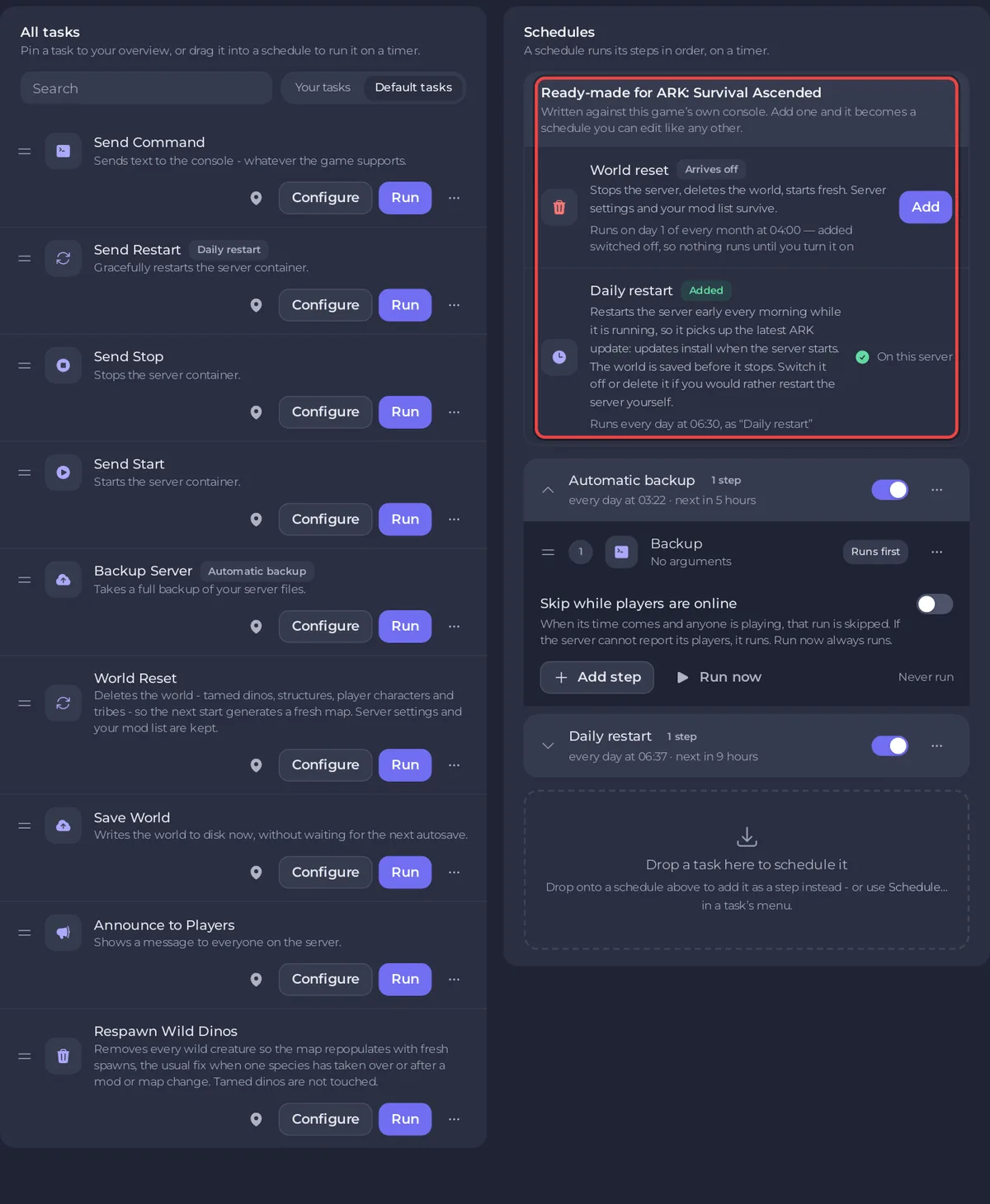
The page
- Pinned tasks: tasks shown as buttons on the Quick tasks card on Overview. Drop a task here to pin it.
- All tasks: every task, with a Search box and the filters Your tasks and Default tasks.
- Schedules: the schedules on your server, such as Daily restart and, if your plan has backup space, Automatic backup, with the Ready-made for ARK: Survival Ascended list.
The ready-made schedules
| Schedule | What it does | On a new server |
|---|---|---|
| Daily restart | Restarts the server early every morning while it is running, so it installs the latest ARK update. The world is saved before it stops. | On |
| World reset | Day 1 of every month at 04:00: stops the server, waits for Offline, deletes the world, starts fresh. Settings and mods are kept. | Not added. Arrives off when you add it |
A ready-made schedule already on your server says On this server. Click Add to put one on your server.
Automatic backup is not in this list: the panel adds it for you when your plan has backup space, and it shows under Schedules. It backs up your server every night, without ARK's own game files, and when your backup slots are full the oldest unlocked automatic backup makes room. Its settings are on Backups.
The tasks
| Task | What it does |
|---|---|
| Save World | Writes the world to disk now, without waiting for the next autosave. |
| Announce to Players | Shows a message to everyone on the server. Run opens Configure task to ask for the Message. |
| Respawn Wild Dinos | Removes every wild creature so the map repopulates with fresh spawns, the usual fix when one species has taken over or after a mod or map change. Tamed dinos are not touched. |
| World Reset | Deletes the world of every map. Asks first, with Back up the server first. |
| Send Restart, Send Stop, Send Start | Restart, stop or start the server. A stop saves the world. |
| Backup Server | Takes a backup now. On ARK it holds your worlds, settings and mods, not the game files. |
| Send Command | Sends any ARK command, such as serverchat Hello. Run opens Configure task to ask for it. |
Run, pin or schedule a task
- Run runs it now. A task that needs a value opens Configure task. Save task saves your version without running it: click Your tasks above the list and use Run there. On Default tasks, Run always asks for the value again.
- Pin to overview, in the task's menu, adds it to the Quick tasks card on Overview. You can also drop a task on Pinned tasks.
- Schedule…, in the same menu, puts it on a timer: give it a Name, click Next step, choose Once or Repeats and the time, and click Schedule. On World Reset, it adds the ready-made reset (stop, wipe, start) with the name, time and switch you chose, and the wipe deletes only once the server is Offline: How to wipe your ARK: Survival Ascended server. Dragging World Reset onto a schedule opens Schedule… too.
Manage a schedule
Each schedule has a switch to turn it on or off, and an options menu with Edit schedule…, Run now and Delete schedule. Click a schedule to see its steps and the switch Skip while players are online: the panel counts ARK players, so a restart can wait for an empty server. See How to restart your ARK: Survival Ascended server on a schedule.
The page cannot change the time of a schedule that exists. For another time, make a new schedule with Schedule… and switch the old one off or delete it. The time of the Automatic backup can be changed on Backups, with Edit under Scheduled backups.
Good to know
- The full guide to the page: How to schedule tasks and automatic backups.
- Resetting the world: How to wipe your ARK: Survival Ascended server.


