

To start a new Vintage Story world on a PlayNHost server, stop the server, delete default.vcdbs in data/Saves under Files, and start the server again. With no world file, the server generates a new world using the world options under Settings, Game Settings. Your mods and serverconfig.json settings stay.
This deletes the current world for good: everything built and explored, and every player's inventory in it. Take a backup first so you can go back.
How do I start a fresh world?
- Open your server in the panel and click Backups in the left menu. In the Create backup card, click Start backup and wait for it to finish.
- Optional: click the Settings tab, then Game Settings, and choose a new World play style, World seed, World size or climate: How to choose your Vintage Story world settings before you start.
- Click the Console tab, click Stop and wait for the badge to say Offline.
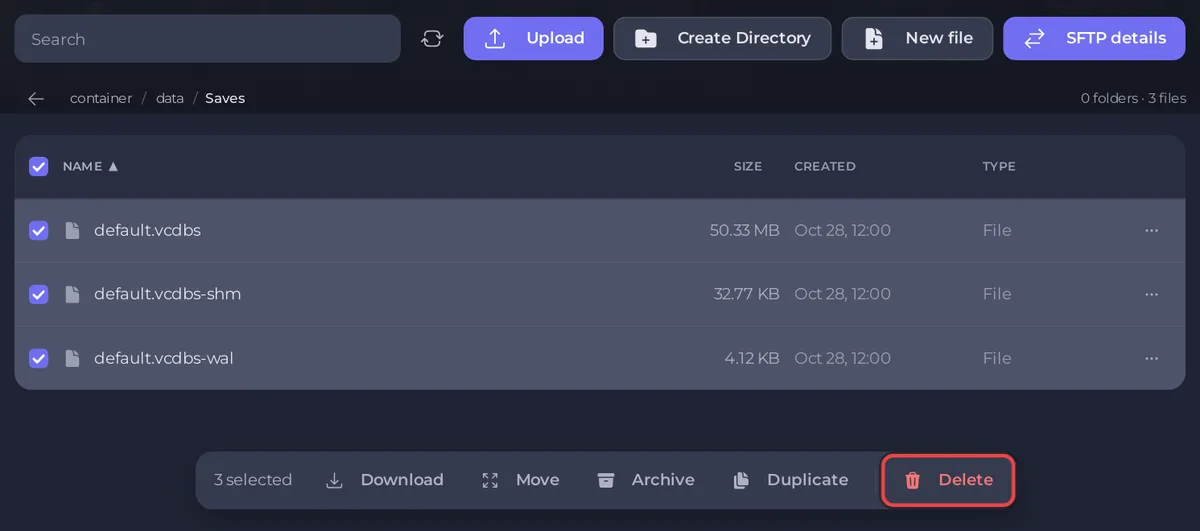
- Click the Files tab, then open
data, thenSaves. - Delete
default.vcdbs, anddefault.vcdbs-shmanddefault.vcdbs-walif they are there. - Start the server. The Console prints
[pnh-update] New world:with the settings it uses, then generates the world. - Wait for the badge to say Online, then join.
The new world takes a little longer to start than usual, because the land around the spawn is generated first.
What stays and what goes?
| Goes with the world file | Stays |
|---|---|
| Terrain, buildings, chests, land claims | Mods in data/Mods and their settings |
| Player inventories and positions in that world | serverconfig.json: name, password, whitelist mode, role list |
| The world's seed, size and climate | Your panel settings and backups |
Can I keep the old world to go back to?
Yes, two ways:
- Restore the backup from step 1 later: How to back up and restore your Vintage Story world.
- Or, instead of deleting
default.vcdbsin step 5, download it first and keep it on your computer: How to download your Vintage Story world.
Why did I get the same world again?
The world file was still there when the server started, or you set the same World seed with the same options. Check that data/Saves holds no default.vcdbs before you start, and leave World seed empty for a random world.


