

To download the world of a Vintage Story server on PlayNHost, stop the server, open Files, go to data/Saves and download default.vcdbs. That one file is the whole world: terrain, buildings, chests and player progress. Stop the server first so every change is written into it.
How do I download the world file?
- Open your server in the panel and click the Console tab.
- Click Stop and wait for the badge to say Offline. Vintage Story writes the world to disk when it stops.
- Click the Files tab, then open
data, thenSaves. - Open the menu of
default.vcdbsand choose Download file.
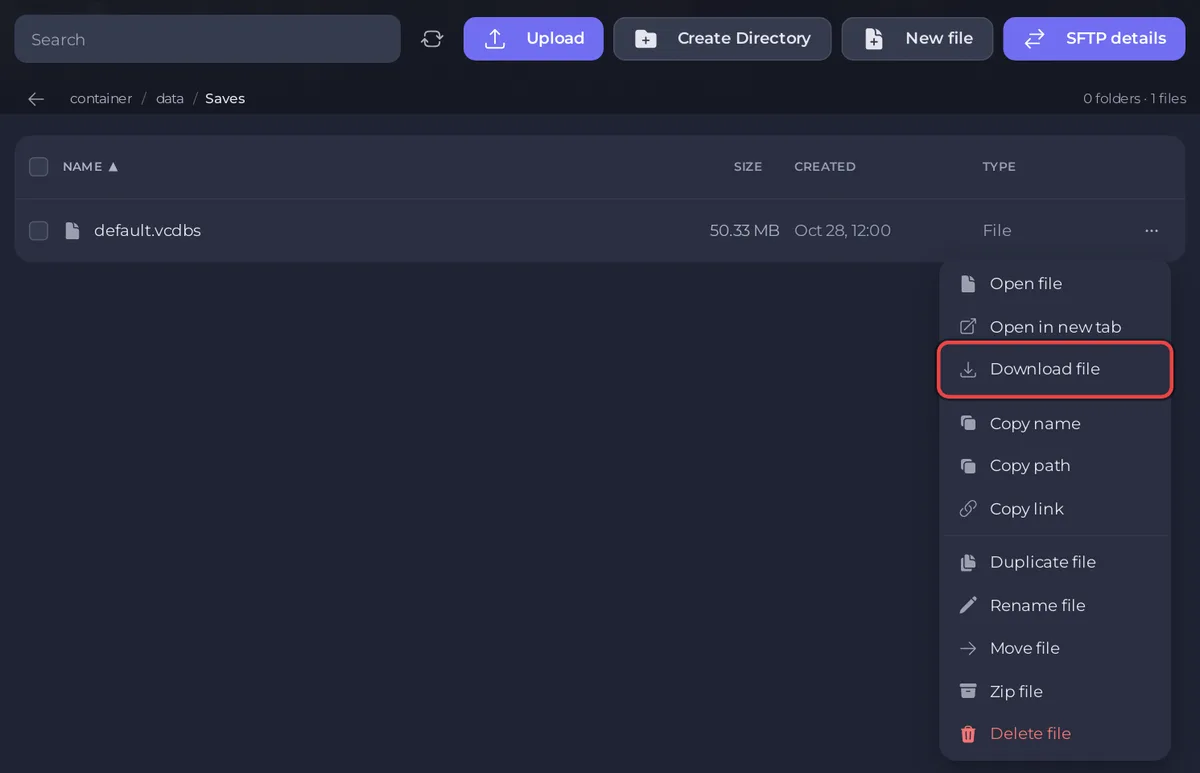
If default.vcdbs-shm and default.vcdbs-wal sit next to it, they belong to the same world: download all three and keep them together.
Can I download it without stopping the server?
Download a backup instead: on the Backups page, open a backup's menu and choose Download. The archive holds the whole data folder, with the world in data/Saves. See How to back up and restore your Vintage Story world.
How do I play the world in singleplayer?
- Copy
default.vcdbsinto the Saves folder of your Vintage Story game on your computer. On Windows that is%AppData%\VintagestoryData\Saves, on Linux~/.config/VintagestoryData/Saves(official server config page). - Give it a name you will recognise, for example
ourserver.vcdbs. - Start Vintage Story and open it from the singleplayer world list.
Use the same game version as the server, or a newer one. If the server used mods, install the same mods in your game first, or the world can behave oddly.
What else should I keep?
data/serverconfig.json: your server settings and roles.data/Mods: the mods the world was played with.data/Playerdata, which the server keeps next to the world.
A backup download holds all of these at once. For large files, SFTP is faster than the browser: How to connect to your server files with SFTP.


