%7B.s%7Banimation%3Ab%201.5s%20ease-out%20both%7D.d%7Banimation-delay%3A.16s%7D%7D%40keyframes%20b%7B0%25%7Bfill%3A%23F4F6FA%7D18%25%7Bfill%3A%23FFE08A%7D34%25%2C70%25%7Bfill%3A%23FF8A1F%7D80%25%7Bfill%3A%23FFE08A%7D100%25%7Bfill%3A%23FF8A1F%7D%7D%3C%2Fstyle%3E%3Cg%20transform%3D%22translate(143%20428.93)%20scale(3.885906)%22%3E%3Cg%20transform%3D%22translate(0%202)%22%20fill%3D%22%23706EF0%22%3E%3Cpath%20d%3D%22M0%200%20H48%20A40%2040%200%200%201%2048%2080%20V100%20H0%20Z%22%2F%3E%3Cpath%20transform%3D%22translate(91.75%200)%22%20d%3D%22M0%200%20L48%200%20L48%2050%20L76%2050%20L76%20100%20L0%20100%20Z%22%2F%3E%3Cpath%20transform%3D%22translate(173%200)%22%20d%3D%22M0%20100%20L58%20-4%20L116%20100%20Z%22%2F%3E%3Cpath%20transform%3D%22translate(264.25%200)%22%20d%3D%22M0%200%20L104%200%20L76%2050%20L76%20100%20L28%20100%20L28%2050%20Z%22%2F%3E%3Cg%20transform%3D%22translate(375%200)%22%3E%3Cpath%20d%3D%22M0%200%20L50%2038%20L50%200%20L100%200%20L100%20100%20L0%20100%20Z%22%20fill%3D%22%23F4F6FA%22%2F%3E%3Crect%20class%3D%22s%22%20x%3D%2247%22%20y%3D%2263%22%20width%3D%2219%22%20height%3D%2230%22%2F%3E%3Crect%20class%3D%22s%20d%22%20x%3D%2274%22%20y%3D%2263%22%20width%3D%2219%22%20height%3D%2230%22%2F%3E%3C%2Fg%3E%3Cpath%20transform%3D%22translate(484.75%200)%22%20d%3D%22M0%200%20L48%200%20L48%2037%20L52%2037%20L52%200%20L100%200%20L100%20100%20L52%20100%20L52%2063%20L48%2063%20L48%20100%20L0%20100%20Z%22%2F%3E%3Cpath%20transform%3D%22translate(588.5%200)%22%20d%3D%22M0%2050%20A53%2053%200%201%200%20106%2050%20A53%2053%200%201%200%200%2050%20Z%22%2F%3E%3Cpath%20transform%3D%22translate(698.25%200)%22%20d%3D%22M25%200%20H102%20V50%20H77%20A25%2025%200%200%201%2077%20100%20H0%20V50%20H25%20A25%2025%200%200%201%2025%200%20Z%22%2F%3E%3Cpath%20transform%3D%22translate(804%200)%22%20d%3D%22M0%200%20L90%200%20L90%2050%20L69%2050%20L69%20100%20L21%20100%20L21%2050%20L0%2050%20Z%22%2F%3E%3C%2Fg%3E%3C%2Fg%3E%3C%2Fsvg%3E)


There are three ways to start fresh. New world on the Worlds page makes a new world and keeps the old one. The Fresh World task replaces the running world with a new one under the same name and keeps the old one as a copy you can rewind to. Delete on the Worlds page removes a world and its copies, after a backup of the server.
Choose a way
| Way | The old world | Best for |
|---|---|---|
| New world | Stays on the server, one switch away | Trying a new world, the Deep North |
| Fresh World task | Set aside as a copy on the Rewind timeline | A reset under the same name, for example a new season |
| Delete | Removed, after a backup of the server | Getting rid of a world for good |
All three keep your server name, password, settings, mods, and the admin, ban and allow lists.
Way 1: New world
See How to start a new world on your Valheim server.
Way 2: the Fresh World task
- Click Quick Tasks in the left menu.
- Under All tasks, find Fresh World. Its text says:
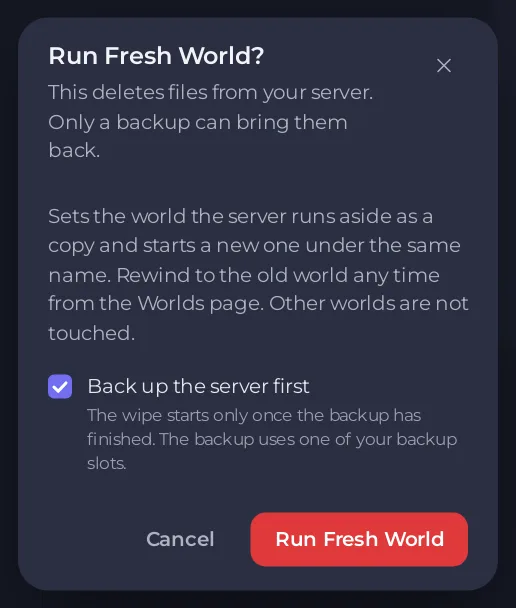
Sets the world the server runs aside as a copy and starts a new one under the same name. Rewind to the old world any time from the Worlds page. Other worlds are not touched. - Click Run. A window called Run Fresh World? opens.
- Back up the server first is ticked when your plan has backup slots. The world is already kept as a copy, so the backup is extra safety and uses a slot. Untick it if you like.
- Click Run Fresh World.
The server stops, waits, sets the world aside and starts again with a new world. A schedule called Fresh world appears in the list, switched off. Leave it off unless you want a fresh world on the first day of every month.
The window says This deletes files from your server. For Valheim nothing is deleted: the old world goes to the Rewind timeline as Kept before a change. The panel keeps the newest three of these per world.
Way 3: delete a world
- Click Worlds in the left menu.
- Open the menu of the world (Actions for the world) and choose Delete.
- The window Delete the world says the world folder and its copies are deleted from the server, and that a backup of the server is taken first, so you can bring the world back from Backups. The delete waits for it.
- Type the world's name in the box to confirm, and click Delete the world.
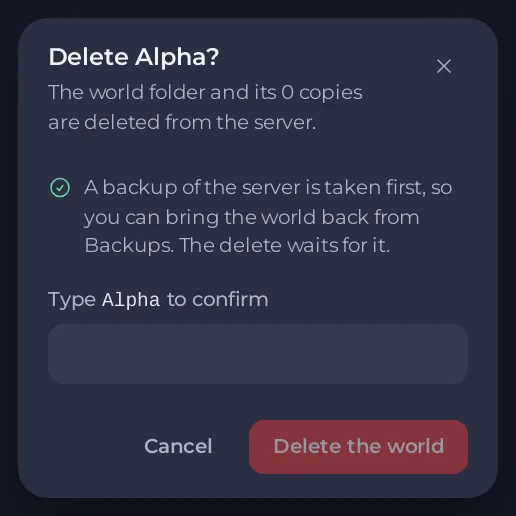
When it finishes, the page says The world and its copies are deleted. The backup taken first is on the Backups page.
- The world the server is running cannot be deleted. The menu says Delete (stop the server first). Stop the server, or switch to another world first.
- If your plan has no free backup slot, the window says No backup can be taken first and why. Free a slot on Backups, or download the world first: How to download your Valheim world to your PC.
- If you delete the active world while the server is stopped, the next start makes a new, empty world with that name.
After a fresh start
The new world follows the rules on the World rules tab: How to set Valheim world modifiers and difficulty. Changed your mind? How to rewind your Valheim world to an earlier copy.





