%7B.s%7Banimation%3Ab%201.5s%20ease-out%20both%7D.d%7Banimation-delay%3A.16s%7D%7D%40keyframes%20b%7B0%25%7Bfill%3A%23F4F6FA%7D18%25%7Bfill%3A%23FFE08A%7D34%25%2C70%25%7Bfill%3A%23FF8A1F%7D80%25%7Bfill%3A%23FFE08A%7D100%25%7Bfill%3A%23FF8A1F%7D%7D%3C%2Fstyle%3E%3Cg%20transform%3D%22translate(143%20428.93)%20scale(3.885906)%22%3E%3Cg%20transform%3D%22translate(0%202)%22%20fill%3D%22%23706EF0%22%3E%3Cpath%20d%3D%22M0%200%20H48%20A40%2040%200%200%201%2048%2080%20V100%20H0%20Z%22%2F%3E%3Cpath%20transform%3D%22translate(91.75%200)%22%20d%3D%22M0%200%20L48%200%20L48%2050%20L76%2050%20L76%20100%20L0%20100%20Z%22%2F%3E%3Cpath%20transform%3D%22translate(173%200)%22%20d%3D%22M0%20100%20L58%20-4%20L116%20100%20Z%22%2F%3E%3Cpath%20transform%3D%22translate(264.25%200)%22%20d%3D%22M0%200%20L104%200%20L76%2050%20L76%20100%20L28%20100%20L28%2050%20Z%22%2F%3E%3Cg%20transform%3D%22translate(375%200)%22%3E%3Cpath%20d%3D%22M0%200%20L50%2038%20L50%200%20L100%200%20L100%20100%20L0%20100%20Z%22%20fill%3D%22%23F4F6FA%22%2F%3E%3Crect%20class%3D%22s%22%20x%3D%2247%22%20y%3D%2263%22%20width%3D%2219%22%20height%3D%2230%22%2F%3E%3Crect%20class%3D%22s%20d%22%20x%3D%2274%22%20y%3D%2263%22%20width%3D%2219%22%20height%3D%2230%22%2F%3E%3C%2Fg%3E%3Cpath%20transform%3D%22translate(484.75%200)%22%20d%3D%22M0%200%20L48%200%20L48%2037%20L52%2037%20L52%200%20L100%200%20L100%20100%20L52%20100%20L52%2063%20L48%2063%20L48%20100%20L0%20100%20Z%22%2F%3E%3Cpath%20transform%3D%22translate(588.5%200)%22%20d%3D%22M0%2050%20A53%2053%200%201%200%20106%2050%20A53%2053%200%201%200%200%2050%20Z%22%2F%3E%3Cpath%20transform%3D%22translate(698.25%200)%22%20d%3D%22M25%200%20H102%20V50%20H77%20A25%2025%200%200%201%2077%20100%20H0%20V50%20H25%20A25%2025%200%200%201%2025%200%20Z%22%2F%3E%3Cpath%20transform%3D%22translate(804%200)%22%20d%3D%22M0%200%20L90%200%20L90%2050%20L69%2050%20L69%20100%20L21%20100%20L21%2050%20L0%2050%20Z%22%2F%3E%3C%2Fg%3E%3C%2Fg%3E%3C%2Fsvg%3E)


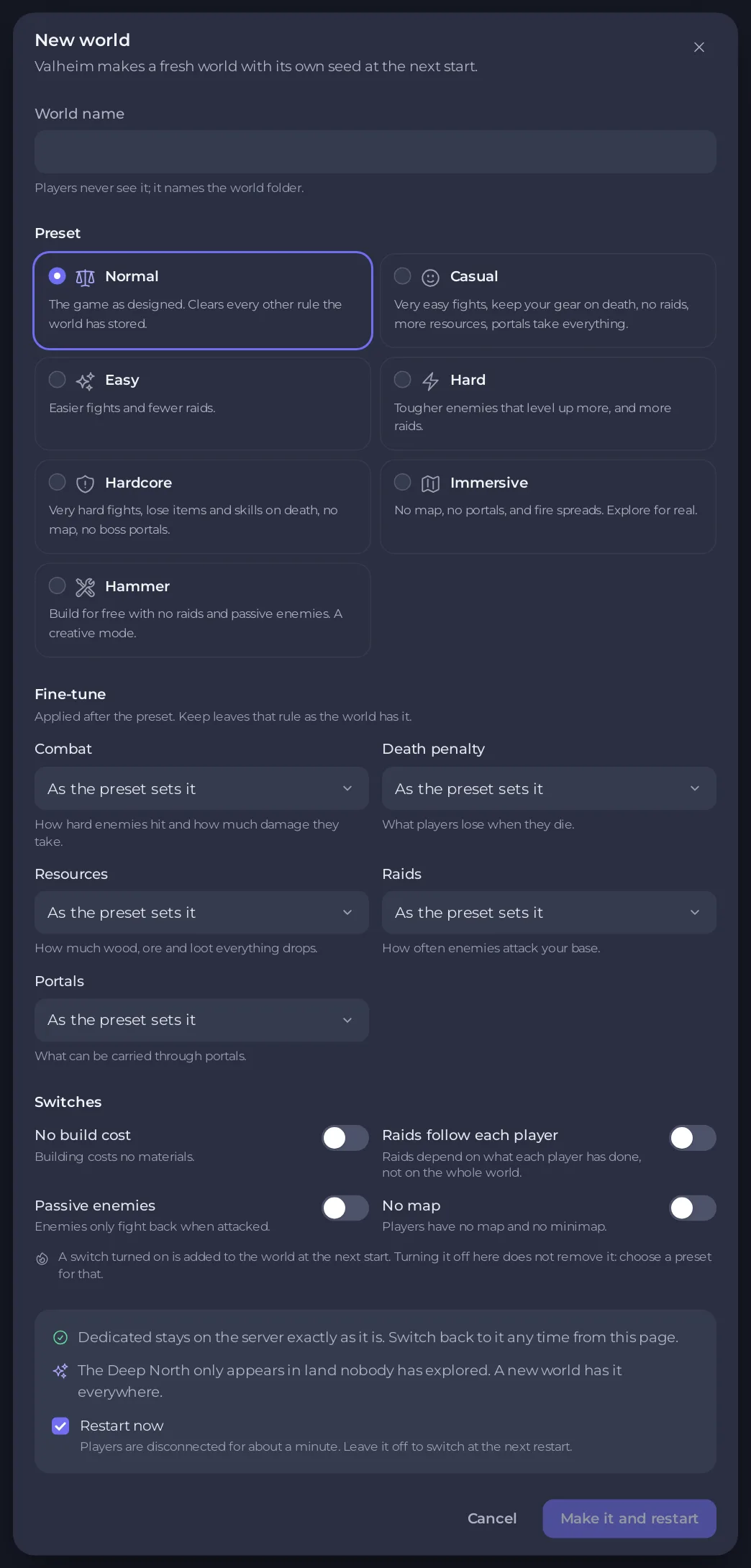
Open Worlds in the left menu, click New world, give it a name, pick a preset and click Make it and restart. Valheim makes a fresh world with its own seed at the next start. Your current world stays on the server exactly as it is, one click away.
Make a new world
- Open your server in the panel and click Worlds in the left menu.
- Click New world on the Your worlds card, or on the Want the Deep North everywhere? card.
- Type a World name: up to 20 letters, numbers or spaces, without quotes or slashes. Players never see it; it names the world folder.
- Pick a preset under Preset: Normal, Casual, Easy, Hard, Hardcore, Immersive or Hammer. Each card says what it does.
- Change any rule under Fine-tune or Switches if you like.
- If the server is running, leave Restart now ticked to make the world right away. Players are disconnected for about a minute.
- Click Make it and restart, or Make it the active world to make it at the next start.
The message says The server is restarting and making your world, It takes about a minute.
Why start a new world
Valheim 1.0 only builds its new lands, such as the Deep North, where nobody has explored yet. A new world has them everywhere. The page says so on the card Want the Deep North everywhere?.
Your old world
It stays on the Your worlds list. Switch back to it at any time with Switch to this: How to switch between Valheim worlds on your server.
If the name is refused
A world with that name is already on this server.Pick another name, or switch to that world instead.Valheim will not start a public server whose password is part of the world name.Pick a name that does not contain your server password.
Start over in the same world name instead
To replace the running world with a new one under the same name, use the Fresh World task. The old world is set aside as a copy you can rewind to: How to delete a Valheim world or start fresh.
Related
- The rules in detail: How to set Valheim world modifiers and difficulty
- Make a first backup once the world has loaded: How to back up and restore your Valheim world





