

To invite friends to your Sons of the Forest server on PlayNHost, send them two things: the Server Address from the Overview page and the Server Password from Settings. They paste the address into the game's direct connection and type the password. Up to 8 players can be on one island at once.
Send the join details
- Open your server in the panel and click the copy icon next to Server Address on the Overview page.
- Click the Settings tab, then Game Settings, and copy the Server Password.
- Send both to your friends in one message, with the Server Name so they recognise the server.
- Ask them to start Sons of the Forest, open the multiplayer menu, connect directly with the address, and type the password.
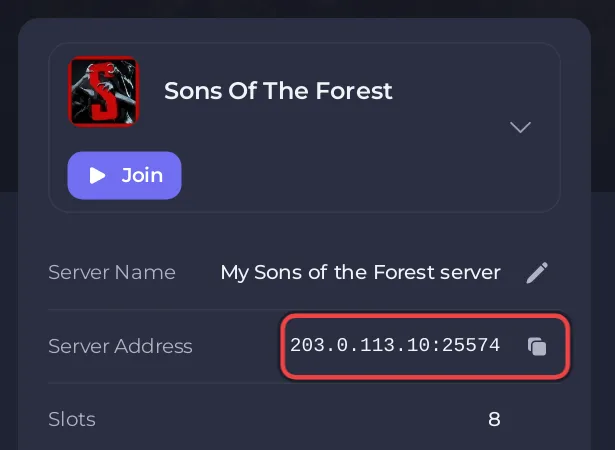
A message like this works:
Join my Sons of the Forest server
Address: 203.0.113.10:25574
Password: (the Server Password from Settings)
Multiplayer menu, connect directly, paste the address.
The full join steps, for friends who get stuck: How to join your Sons of the Forest server.
Should I change the password before inviting people?
You do not have to. The password your server came with is made for your server alone. Change it if you want something easier to type or share, or clear it to let anyone in: How to change the server name and password of your Sons of the Forest server. Players already on the island stay connected until the next restart.
Give a friend control in the game
A friend whose SteamID64 is in ownerswhitelist.txt becomes a server owner in the game, with access to the in-game player administration (kick, ban, promote admins). See How to become admin on your Sons of the Forest server.
Give a friend access to the panel
If a friend should start, restart or back up the server for you, invite them to the panel instead of sharing your account:
- Click Invite people at the end of the row of tabs at the top of your server's page. On a small screen it is an icon. The Team & Roles page opens with the invite window.
- Type their Email address and choose a Role.
- Click Send invitation. They get an email with a link to accept.
You can manage everyone you invited later under Team & Roles in the left menu.
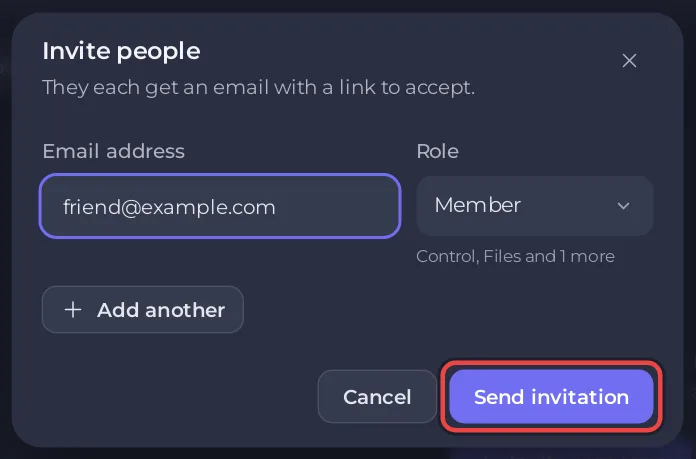
The general guide explains each permission: How to invite friends and give them access.
More about the game on PlayNHost: Sons of the Forest server hosting.


