

Mods for Skyrim Together Reborn are installed by each player on their own PC; the server loads none. To make everyone use the same mods, upload your loadorder.txt to the server's Data folder on PlayNHost, switch on B Enable Mod Check in STServer.ini and start the server. Players with a different mod list are then refused.
Should we use other mods at all?
The mod team advises against it. The official FAQ says: "Our official position is that you should not install any other mods for the best, most stable experience." It also says no mod is synced on purpose: "Mods only sync by accident. The only way to find out if a mod syncs is to test it. Graphics mods generally work well." If your group still adds mods, everyone should run the same list, and the mod check makes sure of it.
How do I make the server check everyone's mods?
You need the loadorder.txt of a PC that has exactly the mod list you want, in the order you want.
- On that PC, find
loadorder.txt. The mod check guide gives the places: for Mod Organizer 2, the profile folder, for exampleC:\Modding\MO2\profiles\Skyrim Together Reborn; for Vortex, Mods, then Open..., then Open Game Application Data Folder. - In the panel, click Stop and wait until the badge says Offline.
- Click Files and open the
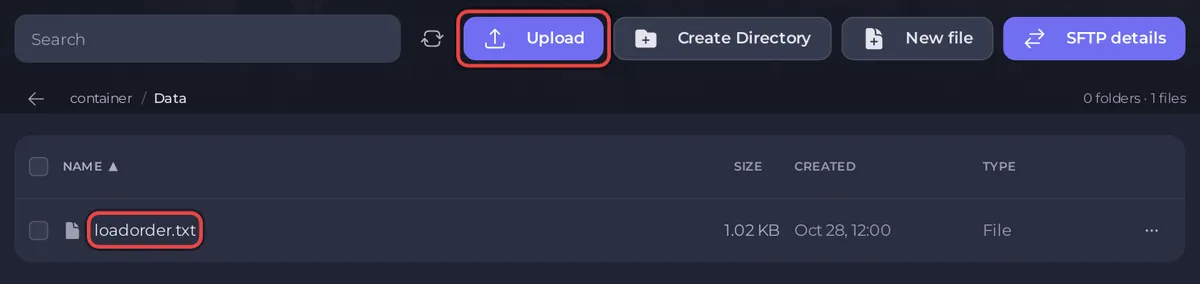
Datafolder. PlayNHost creates it on every new server, next to the server program. - Click Upload and upload
loadorder.txt. Keep the name exactlyloadorder.txt, all lower case, inDatawith a capital D. - Click Settings. Under Config files, click STServer.ini.
- Switch B Enable Mod Check on and click Save only.
- Start the server. The Console shows
ModPolicy is active.
A player whose mods differ sees This server has ModPolicy enabled., followed by Please remove the following mods to join: or Please install the following mods to join: and the mod names. In your Console, /ShowMOPOStats shows whether the check is on (Modcheck enabled: yes), and /mods lists the server's mods.
What if every player is refused for mods they already have?
Check the line endings of loadorder.txt. A file saved on Windows ends each line with two characters (CR LF). In the Skyrim Together Reborn 1.8.4 server code, the mod check keeps that extra CR as part of each mod name on a Linux server like yours, so no player's mods can match; the code itself notes a "line endings problem" with this check. Save the file with Unix (LF) line endings in your text editor, upload it to Data again and start the server. PlayNHost has not yet run the mod check with players on a live Skyrim Together server.
What happens if loadorder.txt is missing?
The server stops right after it starts. The Console shows Failed to start: ModPolicy's ModCheck is enabled, but no mods are installed. Players won't be able to join! Upload loadorder.txt to Data, or switch B Enable Mod Check off again, then start the server.
How do I change the mod list later?
Stop the server, upload the new loadorder.txt to Data over the old one, and start the server. Every player must then match the new list.
How do I allow or block SKSE and Mod Organizer 2?
Two more rows in STServer.ini, under MOD POLICY, decide this. Both are on for a new server.
| Row | What it does (server description, version 1.8.4) |
|---|---|
| B Allow SKSE | "Allow players using SKSE to join. Applies even when bEnableModCheck is off" |
| B Allow MO2 | "Allow players using Mod Organizer 2 to join. Applies even when bEnableModCheck is off" |
With one switched off, a player who uses that tool sees This server disallows and the tool's name, then Please remove them to join. The official client setup guide installs the mod with Mod Organizer 2 or Vortex, so with B Allow MO2 off, every player who followed the Mod Organizer 2 guide is refused. Switch these off only if you know your group does not use them. The official FAQ notes: "If you have SKSE installed, our mod will automatically load it."
Change these rows the same way: stop the server, switch the row, Save only, start. The three mod policy rows cannot be changed with a Console command; Skyrim Together locks them. More on this file: How to change advanced gameplay options on your Skyrim Together server.
Is there a Mods page in the panel for Skyrim Together?
No. The server has nothing to install: mods go on each player's PC through Mod Organizer 2 or Vortex, as the official client setup guide shows. The server's part is only the check above. What every player needs first: What players need to join a Skyrim Together server.


